.png)
A secure captive portal is a Wi-Fi login page that has been hardened to protect the people who use it. It is not just a splash screen that collects a click before letting traffic through. The distinction matters. A captive portal by itself controls access; it does not encrypt your connection or prove who is on the network. Making one "secure" means wrapping it in a few well-understood layers of protection.
This guide explains what a captive portal is and how it works. It also covers what "secure" really means here, the risks of running a portal alone, and the steps that turn an ordinary login page into a secure one.
Key takeaways
- A captive portal is the web login or splash page that intercepts a newly connected device before it reaches the internet.
- A captive portal controls access, not encryption or device identity, so a portal on its own is not a security control.
- A secure captive portal is hardened in four layers: encrypted connection, real authentication, data and network protection, and monitoring.
- Over-the-air encryption such as WPA3, Enhanced Open, or Passpoint is what actually protects traffic on an open guest network.
- For managed corporate devices, pair or replace the portal with certificate-based 802.1X (EAP-TLS).
What is a captive portal?
A captive portal is a web page shown to newly connected users of a Wi-Fi or wired network before they get broader internet access. Depending on how it is configured, it may ask the user to log in, accept an acceptable-use policy, enter a voucher, register an email, or pay. You have almost certainly used one. The login screen at an airport, a hotel, a coffee shop, or a retail store is a captive portal.
The portal acts as a managed gateway between a device and the open internet. Modern operating systems detect these pages automatically through a built-in captive portal detection (Captive Network Assistant for example), which opens the login screen without the user launching a browser. That convenience is why captive portals are everywhere in guest and public Wi-Fi. They let people self-serve access, and they let the network owner set conditions before anyone gets online.
How does a captive portal work?
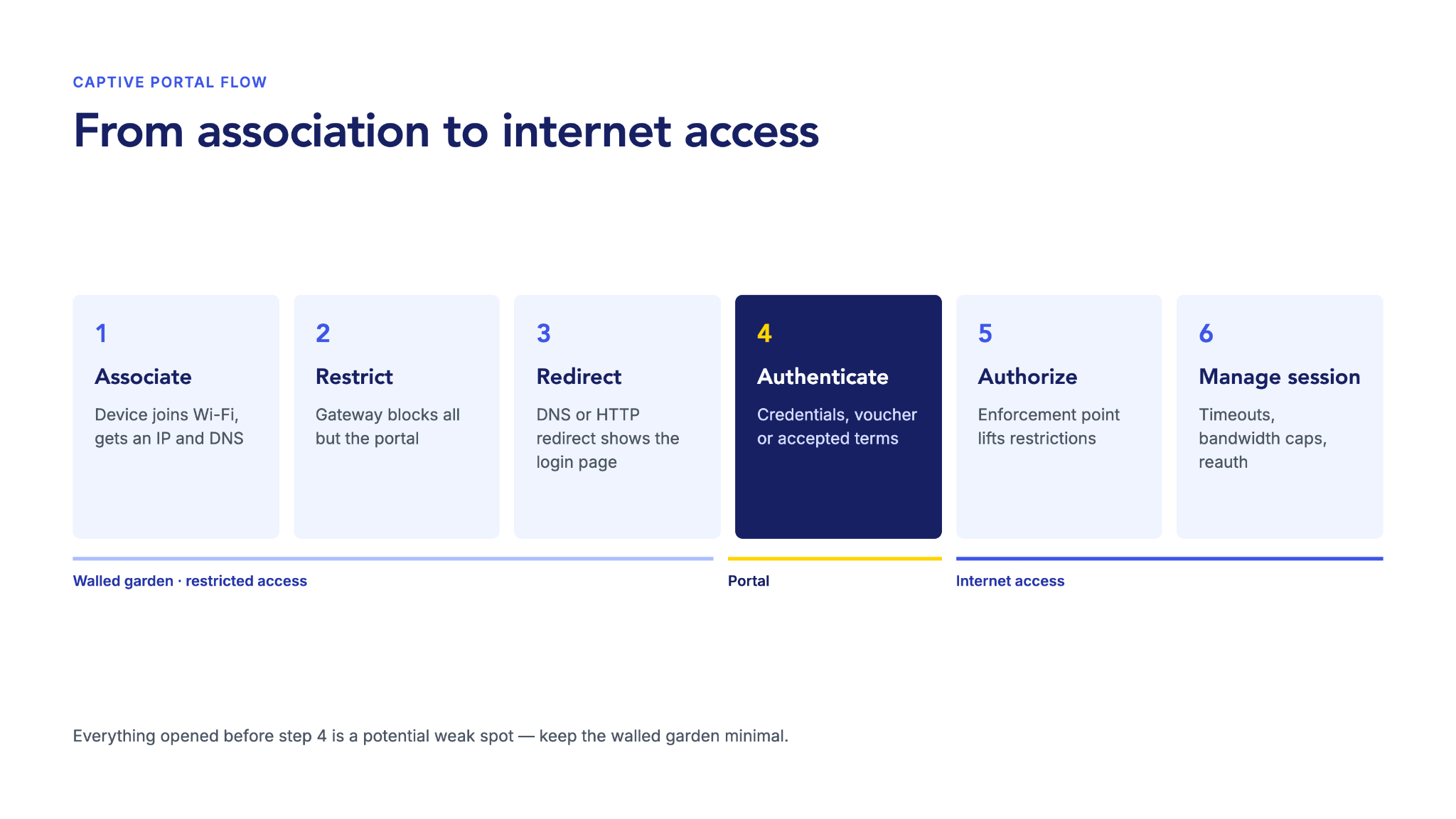
A captive portal intercepts a device's first attempt to reach the internet. It holds the device in a restricted state until the user meets the network's conditions. The flow looks like this:
- The device joins the Wi-Fi network and receives basic configuration, including an IP address and DNS information.
- The network restricts the device: A controller, gateway, or firewall blocks general traffic while allowing just enough to reach the portal.
- The device is redirected to the portal: Redirection uses DNS, HTTP redirection at the gateway, or transparent proxying, and the user sees the login page.
- The user completes the required step, entering credentials, a voucher, or accepting terms.
- The enforcement device changes the authorization state and lifts the restrictions.
- The session is managed with timeouts, idle limits, bandwidth caps, or reauthentication.
In short: association → restricted access → portal authentication → authorization → internet access → session management. The pre-authentication "walled garden" is the small set of domains a device may reach before logging in. It matters because everything the portal opens up before authentication is a potential weak spot.
What does "secure" actually mean for a captive portal?
Here is the core misconception worth clearing up: a captive portal controls access, but access control is not the same as security. A portal authenticates a session — it decides whether a connection is allowed online. It does not, on its own, establish who or what is connected, and it does not encrypt the wireless link. Once a user clears the splash page, the network has no cryptographic assurance about the device behind it.
That gap matters because the biggest real-world risks are about identity and credentials, not access. Verizon's 2024 Data Breach Investigations Report found that a human element was a component of 68% of breaches. A login page that relies on a shared password or a simple form does nothing to reduce that risk.
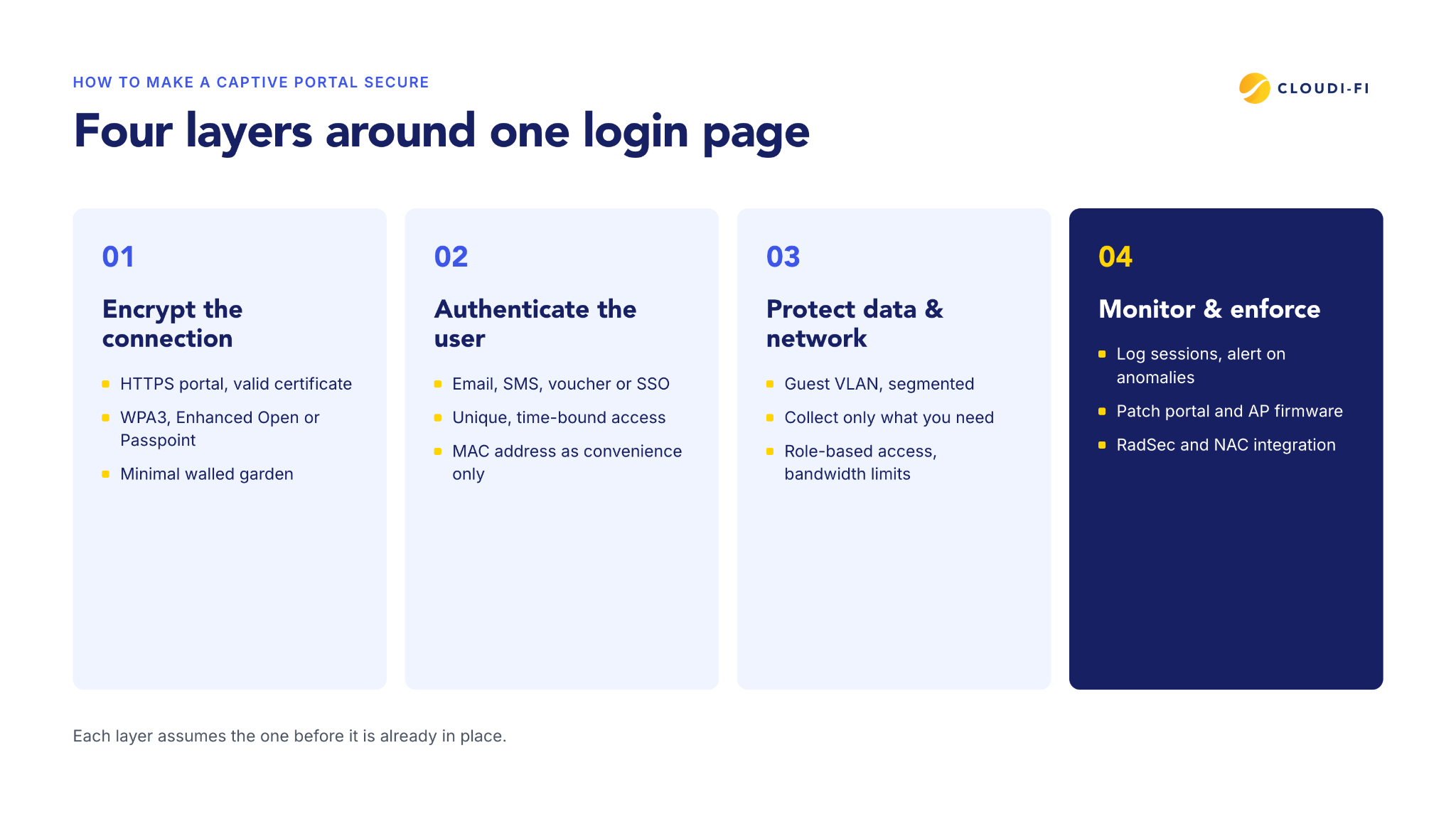
So a "secure" captive portal is not a special product. It is an ordinary portal hardened in layers. The clearest way to organize that hardening is four layers: encrypt the connection, authenticate the user, protect the data and network, and monitor and enforce. The rest of this guide works through the risks and then those four layers.
The security risks of a captive portal alone
Run a captive portal without additional controls and you inherit several structural risks:
- Unencrypted login pages: A portal served over plain HTTP exposes credentials and consent, and can be tampered with in transit.
- Open-network eavesdropping: Portals often run on open SSIDs, so wireless traffic is unencrypted over the air even when the login page uses HTTPS.
- Evil-twin and rogue access points: An attacker stands up a fake access point with a copycat portal to harvest logins. Spoofing is easy because the portal rarely authenticates the network to the user.
- MAC spoofing: Using a device's MAC address for "remember me" access is trivially bypassed, because MAC addresses are sent unencrypted in every frame and easily copied.
- Weak data handling: Collecting more personal data than necessary, or storing it insecurely, creates compliance and breach exposure.
These are not theoretical. In 2024, the Australian Federal Police charged a man with running fake Wi-Fi networks at airports and on domestic flights to steal credentials through a bogus portal page. The barrier to entry is low. As CNBC reported, the equipment to run an evil-twin attack can cost less than $500. A peer-reviewed 2026 study in Electronics describes evil-twin attacks as persistent, adaptive, and underestimated because they are hard to detect.
How to make a captive portal secure: The four layers
Work through these layers in order. Each one assumes the layer before it is already in place.
Layer 1: Encrypt the connection
Start with the login page itself. Serve the portal over HTTPS with a valid certificate, so credentials and consent are never sent in the clear. A valid certificate also avoids browser warnings that train users to click through.
HTTPS on the portal is not enough, because a captive portal does not encrypt Wi-Fi traffic on its own. Many portals run on open networks where the wireless link stays exposed. To close that gap, add over-the-air encryption:
- WPA3 uses Simultaneous Authentication of Equals (SAE) to resist offline password-guessing on password-protected networks.
- Enhanced Open is the Wi-Fi Alliance's branding for Opportunistic Wireless Encryption (OWE), defined in IETF RFC 8110. It encrypts traffic on open networks at association, but protects only against passive eavesdropping.
- Passpoint connects devices automatically to a verified network, with enterprise-grade authentication and encryption (WPA2/WPA3-Enterprise), usually without any login page.
This is increasingly a baseline rather than an upgrade. The Wi-Fi Alliance now mandates WPA3 for Wi-Fi 6E and Wi-Fi 7 devices, and requires Enhanced Open on open 6 GHz networks. Finally, keep the pre-authentication walled garden minimal, allowing only the domains the portal needs.
Layer 2: Authenticate the user
Use real authentication matched to the risk: email or SMS verification, vouchers, social login, or corporate single sign-on. Give each user or device unique, time-bound access rather than a shared password that never changes.
Do not treat a MAC address as authentication. MAC-based recognition is fine as a convenience, such as skipping the splash page for a device that already authenticated. It should never be the security control itself, because it is so easily spoofed.
Layer 3: Protect the data and the network
Isolate guest traffic on its own VLAN, segmented from corporate systems, so a compromised guest device cannot reach sensitive resources. Collect only the personal data you need and state the purpose clearly. Set a defined retention period to meet obligations such as GDPR and, where card payments are involved, PCI DSS. After login, apply role-based access and bandwidth limits — least privilege for guests.
Layer 4: Monitor and enforce
Log every authentication and session, and watch for anomalies such as repeated failures or a rogue access point broadcasting your SSID. Keep portal software and access-point firmware patched, because unpatched portals are a common entry point. Where possible, carry authentication over RadSec (RADIUS over TLS) rather than relying on MD5-based shared secrets, especially when the portal and the RADIUS server communicate across the internet. Integrate the portal with network access control (NAC) so one policy governs guests, staff, and devices.
Captive portal vs. 802.1X and NAC
A hardened captive portal is a good fit for guest and temporary access. It is browser-based, requires no pre-installed profile, and authenticates at the session level. For managed corporate devices, though, there are stronger models.
- 802.1X with EAP-TLS authenticates the device with a digital certificate before it joins the network. It removes shared passwords, automates onboarding, and resists credential theft, ideal for employee and BYOD devices.
- NAC makes access decisions based on identity, device type, and security posture. It can dynamically enforce VLANs, segmentation, and quarantine.
In practice, many organizations run both. A captive portal delivers a convenient guest experience, while 802.1X secures managed devices. That combination keeps click-to-connect for visitors without lowering the bar for corporate access.
Secure captive portal checklist
Use this as a pre-go-live and periodic review:
- Portal served over HTTPS with a valid, current certificate.
- Over-the-air encryption enabled (WPA3, Enhanced Open/OWE, or Passpoint).
- Real authentication in place; MAC address used only as a convenience.
- Guest traffic isolated on its own VLAN, segmented from corporate systems.
- Walled garden limited to required pre-authentication domains only.
- Personal data minimized, with a defined retention period.
- Authentication carried over RadSec or another encrypted transport.
- Sessions and authentications logged, with anomaly alerts configured.
- Portal software and access-point firmware patched and current.
- Role-based access and bandwidth limits applied after login.
The bottom line
A secure captive portal is not a single feature you switch on. It is an ordinary login page plus the layers that make it trustworthy: an encrypted connection, real authentication, isolated and minimized data, and active monitoring. Get those in place and a portal is a legitimate way to secure guest and public Wi-Fi. Where you are onboarding managed devices rather than guests, reach for certificate-based 802.1X, which secures the device itself instead of just the session.
Secure your guest Wi-Fi from the login page up
Cloudi-Fi Captive Portal combines HTTPS login, guest authentication, and policy enforcement in one cloud-based platform, with no on-premises hardware to manage.