
A captive portal is a web page that a Wi-Fi network shows to newly connected devices before it grants internet access. Users must accept terms, sign in, or verify their identity on that page. Hotels, airports, retailers, and enterprises use captive portals to authenticate guests, enforce access policies, and keep the connection logs that local regulations require.
This guide explains how a captive portal works step by step, why your phone shows a "captive portal login" notification, which authentication methods exist, and how organizations run captive portals securely and compliantly across many sites in 2026.
Key takeaways
- A captive portal holds a device in a restricted state until the user authenticates or accepts terms, then releases its traffic to the internet.
- Phones and laptops detect captive portals automatically by sending a test request; when it is intercepted, the device opens the login page.
- "Captive portal login" on Android or iPhone is the operating system's built-in sign-in window, not an app or a threat.
- Enterprises increasingly run captive portals from the cloud, alongside 802.1X and IoT controls, as one part of a Zero Trust access model.
What is a captive portal?
A captive portal is the access-control layer that sits between a Wi-Fi connection and the open internet. When a device joins a network protected by a captive portal, it can reach the local network but not the internet. Every web request is held back until the user completes the step the network requires.
The page users see is often called a splash page. The captive portal is the whole system behind it: the redirection, the authentication, the session rules, and the logs. That distinction matters when comparing solutions, because most access points ship with a basic splash page but little of the rest.
People meet captive portals in hotel lobbies, airports, trains, shopping centers, hospitals, university campuses, and corporate visitor networks. In each case, the organization offering the Wi-Fi wants to know who is connecting, under which terms, and with which permissions.

How does a captive portal work?
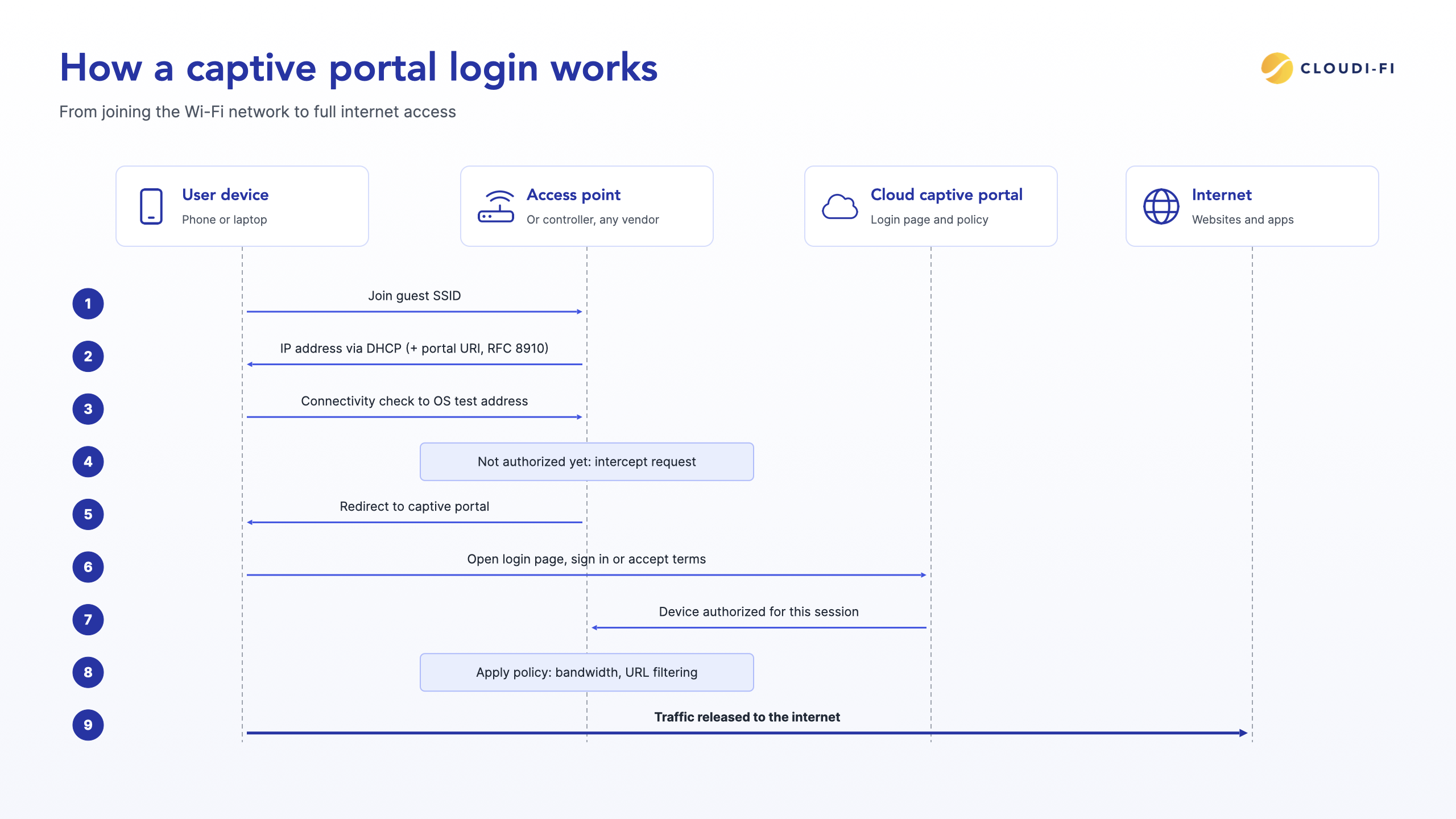
A captive portal works by intercepting a new device's first web traffic and redirecting it to a login page. The device stays in a restricted "walled garden" until the user authenticates, then the network releases its traffic. The full captive portal flow takes seven steps:
- The device joins the guest network, usually an open or lightly protected SSID.
- The network assigns the device an IP address over DHCP. On modern networks, this response can also announce the address of the captive portal.
- The device's operating system sends a small connectivity check to a known test address to find out whether it has real internet access.
- The access point, controller, or gateway intercepts that request because the device is not yet authorized, and redirects it to the captive portal page.
- The user authenticates or accepts the terms of use on the portal.
- The portal tells the network that the device is authorized. The network then applies the right policy to that session, such as a bandwidth limit or URL filtering.
- The session runs until it expires or the device leaves, after which the user may need to sign in again.
How devices detect a captive portal
Each operating system checks for a captive portal as soon as it joins a Wi-Fi network. It requests a plain HTTP test page and compares the answer with the response it expects. If the network returns something else, such as a redirect, the device concludes that it is behind a captive portal and opens the login window.
| Operating system | Test address | Expected response when there is no portal |
|---|---|---|
| iOS, iPadOS and macOS | http://captive.apple.com/hotspot-detect.html |
A page containing the word "Success" |
| Android | http://connectivitycheck.gstatic.com/generate_204 |
An empty HTTP 204 response |
| Windows 10 and 11 | http://www.msftconnecttest.com/connecttest.txt |
The text "Microsoft Connect Test" |
| ChromeOS | http://clients3.google.com/generate_204 |
An empty HTTP 204 response |
| Ubuntu Linux | http://connectivity-check.ubuntu.com |
An empty HTTP 204 response |
| Firefox (any operating system) | http://detectportal.firefox.com/success.txt |
The text "success" |
This is why a captive portal login page usually appears on its own, without the user opening a browser.
The Captive Portal API: RFC 8910 and RFC 8908
Older captive portals relied entirely on intercepting traffic, which works poorly now that almost every website uses HTTPS. A browser cannot be silently redirected away from an encrypted site without showing a certificate warning.
Two IETF standards address this. RFC 8910 lets the network announce the portal's address directly in DHCP or IPv6 router advertisements. RFC 8908 defines an API that tells the device whether it is still captive and how long its session lasts. Together, they let devices find the login page without interception and warn users before a session expires.
What is a captive portal login?
A captive portal login is the sign-in step your device shows when it detects that a Wi-Fi network requires authentication. On most phones, it appears as a "Sign in to Wi-Fi network" notification that opens a small built-in browser window. That window shows the venue's login page, where you accept the terms, enter details, or choose a sign-in method.
On Android, the window comes from a system component called Captive Portal Login. It is part of the operating system, not a downloaded app or malware. On iPhone, iPad, and Mac, the equivalent is the Captive Network Assistant, which opens the login sheet automatically.
Why does captive portal login appear on my phone?
It appears because your phone just joined a Wi-Fi network that holds internet access until you sign in. The phone's connectivity check failed in the way described above, so it opened the login page for you. Once you complete the portal, the notification disappears and your apps connect normally.
If you see the notification on a network you did not expect to have a portal, check that you joined the right network name before entering any details.
Captive portal login not showing up: how to fix it
If you are connected to Wi-Fi but the login page never appears, try these steps in order:
- Forget the network in your Wi-Fi settings, then join it again.
- Open a browser and visit a plain HTTP address, such as http://neverssl.com, which the network can redirect.
- Pause your VPN or private DNS setting until you have signed in, since both can stop the redirect.
- Turn off the private Wi-Fi address (MAC randomization) for that network only, then rejoin.
- Restart Wi-Fi on the device, or restart the device if the page still does not load.
What does "captive portal detected" mean?
"Captive portal detected" means a device or security agent has recognized that the current network requires sign-in before it allows internet access. Operating systems show it as the sign-in notification described above. Security agents also show it, because they must step aside briefly so you can reach the login page.
Zscaler Client Connector is a common example in enterprises. When an employee joins hotel or airport Wi-Fi, the agent detects the captive portal and lets the login page through before it starts forwarding traffic to Zscaler. For configuration details, see the Cloudi-Fi help-center guide on using a captive portal with Zscaler Client Connector.
Captive portal authentication methods
The right authentication method depends on how well the organization needs to know who is connecting. A coffee shop may need only accepted terms, while a corporate office needs to tie every visitor session to a named person and a host.
| Method | How it works | Best for | Identity assurance |
|---|---|---|---|
| Click-through terms | User accepts the terms of use with one tap | High-traffic public venues | Low |
| User enters an email address, optionally confirmed by a link | Retail and hospitality marketing opt-in | Low to medium | |
| SMS one-time code | User enters a phone number and types the code received | Countries where connection logs must be tied to a person | Medium |
| Social login | User signs in with an existing social account | Consumer venues that want profile data | Medium |
| Sponsorship | A host employee approves the visitor's request by email | Corporate offices, visitor and contractor access | High |
| Voucher or access code | User enters a code issued at reception or with a booking | Hotels, events, and paid access | Medium |
| Single sign-on | Employee signs in with a corporate identity provider | BYOD and employee access to a guest-style network | High |
Most organizations combine several methods on one portal, for example sponsorship for visitors and SMS for walk-in guests, and apply a different policy to each.
What organizations use captive portals for
Organizations use captive portals to control guest access, meet legal obligations, and, in customer-facing venues, build a direct relationship with visitors. The benefits of onboarding users through a captive portal differ by sector:
- Hospitality: hotels and restaurants give guests fast access with a voucher or room details and promote on-site services on the welcome page.
- Retail: chains collect marketing consent at sign-in and recognize returning visitors across stores.
- Transport: airports and rail operators manage large numbers of short sessions with time and bandwidth limits.
- Healthcare: hospitals keep patient and visitor traffic separate from clinical systems.
- Education: campuses apply different policies to students, staff, and visitors.
- Corporate offices: companies give visitors and contractors sponsored, logged access without exposing the internal network.
Marketing and CRM integration
In retail and hospitality, the captive portal is also a marketing touchpoint. Marketing teams can collect opt-in data at sign-up, greet returning visitors with a personalized welcome page, and send consented contacts to a CRM such as Salesforce, HubSpot, or Pipedrive through an API or a Zapier connector. Central teams set the rules once, while local teams run their own campaigns within them.
Branded portals across every site
A cloud captive portal can carry each brand's guidelines and adapt to local languages and connection practices. Brands can design their own portals or have the Cloudi-Fi Creative Lab design them, so guests get the same experience at every location. Learn more about guest Wi-Fi management.
Cloud vs on-premises captive portals
A cloud captive portal runs the portal, authentication, and policy engine as a service, while the access points on site only redirect unauthenticated users to it. An on-premises captive portal runs on a controller, gateway, or server installed at each location. For organizations with more than a handful of sites, the cloud model removes most of the constraints of hardware-based guest Wi-Fi.
| Criteria | Cloud captive portal | On-premises captive portal |
|---|---|---|
| Hardware on site | None beyond existing access points | Controller, gateway, or server per site or region |
| Deployment | New sites added from a central console | Configured locally, often by a field engineer |
| Multi-site management | One console for all portals, policies, and logs | Separate systems per site or vendor |
| Vendor support | Works across access point vendors | Tied to the vendor's own controller |
| Updates | Delivered centrally by the provider | Applied site by site |
| Scaling | Grows with the number of users and sites | Limited by installed hardware capacity |
| Data residency | Depends on where the provider stores logs | Stored locally, managed by the organization |
| Cost model | Subscription, pay as you grow | Upfront hardware plus maintenance |
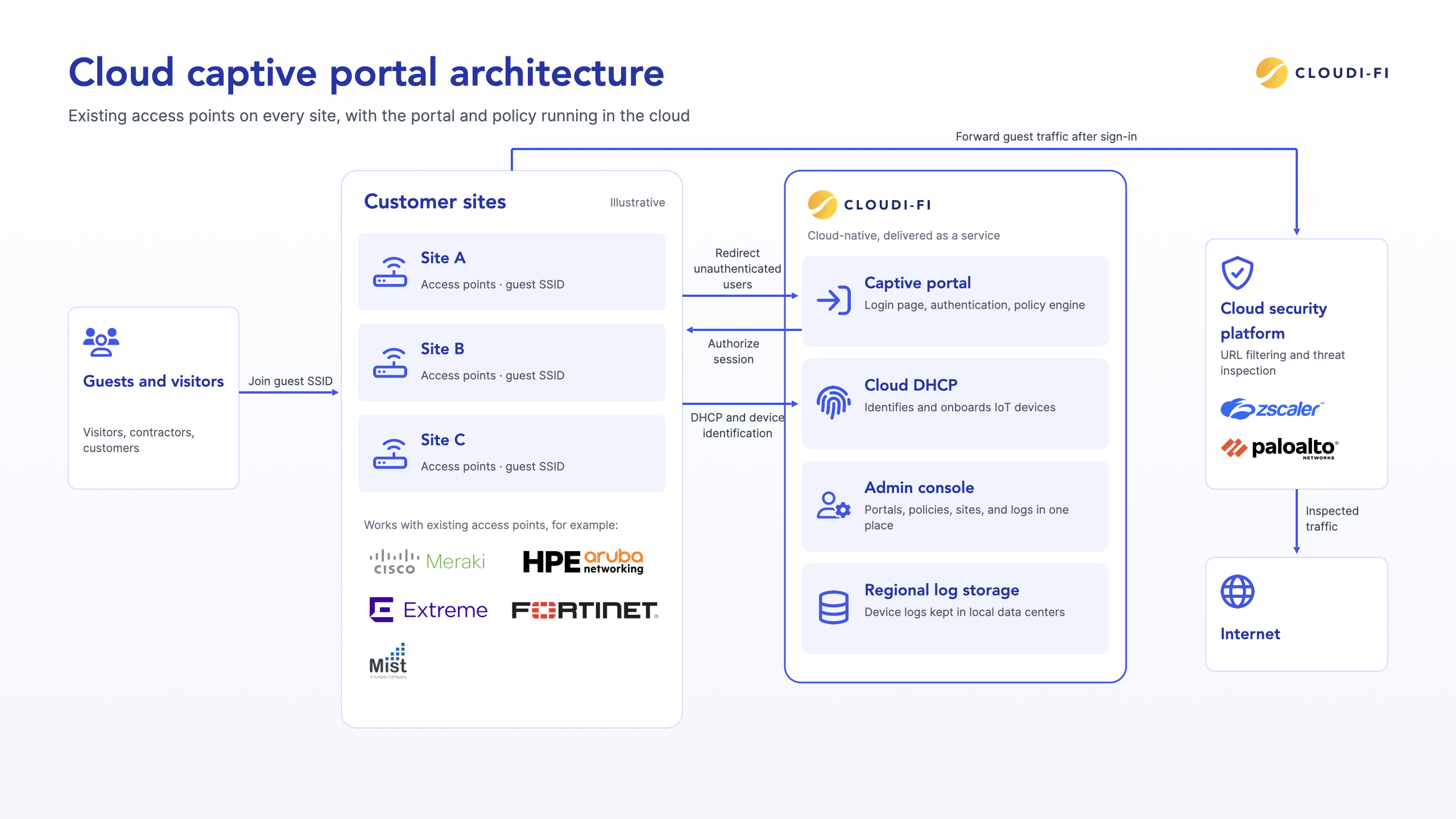
A cloud captive portal is managed from one administration console. Administrators can check each portal's status, change policies, and troubleshoot any location remotely. The Cloudi-Fi captive portal also works with a cloud DHCP service that identifies and onboards IoT devices on the same networks.
Are captive portals secure? Risks and best practices
A captive portal controls who gets onto a network, but it does not encrypt traffic on its own. Its security depends on how the underlying Wi-Fi network is configured and where guest traffic goes after sign-in.
Common captive portal risks
- Open, unencrypted networks: on an open SSID, traffic between the device and the access point can be read by others nearby.
- Evil twin portals: an attacker broadcasts the same network name with a fake portal to collect credentials or personal data.
- MAC spoofing and session hijacking: after sign-in, many portals recognize a device by its MAC address, which another device can imitate.
- MAC address randomization: recent iOS and Android versions use a private MAC address per network, which can break returning-device recognition and force users to sign in again.
Captive portal security best practices
- Serve the portal over HTTPS with a valid certificate so users can verify it.
- Use WPA3 Enhanced Open (OWE) where access points and devices support it, to encrypt traffic on networks without a password.
- Isolate clients from each other and keep guests on a segmented VLAN, separate from corporate and IoT devices.
- Forward guest traffic to a cloud security platform, such as Zscaler or Palo Alto Networks Prisma Access, for URL filtering and threat inspection based on the user's profile.
- Set session timeouts and keep connection logs for the period local law requires.
So, is captive portal login safe? For users, signing in to a well-configured portal from a known venue is safe; the larger risk is joining a look-alike network or using an unencrypted connection without a VPN. For a deeper look, read what makes a captive portal secure and eight ways to secure your Wi-Fi captive portal.
Check whether your guest, BYOD, and IoT access is Zero Trust ready. Get the ZTNA checklist.
Captive portals and data privacy compliance
A captive portal collects personal data, so it falls under the privacy law of every country where it runs. Depending on the location, that can mean the General Data Protection Regulation (GDPR) in Europe, the California Consumer Privacy Act (CCPA), Brazil's LGPD, or other national laws.
Four obligations come up in almost every jurisdiction:
- Consent: users must understand what is collected and why, and marketing consent must be separate from the terms of use.
- Data minimization: the portal should ask only for what the organization needs.
- Retention: personal data must be kept no longer than necessary, then deleted.
- Connection logs: some countries require operators of public Wi-Fi to keep records of who connected and when, for a set period.
These rules often conflict across borders. A log that one country requires may be data another country limits, which makes multi-country guest Wi-Fi hard to run from a single on-premises setup.
What to look for in a compliant captive portal
A cloud captive portal can be fully GDPR compliant; compliance depends on how it is configured and where data is stored, not on whether it runs in the cloud. Look for clear consent screens, encrypted personal data, configurable retention, and log storage in the right region.
Cloudi-Fi stores device logs in local data centers, so each country's records stay where its regulations require. Its legal team reviews regulatory changes across regions, which lets global organizations roll out guest Wi-Fi without building a legal framework for every country. Learn more about global data privacy compliance.
Captive portal vs 802.1X vs Passpoint: which fits which users?
A captive portal is the right access method for people the organization does not manage, such as guests, visitors, and contractors. Managed employee devices, IoT devices, and roaming users are better served by other methods, and most enterprise networks use several at once.
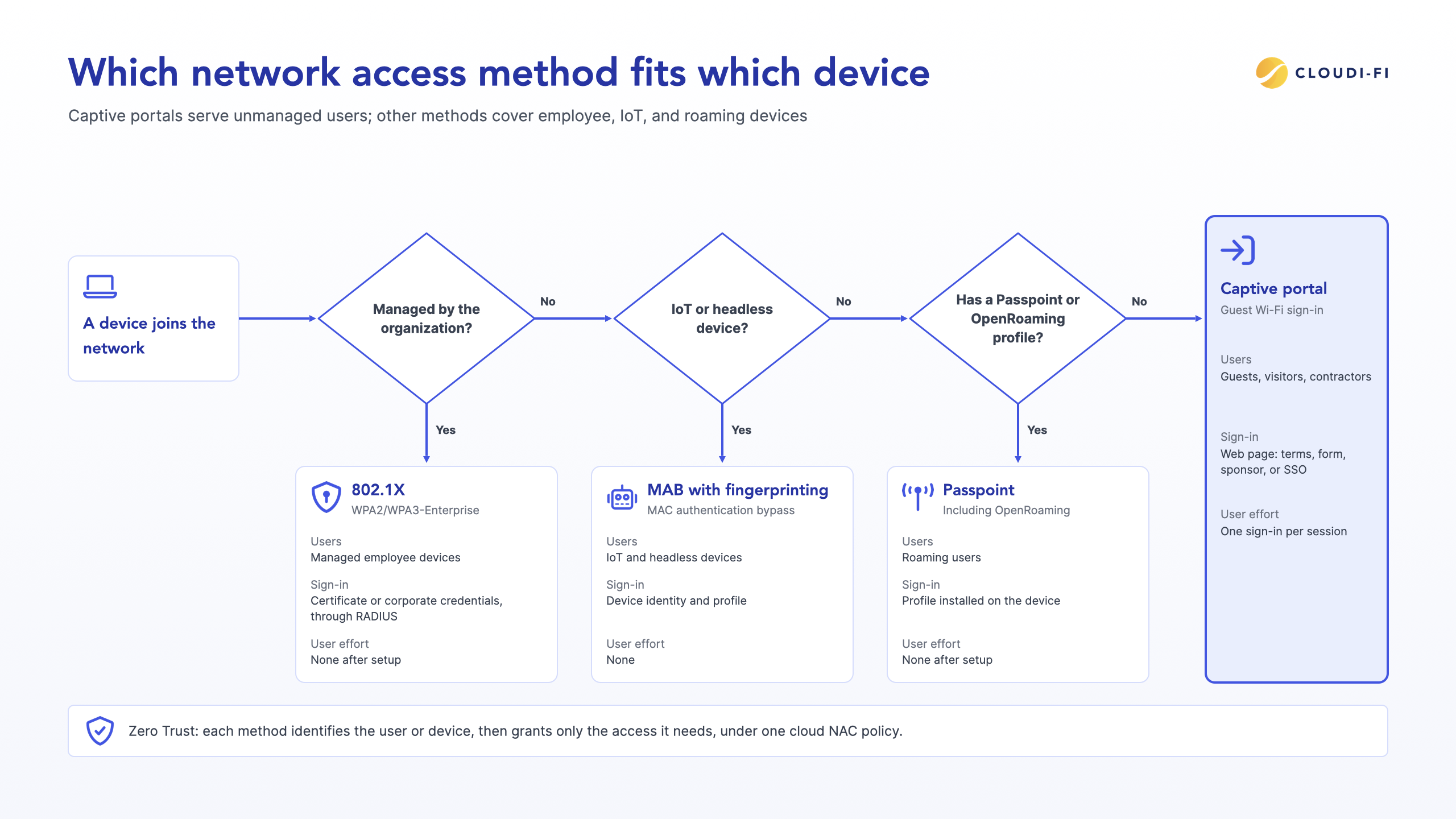
| Method | Typical users | How the user authenticates | Encryption | User effort |
|---|---|---|---|---|
| Captive portal | Guests, visitors, contractors | Web page: terms, form, sponsor, or SSO | Depends on the SSID (open, OWE, or PSK) | One sign-in per session |
| 802.1X (WPA2/WPA3-Enterprise) | Managed employee devices | Certificate or corporate credentials, through RADIUS | Strong, per-user keys | None after setup |
| MAC authentication bypass (MAB) with device fingerprinting | IoT and headless devices | Device identity and profile | Depends on the SSID | None |
| Passpoint and OpenRoaming | Roaming users with a provider profile | Profile installed on the device | WPA2/WPA3-Enterprise | None after setup |
In a Zero Trust model, none of these methods grants blanket trust. Each one identifies the user or device, then applies only the access that identity needs. A cloud platform can run all of them side by side: a captive portal for guests, cloud-ready 802.1X for employees, and IoT discovery and fingerprinting for connected devices, under one cloud NAC policy. For the IoT side, see how to apply least-privilege access to unmanaged devices.
How to choose a captive portal for an enterprise
The best captive portal for an enterprise is the one that fits its existing infrastructure, security stack, and compliance obligations in every country where it operates. Use these eight criteria to compare solutions:
- Infrastructure compatibility: works with the access points and controllers already installed, across vendors.
- Central multi-site management: one console for portals, policies, sites, and logs.
- Authentication options: supports the methods each user group needs, from sponsorship to single sign-on.
- Security stack integration: forwards guest traffic to the cloud security platform already in use.
- Data residency and compliance: stores logs in the right regions and adapts to each country's rules.
- BYOD and IoT coverage: handles personal and headless devices, not only guests.
- Branding and localization: supports each brand's design and local languages.
- Reporting and APIs: exposes usage data and integrates with CRM and IT tools.
To see how these criteria apply in practice, explore the Cloudi-Fi cloud captive portal.
Conclusion
Captive portals remain the standard way to give unmanaged users controlled Wi-Fi access, and in 2026 they work best as one part of a wider access strategy. Running them from the cloud, alongside 802.1X and IoT controls, gives organizations consistent security and compliance at every site. To see how a captive portal fits a Zero Trust approach for guests, BYOD, and IoT, explore the Cloudi-Fi cloud captive portal.

FAQ
What is a captive portal used for?
A captive portal is used to control access to a Wi-Fi network before users reach the internet. Organizations use it to authenticate guests, have them accept terms of use, apply bandwidth and content policies, collect marketing consent, and keep the connection logs that local laws require.
Is captive portal login safe?
Signing into a captive portal at a known venue is generally safe if the page uses HTTPS and you joined the correct network. Avoid entering sensitive passwords on unfamiliar portals, and use a VPN on open networks, because a captive portal controls access but does not encrypt your traffic.
Why does my phone say "captive portal login"?
Your phone shows "captive portal login" when it joins a Wi-Fi network that requires sign-in before granting internet access. The phone detected that its connectivity test was intercepted, so it opened the network's login page in a built-in window. It is a normal system feature, not an app or a virus.
How do I open a captive portal on an iPhone or Android device?
Forget the Wi-Fi network and join it again, which usually triggers the login page. If it still does not appear, open a browser and visit a plain HTTP address such as http://neverssl.com. Pausing a VPN or private DNS setting until you sign in also helps the redirect work.
Can users bypass a captive portal?
A technically skilled user can sometimes bypass a poorly configured portal, for example by copying the MAC address of an authorized device. Enterprise-grade portals reduce this risk by enforcing policy at the network gateway, setting session timeouts, and inspecting traffic through a cloud security platform after sign-in.
Does a captive portal encrypt traffic?
No, a captive portal handles access, not encryption. Whether traffic is encrypted depends on the Wi-Fi network itself. Open networks are unencrypted unless they use WPA3 Enhanced Open (OWE), while WPA2 or WPA3-Enterprise networks encrypt each user's traffic with individual keys.
Is a cloud captive portal GDPR compliant?
A cloud captive portal can be GDPR compliant when it collects clear consent, minimizes and encrypts personal data, enforces retention limits, and stores data in an appropriate region. Compliance depends on configuration and data location, not on whether the portal runs in the cloud or on site.
Run your captive portal from the cloud
Enterprises running guest Wi-Fi across many sites can start with the Cloudi-Fi Cloud Captive Portal. Request a demo to see how it authenticates guests, BYOD and IoT from one cloud platform.