
Managing wireless networks across dozens or hundreds of sites used to mean deploying controllers, RADIUS servers, and dedicated IT staff at every location. Cloud RADIUS changes that equation, moving 802.1X authentication to a centralized cloud platform that works across any infrastructure and eliminates the on-prem server footprint.
This guide focuses on cloud RADIUS: how it works, why enterprises are moving off on-prem RADIUS servers, and the cloud Wi-Fi management features built around it.
What is enterprise cloud Wi-Fi?
Enterprise cloud Wi-Fi delivers centralized, scalable wireless management through a cloud-based dashboard rather than on-site hardware controllers. Instead of installing physical controllers and RADIUS servers at every office, warehouse, or retail location, IT teams manage the entire wireless network from one cloud platform. Configuration, monitoring, security, and troubleshooting all happen remotely.
This approach moves complexity away from individual sites. IT teams gain visibility across hundreds or thousands of access points without visiting each location for routine changes. The cloud platform handles firmware updates, policy enforcement, and authentication in one place.
A few terms worth knowing:
- Cloud-managed Wi-Fi: Wireless networking administered through a cloud dashboard, allowing remote configuration, updates, and monitoring across multiple sites from a single interface.
- Enterprise-grade: Built for large organizations with requirements for scale, reliability, advanced security, compliance, and centralized administration, not the consumer-grade equipment found at home.
- Network Access Management: The process of controlling who and what can connect to the network, under what conditions, and with what level of access.
- Cloud RADIUS: A RADIUS server hosted and managed in the cloud rather than on-premises, authenticating users and devices for 802.1X Wi-Fi access without requiring local hardware or ongoing server maintenance.
How cloud-managed Wi-Fi works

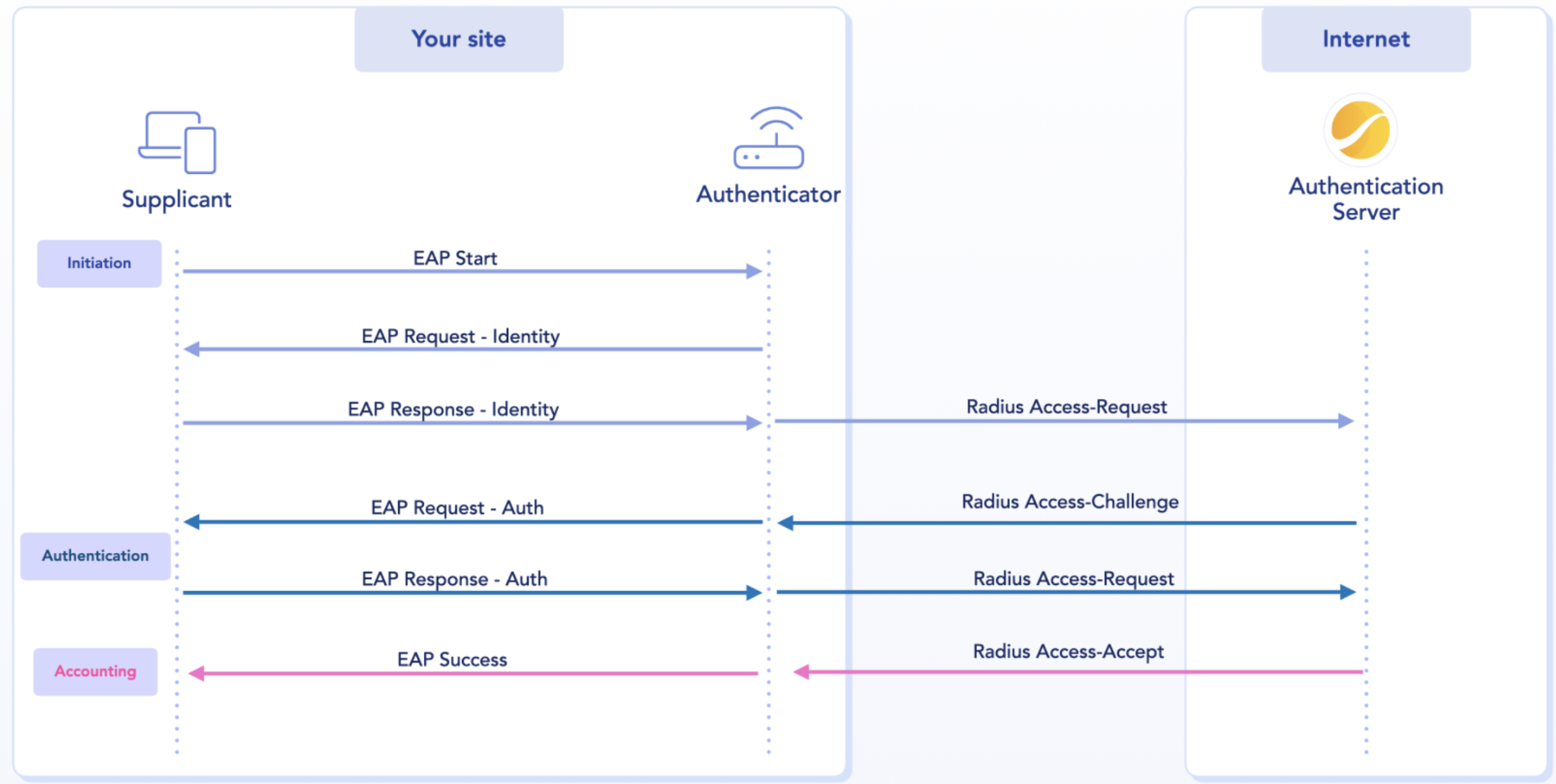
The architecture is simpler than on-prem deployments. Access points at each site connect to a cloud controller over the internet. When a device tries to connect, the cloud platform authenticates the user or device, applies the right access policy based on identity, and monitors the session from that point forward.
Here is the typical flow:
- Device connects to the access point.
- Cloud platform authenticates the user or device.
- Access policy is applied based on identity.
- Session is monitored and logged centrally.
Because the intelligence lives in the cloud, there is no need for on-premises RADIUS servers or local controllers at each site. Access points become simpler hardware, while authentication, policy enforcement, and analytics happen in the cloud.
Benefits of enterprise cloud Wi-Fi for large organizations
Moving wireless management and RADIUS authentication to the cloud delivers operational advantages that compound as organizations grow.
Centralized management across global sites
A single dashboard provides visibility and control across every location. IT teams configure policies, troubleshoot issues, and monitor performance from anywhere. For organizations operating in dozens of countries, this removes the coordination overhead of managing distributed RADIUS infrastructure site by site.
Faster multi-site deployment
New sites can go live in days rather than weeks. With no local RADIUS servers or controllers to install or configure, access points connect to the cloud and download their configuration automatically. This zero-touch provisioning model speeds up rollouts considerably.
Lower hardware and operational costs
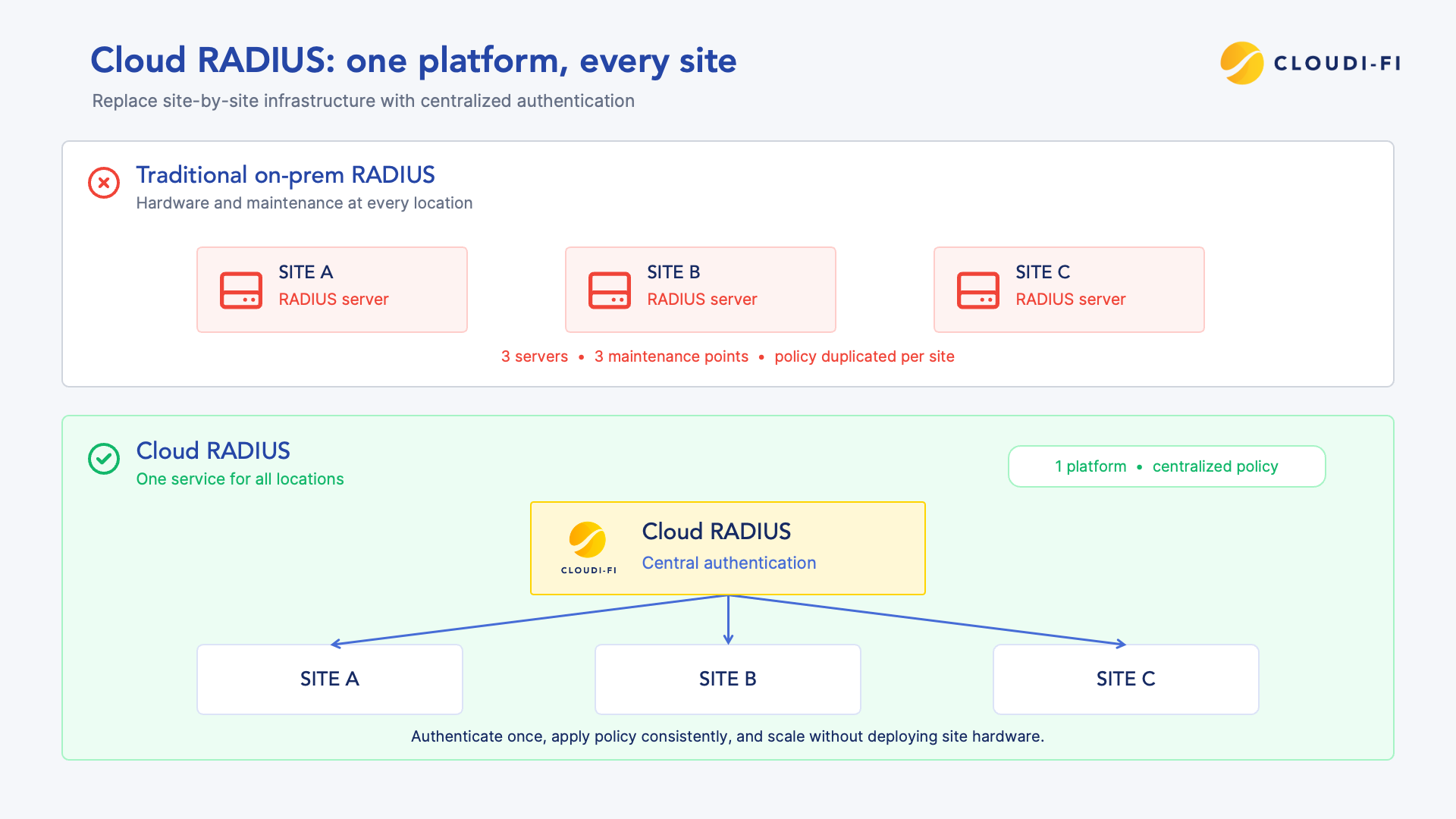
Eliminating on-premises RADIUS servers, controllers, and dedicated IT staff at each location reduces both capital and operational expenses. The cloud platform handles updates and maintenance, which means less ongoing overhead for IT teams.
Security posture
Cloud RADIUS supports Zero Trust principles, verifying every user and device before granting access rather than trusting anything inside the network perimeter.
Scalable performance for hybrid work
Cloud Wi-Fi adapts to fluctuating user counts and device types. Whether supporting employees, guests, BYOD (bring your own device), or IoT (Internet of Things) devices, the platform scales without requiring hardware changes at each site.
Key features built around cloud RADIUS
Not all cloud Wi-Fi platforms offer the same capabilities. These are the features that matter most for large organizations moving off on-prem RADIUS.
Cloud RADIUS and 802.1X authentication
802.1X is the enterprise authentication standard that verifies users against a directory before granting network access. Traditional RADIUS servers that support 802.1X require on-premises hardware, redundant failover setups, and ongoing patching, typically taking weeks to provision and configure at each site.
Cloud RADIUS replaces that server entirely. The provider hosts and maintains the RADIUS infrastructure, so IT teams configure authentication policies once and apply them across every site without shipping or racking hardware. This still supports the same standards, including EAP-TLS (Extensible Authentication Protocol-Transport Layer Security) for certificate-based authentication and PEAP-MSCHAPv2 for username and password authentication over a secure tunnel.
Cloud RADIUS also integrates with SAML (Security Assertion Markup Language) and OAuth (Open Authorization) for single sign-on, letting employees authenticate with the same corporate identity provider credentials, such as Entra ID or Okta, that they use for other applications. Verify explicitly, apply least-privilege access, and assume breach: these three Zero Trust principles are what cloud RADIUS enforces on every connection, regardless of where the user or device is located.
Cloud captive portal
A captive portal is the login page users see when connecting to guest Wi-Fi. Cloud-based portals enable guest onboarding with social logins, custom branding, and compliant data collection, managed centrally rather than configured at each site. For a closer look at captive portal options, see What is a captive portal and how does it work?
Zero Trust Network Access (ZTNA)
Zero Trust Network Access enforces identity verification for every connection, applying profile-based policies that control what each user or device can reach. For more on how this applies to Wi-Fi environments, see why the Zero Trust Wi-Fi framework matters.
Analytics and network visibility
Real-time dashboards show connections, usage, and security events across all sites. This visibility supports troubleshooting, capacity planning, and compliance reporting.
Infrastructure-agnostic integration
The best cloud Wi-Fi platforms work with existing access points and controllers from vendors such as Cisco, Aruba, Fortinet, and Meraki. No rip-and-replace is required; the cloud platform overlays existing infrastructure.
Onboarding guests, BYOD, and IoT on cloud RADIUS
Enterprise networks support diverse device types, and each one authenticates differently against cloud RADIUS or the surrounding platform.
Guest Wi-Fi onboarding
Guests self-register through email capture, social login, SMS verification, or sponsor approval rather than authenticating against RADIUS at all. For a full breakdown of guest authentication options, see Securing guest Wi-Fi: Key risks and best practices.
BYOD and employee authentication
Personal devices authenticate through corporate identity providers, SAML single sign-on, or 802.1X against cloud RADIUS. The platform verifies devices against the corporate directory and applies access policies based on who is connecting, without requiring IT to pre-register every personal device on the network. This matters most for organizations managing large contractor or hybrid-work populations, where manually provisioning each device would create a persistent backlog for IT.
IoT (Internet of Things) and OT (Operational Technology) devices cannot authenticate against RADIUS the way users do, since there is no login prompt on a sensor or controller. For how these devices get identified and profiled instead, see why DHCP device profiling is essential for network visibility and Zero Trust security.
Centralized visibility and multi-site Wi-Fi management
A unified dashboard provides operational clarity across all locations. IT teams configure policies, monitor connections, and respond to alerts from a single interface, with no site visits required.
Key visibility capabilities include:
- Real-time monitoring: See active connections and bandwidth usage across all sites.
- Centralized alerts: Receive notifications for security events or connectivity issues.
- Historical reporting: Analyze trends for capacity planning and compliance audits.
Role-based access controls let distributed IT teams manage their regions while maintaining global policy consistency. Someone in Paris can handle European sites while someone in Singapore manages Asia-Pacific sites, all from the same platform.
Data sovereignty and compliance for enterprise cloud Wi-Fi
Wi-Fi access generates data that falls under privacy regulations such as GDPR (General Data Protection Regulation). Cloud RADIUS platforms centralize compliance through logging, data handling, and consent collection, but data sovereignty adds a further requirement: where that authentication data is physically hosted and processed.
For enterprises operating across the EU and other regions with data localization rules, this matters beyond GDPR compliance alone. Following the Schrems II ruling, organizations increasingly need assurance that authentication data does not transit or reside in jurisdictions subject to conflicting legal access requirements. A cloud RADIUS provider headquartered in the EU with regional data hosting options offers a clearer sovereignty position than providers processing data by default through US-based infrastructure.
Compliant platforms offer granular policy controls per user profile, audit-ready reporting, and region-specific data hosting options. For organizations operating across multiple jurisdictions, this centralized approach simplifies what would otherwise be a fragmented compliance effort spread across dozens of local systems.
How to choose a cloud RADIUS and enterprise cloud Wi-Fi solution
Selecting the right platform requires evaluating several factors.
Step 1: Assess network and site requirements
Evaluate the number of sites, user counts, device types (guests, employees, IoT), and existing infrastructure vendors. This baseline shapes requirements and narrows down options.
Step 2: Evaluate security and Zero Trust capabilities
Check for identity-based access control, captive portal options, content filtering, and segmentation features. These capabilities determine the resulting security posture.
Step 3: Check integration with existing infrastructure
Confirm compatibility with current access points, controllers, firewalls, and identity providers. Vendor-agnostic solutions avoid lock-in and reduce deployment friction.
Step 4: Review global compliance and data sovereignty coverage
Ensure the platform supports data privacy regulations in all operating regions and offers data hosting options that meet sovereignty requirements, not only GDPR compliance in general terms.
Step 5: Plan for scale and future growth
Consider how easily the solution adds new sites, supports IoT growth, and adapts to hybrid work demands over time.
Deploying cloud RADIUS across global sites
Cloud-native platforms typically offer two deployment models: WAN-based VPN tunnels or native integration with existing infrastructure. Both eliminate hardware shipments and enable rapid rollout with consistent configuration across locations. New sites can go live in days, since access points connect to the cloud and receive their authentication policies automatically with no local RADIUS server to configure.
Start your cloud RADIUS journey with Cloudi-Fi
Cloudi-Fi delivers a cloud-native, infrastructure-agnostic Network Access Platform trusted by 200+ enterprises globally. With plug-and-play deployment, Zero Trust security, and centralized management across 100,000+ secured sites in 90+ countries, organizations gain visibility and control without hardware complexity.
Enterprises such as Schneider Electric, L'Oréal, TotalEnergies, and Goldman Sachs rely on Cloudi-Fi to secure guest, employee, BYOD, and IoT connections worldwide.
FAQs
What is the difference between cloud RADIUS and traditional on-prem RADIUS?
Traditional RADIUS runs on servers installed and maintained at each site, while cloud RADIUS hosts that authentication infrastructure centrally, removing the need for local hardware, redundancy planning, and ongoing patching at every location.
Is cloud RADIUS secure for large enterprises?
Cloud RADIUS can enforce Zero Trust security with identity-based access control, encryption, and continuous monitoring, often providing more consistent security than fragmented on-prem RADIUS deployments across many sites.
Can cloud RADIUS work with existing access points?
Leading cloud RADIUS platforms are infrastructure-agnostic and integrate with access points and controllers from major vendors such as Cisco, Aruba, Fortinet, and Meraki without requiring hardware replacement.
How long does a cloud RADIUS deployment take?
Cloud-native platforms with plug-and-play deployment can bring new sites online in days rather than weeks, since there is no on-premises RADIUS server to install or configure.
How does cloud RADIUS support hybrid and remote work?
Cloud RADIUS applies consistent 802.1X authentication policies across all locations, so employees and BYOD devices authenticate the same way whether at headquarters, branch offices, or temporary sites.