
Wi-Fi authentication tools control who can access your wireless network and under what conditions. From guest captive portals to enterprise 802.1X and cloud RADIUS platforms, they secure employee, BYOD, IoT, and visitor access.
The hard part is no longer any single category. It is that the categories now overlap. Cloud RADIUS platforms ship certificate authorities. NAC vendors ship captive portals. Identity providers issue the credentials that all of them consume. Buy without a map and you either pay twice for the same function, or discover after rollout that the piece you skipped was the one holding the rest together.
Here is how the categories actually divide, and where they stack.
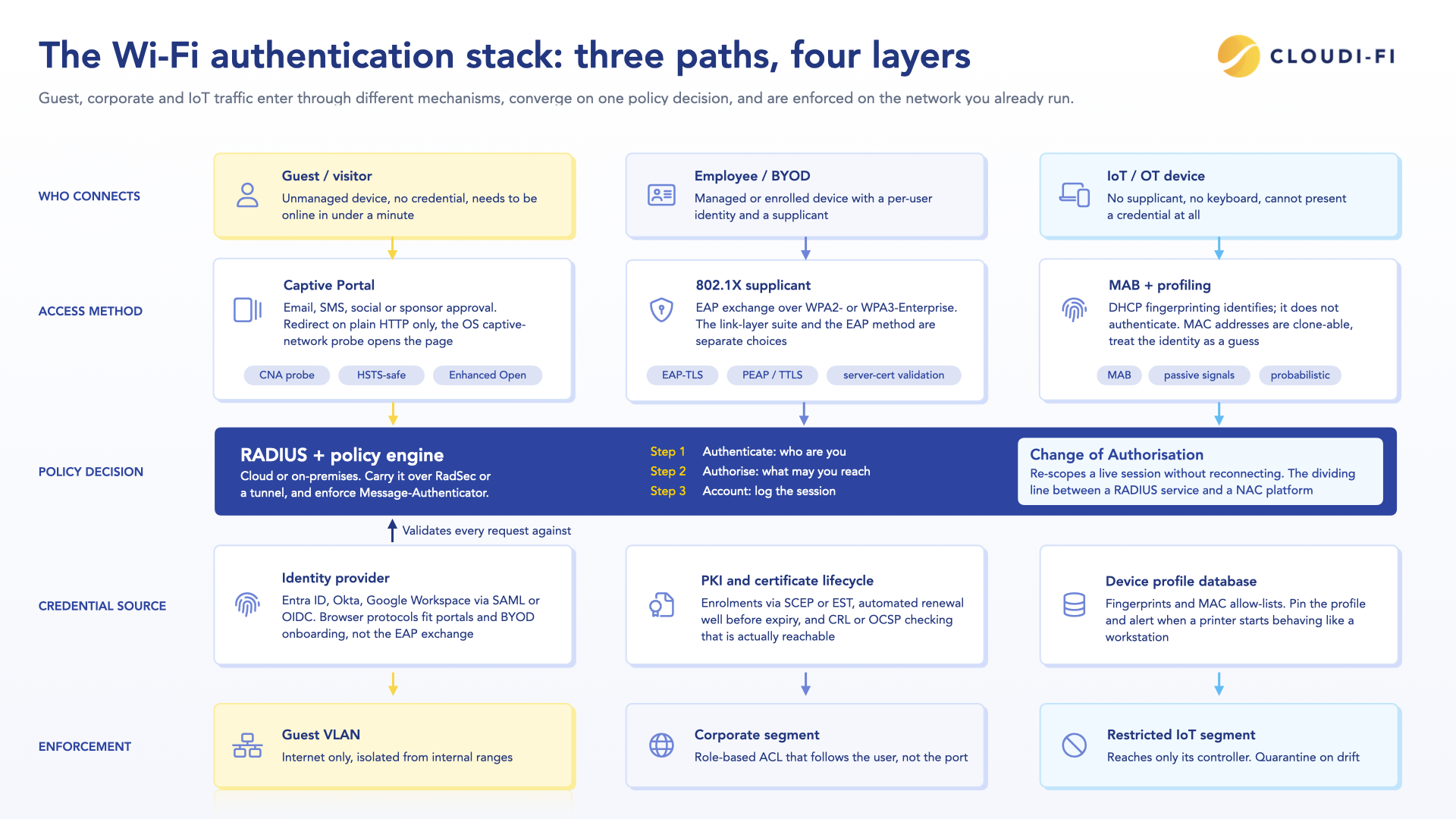
These are layers, not alternatives. A typical enterprise runs four of them at once: an IdP holding identity, a PKI issuing certificates, cloud RADIUS validating 802.1X, and a captive portal for everyone outside that chain. The sections below explain how they fit together.
What are Wi-Fi authentication tools?
Wi-Fi authentication tools verify the identity of users and devices before granting network access. Some rely on a shared password such as WPA2-PSK. Enterprise platforms use 802.1X, on-prem RADIUS, digital certificates, or an identity provider such as Entra ID or Okta.
Think of them as the checkpoint between a device asking to connect and the network deciding whether to let it in. Most tools handle three things:
- Identity verification: Confirms who or what is connecting before access is granted.
- Authorisation: Applies the policy that determines which VLAN, ACL, or segment the session lands in.
- Accounting and logging: Records session data for audits, legal retention requirements, and troubleshooting.
Authentication answers "who are you". Authorization answers "what may you reach". Most deployments that go wrong get the first part right and never design the second.
Why Wi-Fi authentication matters for guest and corporate networks
Without authentication, anyone in range can join the network. That means unauthorized access, lateral movement toward systems that were never meant to be reachable from Wi-Fi, and compliance exposure. Across a multi-site estate, every unsecured access point multiplies the same risk.
Guest and corporate networks pull in different directions. Guests want to be online in under a minute, which caps how much friction you can impose. Corporate users need per-user identity, device trust, and policy that follows the session. The operational challenge is running both from one place without shipping an appliance to every site.
Core Wi-Fi authentication protocols
Two different things get called "Wi-Fi security", and conflating them causes most of the confusion in vendor comparisons.
The first is the link-layer security suite: WPA2, WPA3, and their predecessors. This determines how traffic is encrypted over the air and how keys are derived.
The second is the authentication method: how a user or device proves who it is, which is what 802.1X and EAP handle.
WPA3-Enterprise does not replace EAP-TLS. It runs. Treat the two as separate choices.
Link-layer security suites
WPA2-Enterprise remains the practical default in most estates because client support is universal. WPA3-Enterprise is the right target for new builds, but plans a transition mode: mixed WPA2/WPA3 SSIDs behave inconsistently on older clients, and 802.11w management frame protection, which WPA3 mandates, still breaks a long tail of devices.
Enhanced Open deserves more attention than it gets
An open guest SSID sends traffic in the clear. Anyone within range can read it. Enhanced Open, based on Opportunistic Wireless Encryption, encrypts that traffic without asking the user for anything at all. The user experience is identical to an open network.
It does not authenticate anyone, so it does not replace a captive portal. It removes the passive eavesdropping problem that every open guest network has had for twenty years. If you run guest Wi-Fi and your access points support it, there is no good argument for leaving it off.
Authentication methods
Types of Wi-Fi authentication tools
Cloud captive portals
A captive portal is the browser-based page that appears when someone joins a guest network. Cloud versions support social login, email registration, SMS verification, and sponsor approval without on-premises hardware.
Three mechanics decide whether a portal works well or badly, and vendor datasheets rarely mention them:
Captive Network Assistant behavior
iOS, Android, Windows, and macOS each probe a known URL after association (captive.apple.com, connectivitycheck.gstatic.com, www.msftconnecttest.com, and others). The response to that probe is what triggers the mini-browser popup. Portals that mishandle these probes produce the "connected, no internet" state that generates most guest Wi-Fi helpdesk tickets.
HSTS
Intercepting an HTTPS request to redirect it to a portal breaks the TLS handshake, and any site on the HSTS preload list will refuse to load rather than show a warning the user can click through. Redirect on plain HTTP only, and rely on the OS probe for everything else.
The walled garden
Before a user authenticates, the network has to permit traffic to a specific set of destinations: the portal itself, the identity provider if you federate, whatever CDN serves the portal assets, OCSP or CRL endpoints, and the OS connectivity-check URLs. Everything else stays blocked. Get this list wrong and authentication fails in ways that look like a portal bug.
The recurring problem is that walled gardens are often implemented as IP-based ACLs, while the destinations they need to permit are FQDNs behind CDNs with rotating address pools. An entry that works at deployment breaks weeks later when the provider changes IP ranges. Where the platform supports FQDN-based rules, use them. Where it does not, treat the walled garden as something with a maintenance cycle rather than a one-time configuration, and confirm that SAML or OIDC redirects to your IdP are covered end to end, including any intermediate domains the login flow touches.
Network access control platforms
NAC goes past authentication into enforcement: segmentation, posture checks, device visibility, and dynamic re-authorization through RADIUS Change of Authorization. CoA is the mechanism that lets a policy change take effect on a live session without making the user reconnect, and it is the practical dividing line between a RADIUS service and a NAC platform.
PKI and certificate lifecycle
Certificates remove the shared secret. There is no password to phish, reuse, or crack offline. They do not remove all risk: private keys stored outside a TPM or secure enclave can be extracted, and certificate authority misconfiguration is its own attack class.
The part that determines whether an EAP-TLS project succeeds is the lifecycle, not cryptography:
- Enrolment: SCEP or EST, usually driven by Intune, Jamf, or Workspace ONE. Unmanaged devices need a self-service onboarding flow or they will not get certificates at all.
- Renewal: Certificates expire. If renewal is not automated and does not run well before expiry, you get a synchronized outage across every device issued in the same week.
- Revocation: CRL or OCSP checking has to be enabled on the RADIUS server and actually reachable, or a revoked certificate keeps working.
- Server-side trust: Clients must validate the RADIUS server certificate against a pinned root and expected server name.
Identity providers and SSO
Entra ID, Okta, and Google Workspace hold identity centrally. Integrating Wi-Fi authentication with the IdP through SAML or OIDC means employees connect with the credentials they already use, and deprovisioning in one place removes network access everywhere.
SAML and OIDC are browser protocols — they fit captive portals and BYOD onboarding, but do not carry inside an 802.1X EAP exchange. When a vendor advertises 'SSO for 802.1X', it usually means IdP-driven certificate issuance, not live federation.
Wi-Fi authentication tools for guest networks
Guest networks optimize for low friction and legal compliance rather than deep security integration. Visitors want to connect quickly. You need identity capture and defensible connection records.
Platforms commonly evaluated for guest access:
- Cloudi-Fi: Cloud captive portal that works across existing Cisco, Meraki, Aruba, Fortinet, Ruckus, and other infrastructure, with per-country log retention and data residency handling.
- Cisco Meraki splash pages and Cisco Spaces: Native to Meraki estates, no additional vendor, tied to that infrastructure.
- Aruba ClearPass Guest and Aruba Central guest: Deep policy control, strongest where ClearPass is already deployed.
- Ruckus Cloudpath: Onboarding and guest access with certificate provisioning built in.
- Fortinet FortiGate captive portal: Adequate for single-site or FortiGate-standardized environments.
- Purple, Zenreach, and similar: Marketing and analytics-oriented, with authentication as a secondary function.
- Ucopia and Wifirst: European vendors with established positions in hospitality, healthcare, and public-sector estates, and long-standing handling of EU connection-log obligations.
The differentiator across a multi-country estate is rarely the login screen. It is whether the platform can apply different retention periods, consent language, and data residency per jurisdiction without you deploying something different in each region.
Wi-Fi authentication tools for corporate networks
Corporate authentication covers employees, contractors, and BYOD devices reaching sensitive resources, so per-user identity and audit trails are non-negotiable.
Platforms commonly evaluated for enterprise access:
- Cisco ISE: The deepest policy engine, covering wired and wireless
802.1X, posture assessment, profiling, and TACACS+ device administration. Widely regarded as the heaviest of these platforms to operate, and generally assumes a dedicated team. - Aruba ClearPass: Comparable scope with strong multi-vendor support. Available as an appliance or hosted.
- Juniper Mist Access Assurance: Cloud-native NAC and RADIUS, microservices architecture, strongest inside Mist estates.
- Arista AGNI: Cloud-native NAC with an emphasis on simplified policy and identity integration.
- Portnox Cloud: Cloud RADIUS and NAC aimed at organizations replacing appliances without an ISE-scale operations team.
- SecureW2 JoinNow: Cloud PKI plus RADIUS, focused specifically on getting estates onto EAP-TLS.
- Foxpass and JumpCloud: Lighter cloud RADIUS, typically directory-adjacent and suited to smaller estates.
- Cloudi-Fi: Cloud NAC covering guest, BYOD, and IoT across existing infrastructure, without per-site appliances. Per-country retention and residency built in.
Scope varies widely across that list. Posture assessment, wired 802.1X, and TACACS+ device administration are present in some platforms and absent in others. Map your actual requirements before comparing prices, because the cheapest option is usually the cheapest because it does less.
Authentication for IoT and OT devices
A temperature sensor cannot type a password or accept a certificate prompt. Onboarding unmanaged devices relies on a different model, and it is worth being precise about what that model does and does not provide.
DHCP fingerprinting is identification, not authentication: It infers device type, vendor, and operating system from DHCP option patterns and other passive signals. It is probabilistic, and every signal it reads can be forged by an attacker who cares to.
MAB is the access mechanism, and it is spoofable: A MAC address is broadcast in the clear on every frame. Anyone able to observe the network can clone one.
Neither of these is a reason to avoid them. They are the only option for devices with no supplicant. It is a reason to design around their limits:
- Segment first: Profiled devices belong in a restricted segment that reaches only what they need. Assume the identity may be wrong.
- Pin the profile: Alert when a device that is fingerprinted as a printer starts behaving like a workstation.
- Use dynamic profiling to drive policy: Whitelist, quarantine, or restrict based on identity, with CoA to move a device when its behavior changes.
Cloud profiling engines let this run at scale without a dedicated SSID or on-site appliance per location, which is what makes it workable across a large estate.
How to choose the right Wi-Fi authentication tool
Scalability across sites and devices
Centralized management matters more than raw device count. Ask how policy is pushed to a new site, how long a site takes to bring online, and whether anything has to be configured locally.
Cloud-native versus on-premises
Appliances mean hardware, maintenance, and a refresh cycle at every site. Cloud platforms deploy faster and have a lower total cost of ownership, provided the survivability question above has a real answer.
Integration with existing infrastructure
Vendor lock-in creates long-term costs. Authentication platforms that work across Cisco, Meraki, Aruba, Fortinet, Ruckus, Juniper, and Huawei let you standardize policy without replacing network equipment. Confirm which vendors are supported through native API integration rather than generic RADIUS, because the difference shows up in CoA support, profiling depth, and error handling.
Compliance and data privacy
GDPR is the headline, but the operational detail is per country. Connection log retention periods differ by jurisdiction, several countries require records to stay in-region, and consent language is not uniform. A platform that treats compliance as one global setting will need a workaround in every country that disagrees with it.
Best practices for deploying Wi-Fi authentication
- Map users, devices, and use cases first: Audit who and what connects: employees, guests, contractors, BYOD, IoT, OT. Define the access each group needs before shortlisting tools.
- Separate authentication from authorization in the design: Decide what each identity may reach, not just whether it gets on.
- Secure the RADIUS transport: RadSec or a tunnel. Enforce Message-Authenticator. Confirm supplicant server-certificate validation.
- Plan for the WAN outage: Critical VLAN, cached authentication, and sane reauthentication timers, tested rather than assumed.
- Automate onboarding: Portals for guests, self-service certificate enrolment for BYOD, and profiling for IoT.
- Maintain the walled garden. Treat pre-authentication allow-lists as a living configuration, and re-verify them whenever an IdP, portal, or CDN dependency changes.
- Segment by default: Every profiled or MAB-authorized device lands somewhere restricted.
- Monitor, audit, and review: Real-time visibility into sessions, retained logs that meet local requirements, and a policy review cadence that keeps up with regulation.
Secure every connection with Cloudi-Fi
Most of what makes a multi-country deployment difficult is not the authentication itself. It is running consistent policy across mixed infrastructure, in jurisdictions that disagree about retention, without putting a box in every site.
Cloudi-Fi provides a cloud-native, infrastructure-agnostic platform that unifies authentication for guests, employees, BYOD, and IoT. Policy is defined centrally and enforced on the network equipment you already run, so there is no Cloudi-Fi hardware to deploy at any site. The platform integrates with Cisco, Meraki, Aruba, Fortinet, Ruckus, Juniper, Huawei, and Zscaler, and handles connection log retention and data residency on a per-country basis.
Cloudi-Fi secures guest, employee, BYOD, and IoT access across enterprise environments in 90+ countries.
FAQs about Wi-Fi authentication tools
How do I authenticate users on my Wi-Fi network?
Use a captive portal for guests and 802.1X with RADIUS for corporate users. Cloud platforms deliver both without on-premises hardware at each site, provided RADIUS traffic is carried over RadSec or a tunnel.
What are the main types of Wi-Fi authentication?
Open access, including Enhanced Open which encrypts without a credential; shared passphrase, meaning WPA2-Personal or WPA3-Personal; per-device keys through MPSK; and enterprise authentication using 802.1X with individual credentials or certificates.
Is WPA3 better than WPA2 for enterprise authentication?
WPA3 provides stronger encryption and mandatory management frame protection. It does not change how users authenticate, since WPA3-Enterprise still uses 802.1X and EAP. WPA2-Enterprise with EAP-TLS remains secure and is still the practical default where client support is mixed.
Do enterprise networks still need on-premises RADIUS servers?
Not for the authentication function itself. Many estates keep a small local component for RadSec proxying or offline survivability, which is a different requirement from running a full RADIUS deployment per site.
Is MAC authentication secure?
No. MAC addresses are transmitted in the clear and can be cloned. MAB exists because some devices cannot authenticate any other way. Use it with segmentation and behavioral monitoring rather than treating it as identity.
Can one platform secure both guest and corporate Wi-Fi?
Yes. Unified platforms manage guest portals, corporate 802.1X, BYOD onboarding, and IoT profiling from one console. Check that the corporate side supports the specific EAP methods, transport security, and enforcement points your estate needs, since guest-first platforms vary in depth there.