What is 802.1X protocol?
802.1X is the IEEE standard for port-based network access control. It blocks a device from using a wired port or Wi-Fi connection until the device or its user proves its identity to an authentication server, usually a RADIUS server. Each user or device authenticates individually, so there is no shared password, and every session can receive its own access policy.
The standard was first published in 2001 for Ethernet switches. Today it secures wired LANs, enterprise Wi-Fi through WPA2-Enterprise and WPA3-Enterprise, and it underpins most network access control (NAC), cloud-based or on-premise. It serves as the network access enforcement point in a Zero Trust approach: a device gets no network access until its identity is verified.
Why organizations use 802.1X
A shared Wi-Fi password or an open switch port gives every device the same access. Once that password leaks, anyone can join, and IT has no record of who connected. 802.1X replaces that model with identity-based access:
- Every user or device authenticates with its own credential, such as a certificate or directory account.
- Access policy follows identity. Finance laptops, printers, and contractors can land in different network segments on the same SSID or switch.
- Every connection is logged against a named identity, which supports audits and incident response.
- Revoking one certificate or account removes one device, without changing a password for everyone.
- The same model covers wired, wireless, and remote sites, so policy stays consistent across locations.
The three components of 802.1X
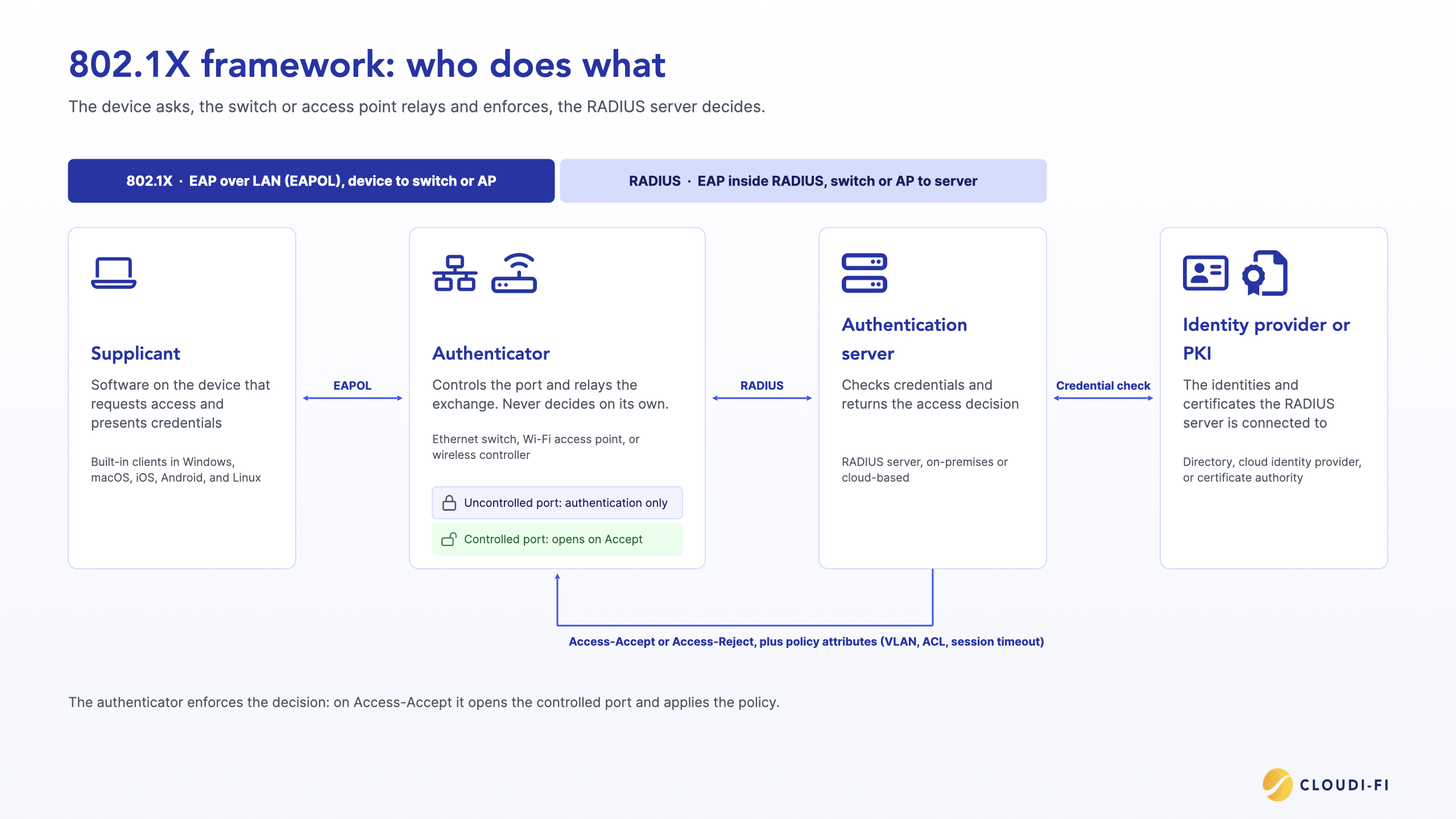
The authenticator never decides on its own. It relays messages between the supplicant and the authentication server, then enforces whatever decision comes back.
How 802.1X authentication works
Until authentication succeeds, the authenticator keeps the port in an unauthorized state. Only authentication traffic can pass. In the standard's terms, that traffic uses the uncontrolled port, while normal traffic waits on the controlled port.
A typical exchange runs in six steps:
- The device connects to a switch port or associates with an access point.
- The authenticator asks for an identity with an EAP-Request/Identity message. The device can also start the exchange itself with EAPOL-Start.
- The supplicant answers with an EAP-Response/Identity, such as a username or certificate name.
- The authenticator wraps the EAP messages in RADIUS Access-Request packets and forwards them to the RADIUS server.
- The supplicant and the server complete the chosen EAP method, for example a mutual certificate check with EAP-TLS, over several Access-Challenge rounds.
- The server returns Access-Accept or Access-Reject. On Access-Accept, the authenticator opens the port and applies any policy the server sent.
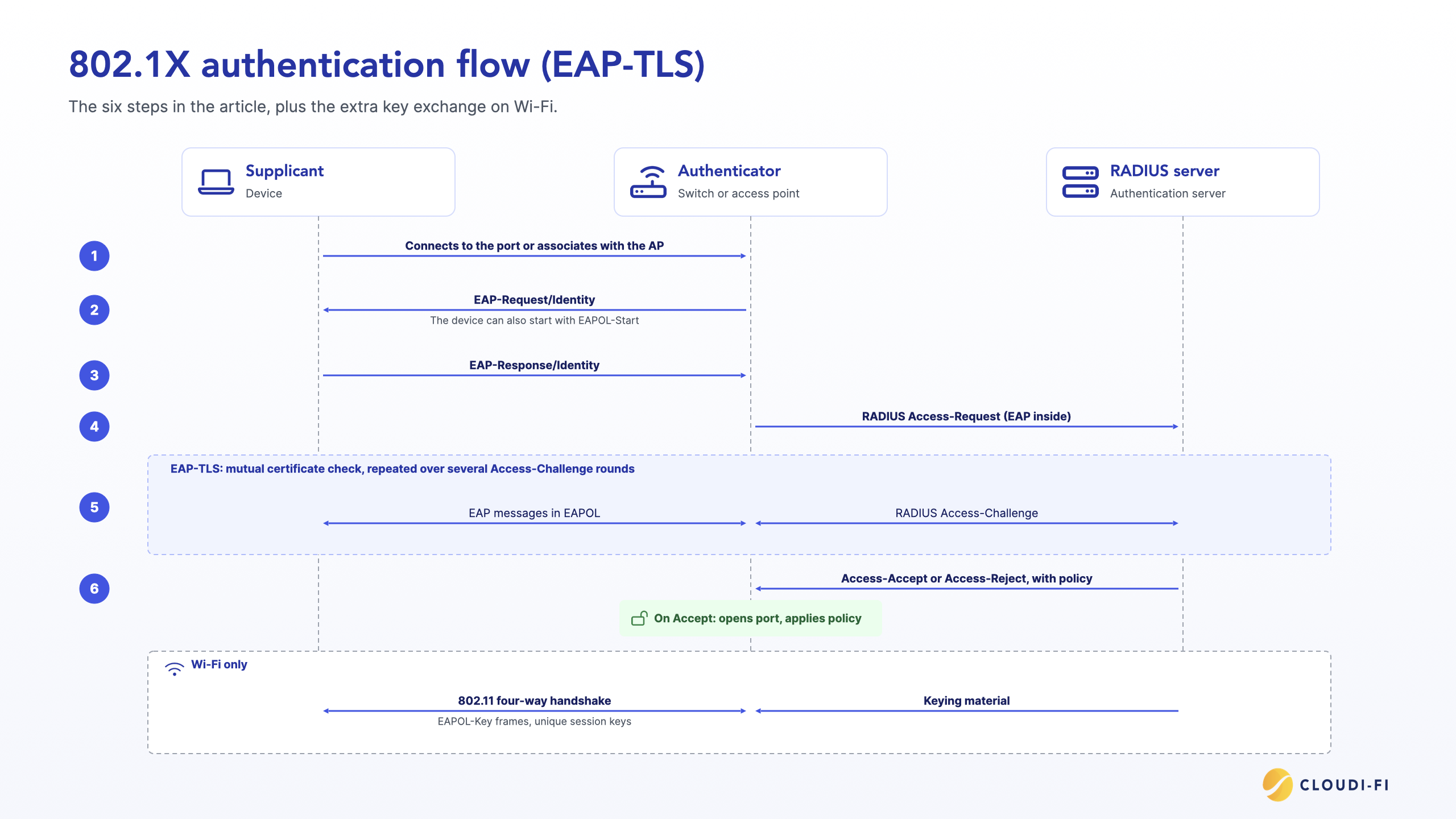
On Wi-Fi, one more step follows. The RADIUS server sends keying material to the access point, and the access point and device run the 802.11 four-way handshake to derive unique encryption keys for that session.
EAPOL frame types
Between the device and the authenticator, EAP messages travel inside EAP over LAN (EAPOL) frames. On Wi-Fi, EAPOL frames are carried in 802.11 data frames. The main EAPOL frame types are:
- EAPOL-Start: the supplicant asks to begin authentication.
- EAPOL-EAP: carries the EAP packets, including the identity request and response.
- EAPOL-Key: carries key exchange messages, including the Wi-Fi four-way handshake.
- EAPOL-Logoff: the supplicant ends the session.
Policy the RADIUS server can return
An Access-Accept can carry RADIUS attributes that tell the authenticator how to treat the session:
- Tunnel-Private-Group-ID, with Tunnel-Type and Tunnel-Medium-Type: assigns a VLAN.
- Filter-Id: applies a named access control list.
- Session-Timeout: limits how long the session lasts before re-authentication.
- Termination-Action: defines what happens when the session ends.
This is how one SSID or switch port can place a managed laptop, a contractor phone, and a printer into different segments. Vendors also add their own attributes, such as downloadable ACLs on Cisco equipment.
802.1X authentication methods
802.1X does not define how a credential is checked. That job belongs to the Extensible Authentication Protocol (EAP) method the supplicant and server agree on. Three methods cover most enterprise deployments:
PEAP is easy to roll out but has a known weakness. If devices do not validate the server certificate, a rogue access point can capture password hashes. Configure every supplicant to trust only your RADIUS server certificate, or move managed devices to EAP-TLS.
For a deeper comparison of certificate and identity-based options, see how to choose an 802.1X authentication method.
802.1X vs PSK vs MAB
Most networks combine more than one access method. The right choice depends on whether the device can run a supplicant.
MAC Authentication Bypass should always land devices in a restricted segment. Pair it with device profiling, such as DHCP fingerprinting, so a spoofed MAC address does not inherit a trusted device's access.
What is the difference between 802.1X and RADIUS?
802.1X and RADIUS work together but do different jobs. 802.1X runs between the device and the switch or access point, and it controls whether the port opens. RADIUS runs between the switch or access point and the authentication server, and it carries the credential check and the access decision.
In short, 802.1X is the gate and RADIUS is the decision behind it. An enterprise 802.1X deployment needs both. The RADIUS server can run on-premises, as with Microsoft Network Policy Server (NPS) or Cisco Identity Services Engine (ISE), or as a cloud RADIUS service.
802.1X on wired and wireless networks
The authentication exchange is the same on both. The differences come after it:
- On a wired switch, a successful authentication opens the physical port. Traffic is not encrypted by 802.1X itself, though MACsec can add link encryption.
- On Wi-Fi, 802.1X is the authentication part of WPA2-Enterprise and WPA3-Enterprise. The four-way handshake then gives each device its own encryption keys, so one user cannot decrypt another's traffic.
- WPA3-Enterprise also requires Protected Management Frames and offers an optional 192-bit mode for high-security environments.
Devices that cannot use 802.1X
Some devices have no supplicant: older printers, badge readers, medical devices, and many IoT sensors. A common pattern assigns each device type its own path:
- Managed laptops and phones: 802.1X with EAP-TLS.
- Printers and IoT devices: MAB, device profiling, and a dedicated VLAN.
- Guests: a captive portal on a separate, isolated network.
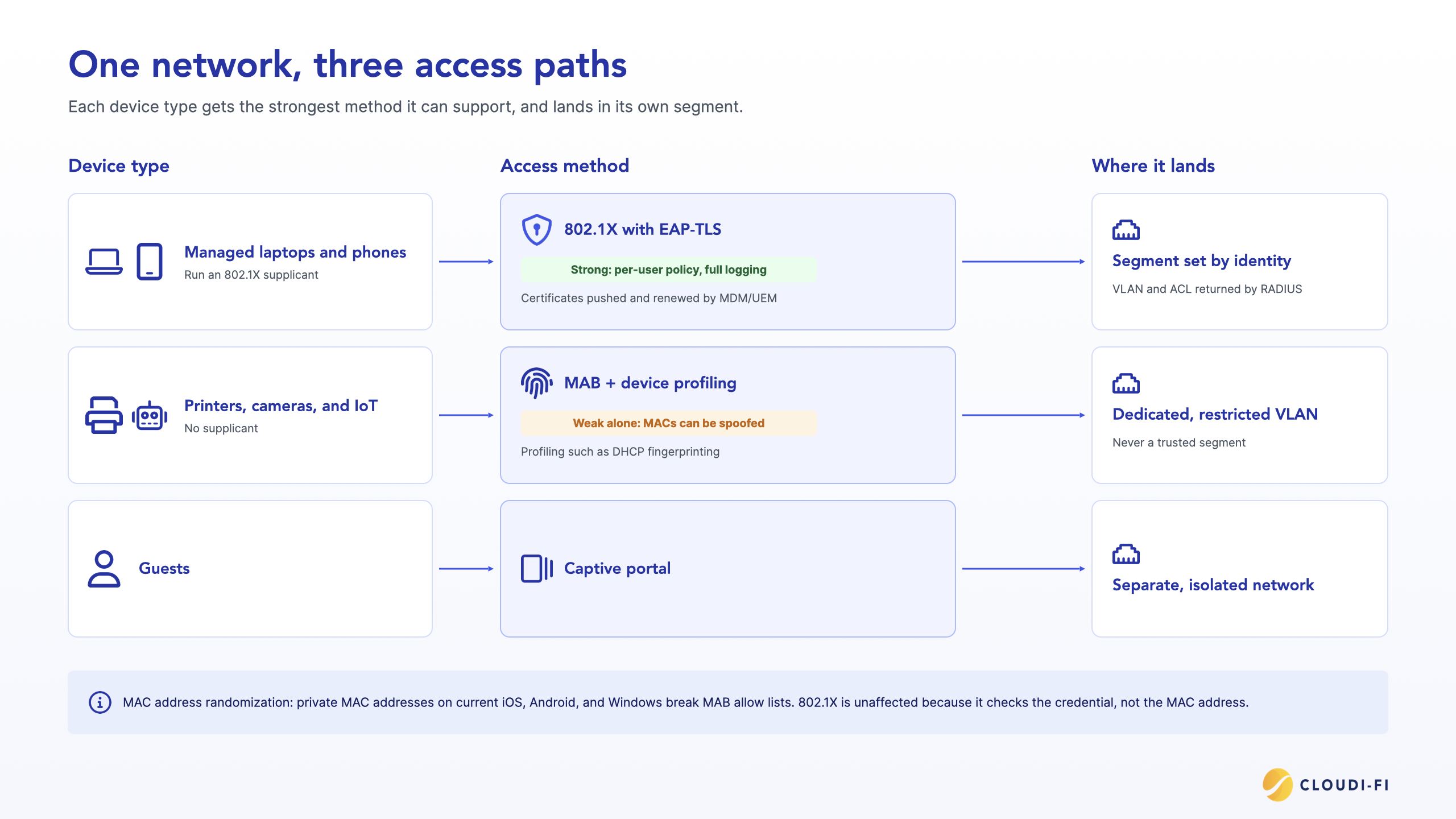
MAC address randomization affects this design. Current iOS, Android, and Windows versions can use a private MAC address per network, which breaks MAB allow lists and MAC-based tracking for personal devices. 802.1X itself is not affected, because it authenticates the credential rather than the MAC address.
Deploying certificates at scale
EAP-TLS is only practical when certificates reach devices automatically. Mobile device management and unified endpoint management (MDM/UEM) platforms such as Microsoft Intune, Jamf, and Workspace ONE push the Wi-Fi profile, request a certificate through SCEP or a certificate connector, and renew it before it expires. They can also withhold the profile from devices that fail compliance checks, such as missing disk encryption. Cloudi-Fi covers this side in its article on PKI and certificate services for cloud NAC.
Moving 802.1X to the cloud
Many organizations still run 802.1X on on-premises RADIUS servers such as Microsoft NPS or Cisco ISE. These servers need hardware, patching, high availability, and a connection to every site. As identity moves to cloud providers such as Microsoft Entra ID and Okta, that on-premises server becomes the last piece tying access control to a data center.
Cloud RADIUS moves the authentication server into a managed service. Access points and switches send requests to the cloud service, which checks certificates or cloud identities and returns the same VLAN and policy attributes. RADIUS over TLS (RadSec) can protect that traffic across the internet.
Cloudi-Fi provides 802.1X with cloud RADIUS, without local RADIUS servers. It supports certificate-based EAP-TLS, identity providers, and RadSec for encrypted RADIUS traffic between sites and the cloud, and it integrates with infrastructure from vendors including Cisco, HPE Aruba Networking, Fortinet, and CommScope Ruckus. Organizations replacing existing servers can follow the Cisco ISE replacement or Microsoft NPS replacement use cases.
Next step
802.1X works best when the authentication server is as available as the network it protects. See how Cloudi-Fi delivers 802.1X without on-premises RADIUS.
FAQ
What is 802.1X in simple terms?
802.1X is a gatekeeper for network ports and Wi-Fi connections. A device must prove who it is to an authentication server before the network lets its traffic through.
Is 802.1X the same as RADIUS?
No. 802.1X controls access between the device and the switch or access point. RADIUS carries the credential check between the switch or access point and the authentication server. Enterprise deployments use both.
Does 802.1X work on wired networks?
Yes. 802.1X was designed for Ethernet switches and still secures wired ports. The same RADIUS server and policies can cover wired and wireless access.
Which 802.1X authentication method is most secure?
EAP-TLS. It uses certificates on both the device and the server, so no password crosses the network and stolen passwords cannot be replayed.
What happens to devices that do not support 802.1X?
They usually connect through MAC Authentication Bypass with device profiling, and land in a restricted VLAN. Guests use a captive portal on a separate network.
Does MAC address randomization affect 802.1X?
Not directly. 802.1X authenticates a credential, not a MAC address. Randomization does affect MAB allow lists and any policy keyed to a MAC address.