Key takeaways
- 802.1X with certificates gives the strongest device identity, but many headless Internet of Things (IoT) devices can't run a supplicant or hold a certificate.
- MAC Authentication Bypass (MAB) works with almost any device, but a media access control (MAC) address is an identifier, not a credential.
- Dynamic Host Configuration Protocol (DHCP) fingerprinting identifies what a device appears to be once it requests an address. It doesn't authenticate the device, but it shows when a device doesn't match the class its MAC address was registered under.
- At scale, authenticate each device with the strongest method it supports, place it in a least-privilege segment, and use fingerprinting to keep the inventory accurate.
Introduction
IoT onboarding is now a daily operational task. IoT Analytics counted 21.1 billion connected IoT devices at the end of 2025, and 45% of those connections were from enterprise devices. Printers, cameras, point-of-sale (POS) terminals, heating, ventilation, and air conditioning (HVAC) sensors, and medical devices join enterprise networks every day.
Most of these devices have no screen and no keyboard, so choosing an onboarding method means matching it to what each device can do. This guide compares the three methods on what each one proves and when it acts, then sets out a layered model for multi-site rollouts.
Why IoT onboarding breaks at scale
Methods built for laptops expect someone at a screen and, usually, a management agent on the device. Headless devices have neither.
The National Institute of Standards and Technology (NIST) addresses this in SP 1800-36. It defines network-layer onboarding as attesting a device's identity and posture before issuing network credentials. NIST also states that providing unique credentials manually "cannot be performed at scale."
The common workaround is a shared password. NIST notes that shared passwords control access only by possession: anyone holding the password gets in, and there is no per-device identity to audit or revoke.
Running hundreds of sites adds its own problems:
- Mixed infrastructure: Each site may run a different Wi-Fi or switch vendor.
- Local appliances: Legacy network access control (NAC) deployments often rely on appliances or RADIUS servers at each site.
- Inconsistent policy: The same device class gets different access depending on location.
This article judges each method on four criteria:
- Identity strength: How confidently the method proves a device is what it claims to be.
- Device coverage: Which share of your device fleet the method can support.
- Operational effort at scale: How much provisioning and upkeep the method needs across many sites.
- When it acts: Before the device gets network access, or after it is already connected.
How each method works
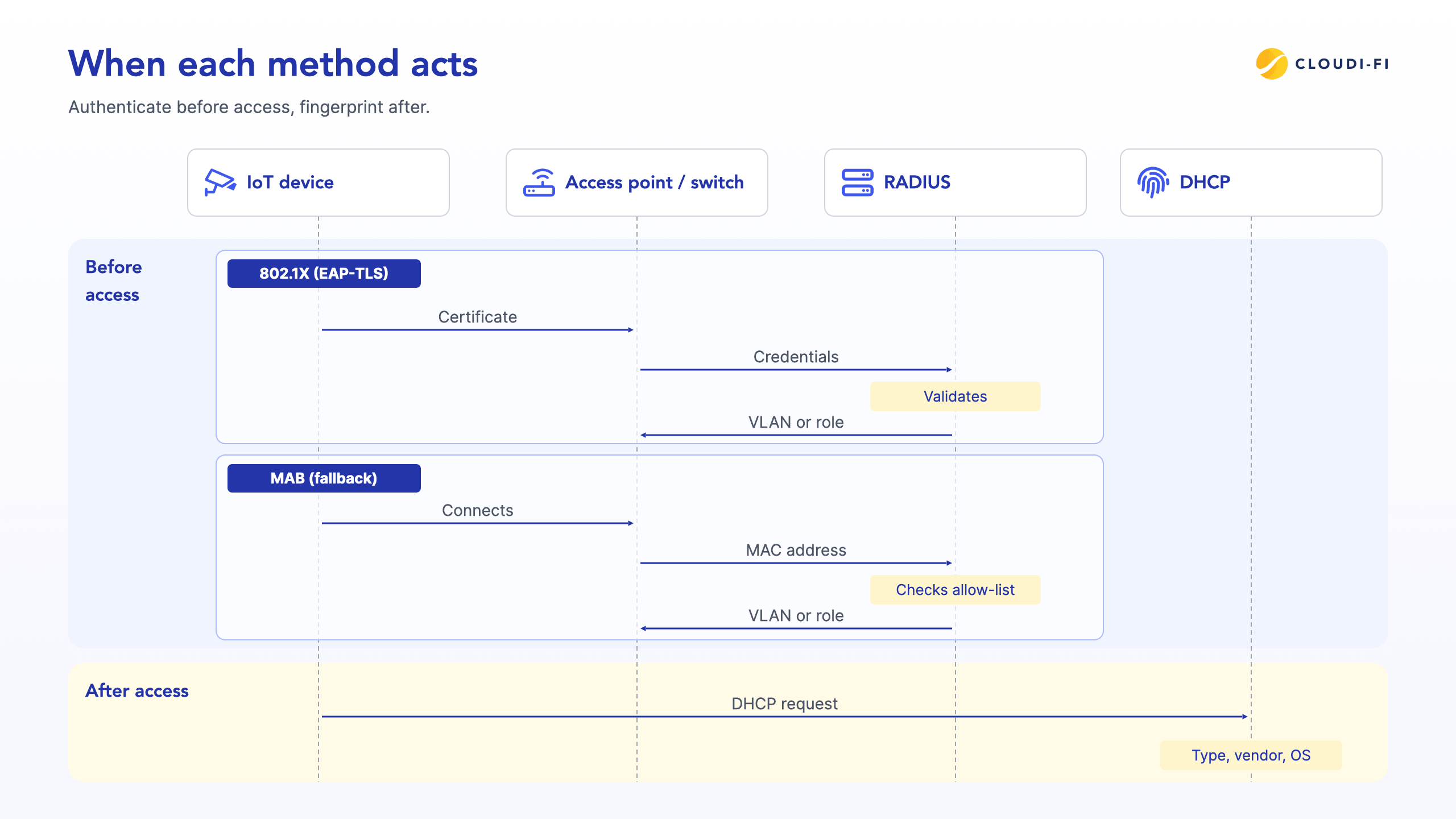
The three methods do different jobs. 802.1X asks the device to prove its identity, MAB checks whether its MAC address is on a list, and DHCP fingerprinting describes what the device appears to be. 802.1X and MAB run before the device gets network access. Fingerprinting runs afterward, when the device asks for an IP address.
802.1X: certificate-based authentication
802.1X is the Institute of Electrical and Electronics Engineers (IEEE) standard for port-based network access control (IEEE 802.1X-2020). It involves three parties: a supplicant on the device, an authenticator (the access point or switch), and an authentication server, usually Remote Authentication Dial-In User Service (RADIUS).
The device presents credentials to the authenticator, which relays them to RADIUS. RADIUS accepts or rejects the connection and can return a role or virtual local area network (VLAN) assignment.
Extensible Authentication Protocol-Transport Layer Security (EAP-TLS) with device certificates is the strongest form of 802.1X. As defined in RFC 5216, it provides certificate-based mutual authentication. Its strengths:
- Cryptographic identity: The device proves possession of a private key bound to its certificate.
- Per-device credentials: Each device gets a unique certificate, in line with NIST guidance on unique credentials.
- Dynamic assignment: RADIUS returns a VLAN or role per device at connection time.
The limit is device capability. EAP-TLS needs a supplicant and certificates from a public key infrastructure (PKI), usually provisioned through mobile device management (MDM). For example, Microsoft Intune can deploy certificates with Simple Certificate Enrollment Protocol (SCEP) profiles, described in the informational RFC 8894. Many IoT devices can't take part: NIST notes that many lack user interfaces, which makes manual credential entry cumbersome.
MAC Authentication Bypass (MAB)
MAB is the fallback for devices that don't answer 802.1X. The switch or access point sends the device's MAC address to RADIUS, which checks it against an allow-list. It works with almost any wired or wireless device and needs nothing configured on the device itself.
The limits come from the MAC address and from how the request travels:
- Spoofing: MAB uses the MAC address as the only identifier. NIST SP 800-97 notes that MAC addresses are not encrypted and that spoofing one is relatively trivial.
- Observability: RFC 9724 notes that passive third parties can observe MAC addresses, and that some identifier-bearing DHCP options also enable tracking.
- Randomization: RFC 9724 also documents that modern devices randomize or change their MAC addresses, sometimes per boot or per network.
- Stale allow-lists: Lists maintained site by site drift out of date as devices move, fail, or get replaced.
- Exposure in transit: MAB requests carry no EAP exchange, so they are the kind of RADIUS flow targeted by the 2024 Blast-RADIUS vulnerability (CVE-2024-3596). Protect them with RADIUS over TLS (RadSec) or, on equipment without RadSec support, the Message-Authenticator attribute.
DHCP fingerprinting
DHCP fingerprinting identifies a device by how it asks for an IP address. A device sends its DHCP request once it is on the network, so fingerprinting happens after 802.1X or MAB has let the device in.
The request typically carries Option 55 (the parameter request list) and Option 60 (the vendor class), which clients may send optionally. Both are defined in RFC 2132, and together they form a fingerprint of the device type and operating system. RFC 7844 states that the option numbers and their order in the parameter request list can be used to fingerprint the client.
What fingerprinting gives you:
- Passive and agentless: It reads traffic the device already sends, with no software to install.
- Broad coverage: It works for every device that requests an IP address.
- Mismatch detection: It shows when a device doesn't match its registered class, such as a "printer" MAC address sending a Linux workstation fingerprint.
A fingerprint identifies a device but doesn't authenticate it. DHCP itself provides no client authentication, and RFC 2131 describes DHCP in its current form as quite insecure. Fingerprints are built from options the client chooses to send, so one device can imitate another. Treat a fingerprint as a strong hint about what a device is, and use it to check access decisions already made rather than to make the first one.
Cloud DHCP fingerprinting is Cloudi-Fi's capability for identifying and classifying unmanaged IoT and operational technology (OT) devices. It fingerprints devices at sites where it serves addresses, with each site relaying its DHCP requests to the cloud service.
DHCP fingerprinting vs MAC auth vs 802.1X: side-by-side comparison
The table compares the three methods against the criteria above. None of them covers every device on its own.
Use three rules to choose:
- Choose 802.1X with EAP-TLS when the device runs a supplicant and you can provision certificates.
- Choose MAB when the device can't run 802.1X, and pair it with a least-privilege segment and fingerprint checks.
- Run DHCP fingerprinting on every network to classify devices once they connect and catch mismatches.
The layered model: authenticate, segment, identify, review
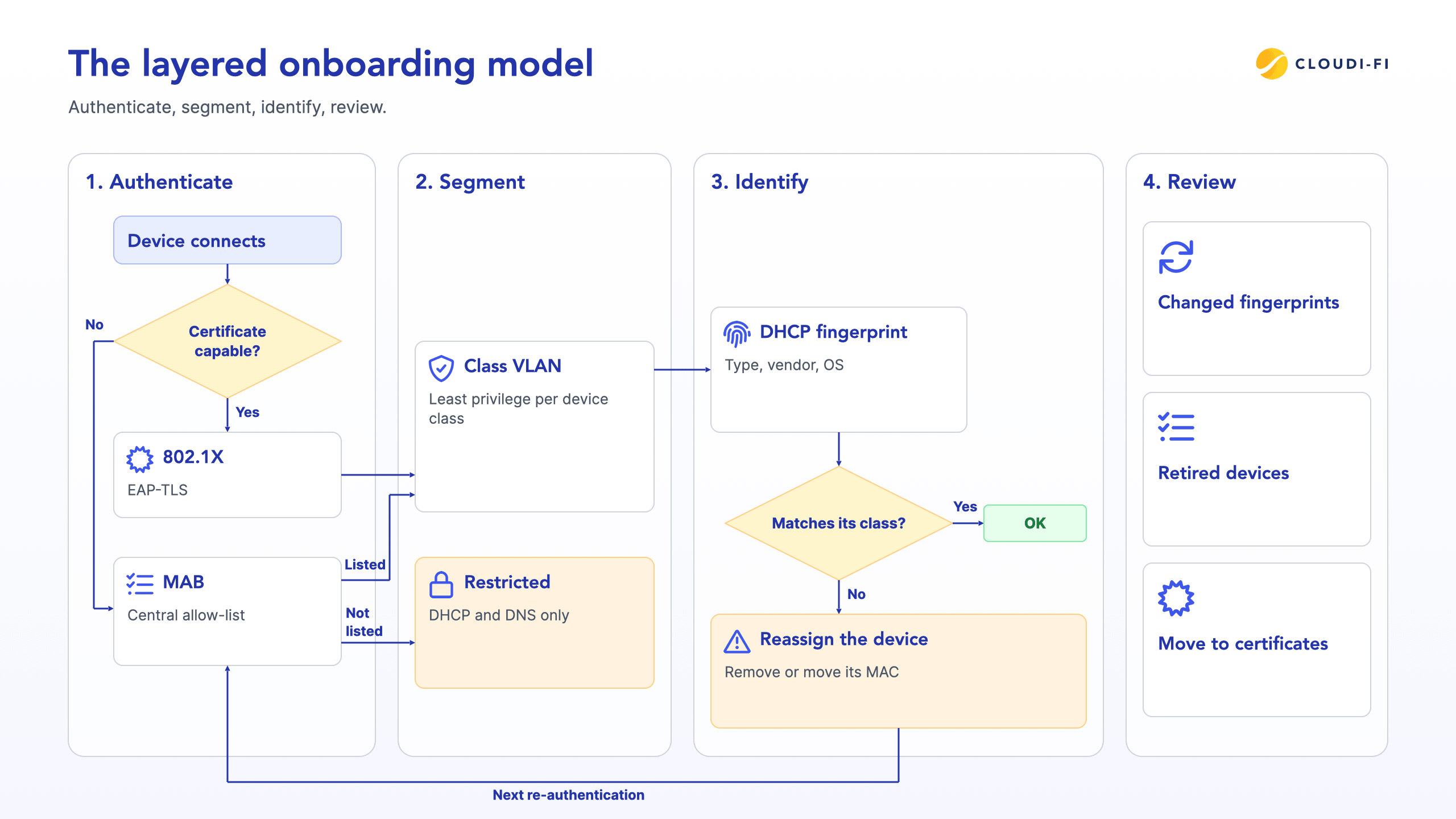
The layered model uses all three methods, in the order a device meets them when it connects.
Step 1: Authenticate with the strongest method the device supports
Use 802.1X with EAP-TLS for devices that run a supplicant and accept certificates. Use MAB for the rest, from one central allow-list grouped by device class rather than separate lists at each site.
Step 2: Assign least-privilege access by device class
At authentication, RADIUS returns a VLAN or role for each device class, so printers reach print servers and cameras reach video storage. Assign access by class, not by location, and deny lateral movement between classes. A spoofed MAC address then gets only the access of the class it imitates.
Where your infrastructure supports it, send MAC addresses that match no allow-list to a restricted onboarding segment that allows only DHCP and DNS. This applies Zero Trust principles to IoT: every device gets only the access its function requires.
Step 3: Identify devices with DHCP fingerprinting
Once a device requests an address, fingerprinting classifies it by type, vendor, and operating system. This builds a live inventory, surfaces shadow devices that no one registered, and gives you a baseline to compare later connections against. Devices with static IP addresses never send a DHCP request, so register those by hand.
Compare each MAB device's fingerprint with the class its MAC address was registered under. A camera MAC address presenting a camera fingerprint is consistent. A camera MAC address presenting a workstation fingerprint is a mismatch to investigate. If you remove the address from the allow-list or move it to another class, the device gets the new access at its next authentication. Set a re-authentication timer on MAB ports so these changes take effect within a known window.
Step 4: Review and re-certify continuously
NIST SP 1800-36 stresses maintaining a secure device posture throughout the device lifecycle.
Review devices whose fingerprint changes, and remove allow-list entries for retired devices. Move devices to certificates as they gain support for them. Cloudi-Fi delivers these layers through Cloud NAC, Cloud DHCP, and Analytics on top of your existing infrastructure vendors.
Best practices for onboarding IoT across many sites
These practices cut risk and effort when you onboard IoT across many sites:
- Don't treat MAB as authentication on its own: Pair it with least-privilege segments and fingerprint checks.
- Plan for MAC randomization: Phones, tablets, and laptops may randomize their MAC addresses, as RFC 9724 documents. Keep them off MAB allow-lists and onboard them with 802.1X or a captive portal.
- Centralize policy, not hardware: Run cloud-native RADIUS and DHCP instead of deploying NAC appliances at each site, and protect RADIUS traffic with RadSec or the Message-Authenticator attribute.
- Start with a pilot device class: Onboard printers or cameras at three sites first, then roll out globally.
- Move capable devices to certificates over time: Align with NIST SP 1800-36 guidance on unique, per-device credentials.
Centralized policy also keeps rules consistent across regions.
How Cloudi-Fi onboards IoT at scale
Cloudi-Fi onboards IoT devices from the cloud, on the switches and access points you already run.
- Cloud NAC: Cloud RADIUS for 802.1X and MAB, replacing legacy on-premises NAC without local RADIUS servers or additional hardware. It supports RadSec and the Message-Authenticator attribute across infrastructure vendors.
- 802.1X with certificates: Authenticates capable devices with certificates issued by the Cloudi-Fi PKI through SCEP via Microsoft Intune, or by the organization's own certificate authority.
- IoT/OT identification: Uses Cloud DHCP fingerprinting to identify and classify unmanaged devices, so each device class can be assigned a role and shadow devices surface.
- Analytics: Shows which devices connect at each site and which policy each one received.
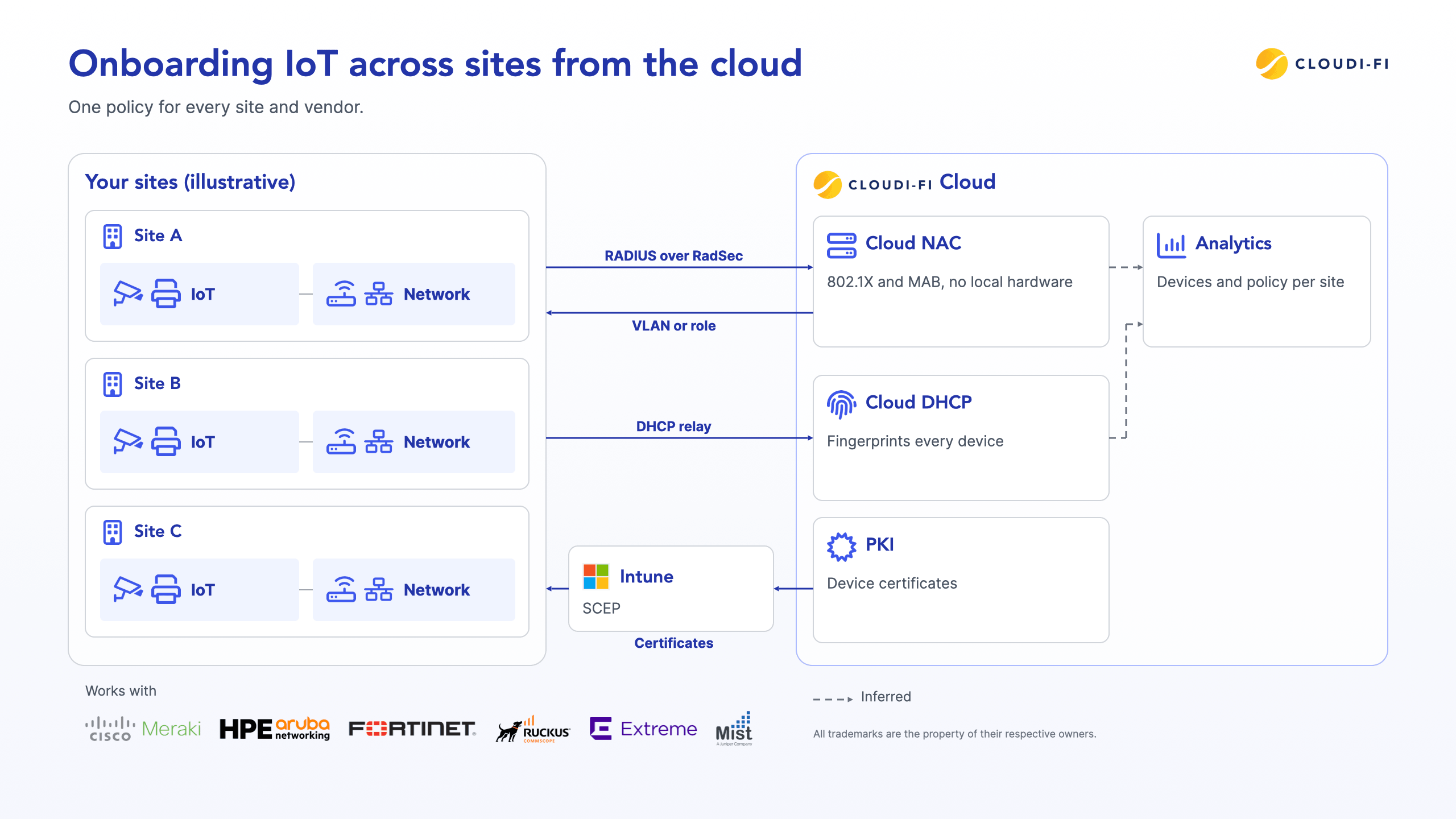
Cloudi-Fi integrates with compatible infrastructure from Cisco Meraki, HPE Aruba Networking, Fortinet, CommScope Ruckus, Extreme Networks, and Juniper Mist. For IoT on Cisco Meraki, Cloudi-Fi documents a dedicated service set identifier (SSID) with MAC-based authentication.
Cloudi-Fi is trusted by 200+ enterprises worldwide. The platform covers 500M+ users and devices and 100K+ secured sites in 90+ countries.
FAQ
What is IoT onboarding?
IoT onboarding is the process of identifying an IoT device, authenticating it, and granting it network access. NIST describes it as attesting identity and posture before issuing network credentials.
Is MAC Authentication Bypass secure enough for IoT devices?
MAB alone is weak because MAC addresses can be spoofed and observed. Pair it with a least-privilege segment and fingerprint checks, and protect RADIUS traffic with RadSec or the Message-Authenticator attribute.
Can IoT devices use 802.1X?
Some can. Devices that run a supplicant and accept certificates can use 802.1X; many headless devices lack the user interface or software to do so.
Does DHCP fingerprinting authenticate a device?
No. It identifies a device's likely type, vendor, and operating system from options the device chooses to send. Use it to classify devices and check MAB decisions, not to grant access.
Can you combine DHCP fingerprinting, MAB, and 802.1X?
Yes. Authenticate each device with 802.1X or MAB, place it in a least-privilege segment by device class, and use DHCP fingerprinting once it is connected to classify it and catch mismatches.
Conclusion
IoT onboarding at scale needs more than one method. Authenticate with 802.1X where devices support it and MAB where they don't, and place each device in a least-privilege segment by class. Then use DHCP fingerprinting to classify the devices that request an address and to catch the ones that don't match their registration. Running these layers from the cloud keeps one policy across every site and vendor.