

NDES (Network Device Enrollment Service) is an AD CS (Active Directory Certificate Services) role that handles SCEP (Simple Certificate Enrollment Protocol) requests. You need it for Intune only when SCEP certificates must come from an on-premises AD CS certificate authority (CA). Microsoft Cloud PKI (public key infrastructure) and PKCS (Public Key Cryptography Standards) certificates remove it.
Two changes make the question urgent in 2026. Cloud PKI licensing changed for Microsoft 365 E5, as the Cloud PKI section below explains. Also, after the September 9, 2025 Windows security update is installed, domain controllers can no longer move back to Compatibility mode.Certificates without strong mapping now fail authentication against Active Directory, including EAP-TLS through NPS.
This guide covers how the Network Device Enrollment Service works with Intune and the three ways to deploy an Intune certificate. It then gives decision criteria and covers the network access side.
What NDES is and how it works with Intune
NDES is a role service of AD CS that acts as a registration authority (RA). It lets devices without domain credentials request certificates from your CA over SCEP. Intune-managed laptops, phones, and tablets fit that description, so the NDES server became the standard bridge between Intune and on-premises PKI.
As an RA, NDES doesn't sign certificates itself. It checks each request and forwards it to the CA, which signs and issues the certificate.
SCEP keeps the private key on the device. The device generates its key pair locally and sends only a certificate signing request (CSR). The private key never leaves the endpoint.
The Intune SCEP enrollment chain runs in five steps:
- Intune pushes a SCEP certificate profile to the device.
- The device generates a key pair and sends a CSR to the NDES URL.
- NDES passes the request to the policy module in the Intune Certificate Connector, which validates it with Intune.
- The CA issues the SCEP certificate.
- The device receives and installs the certificate.
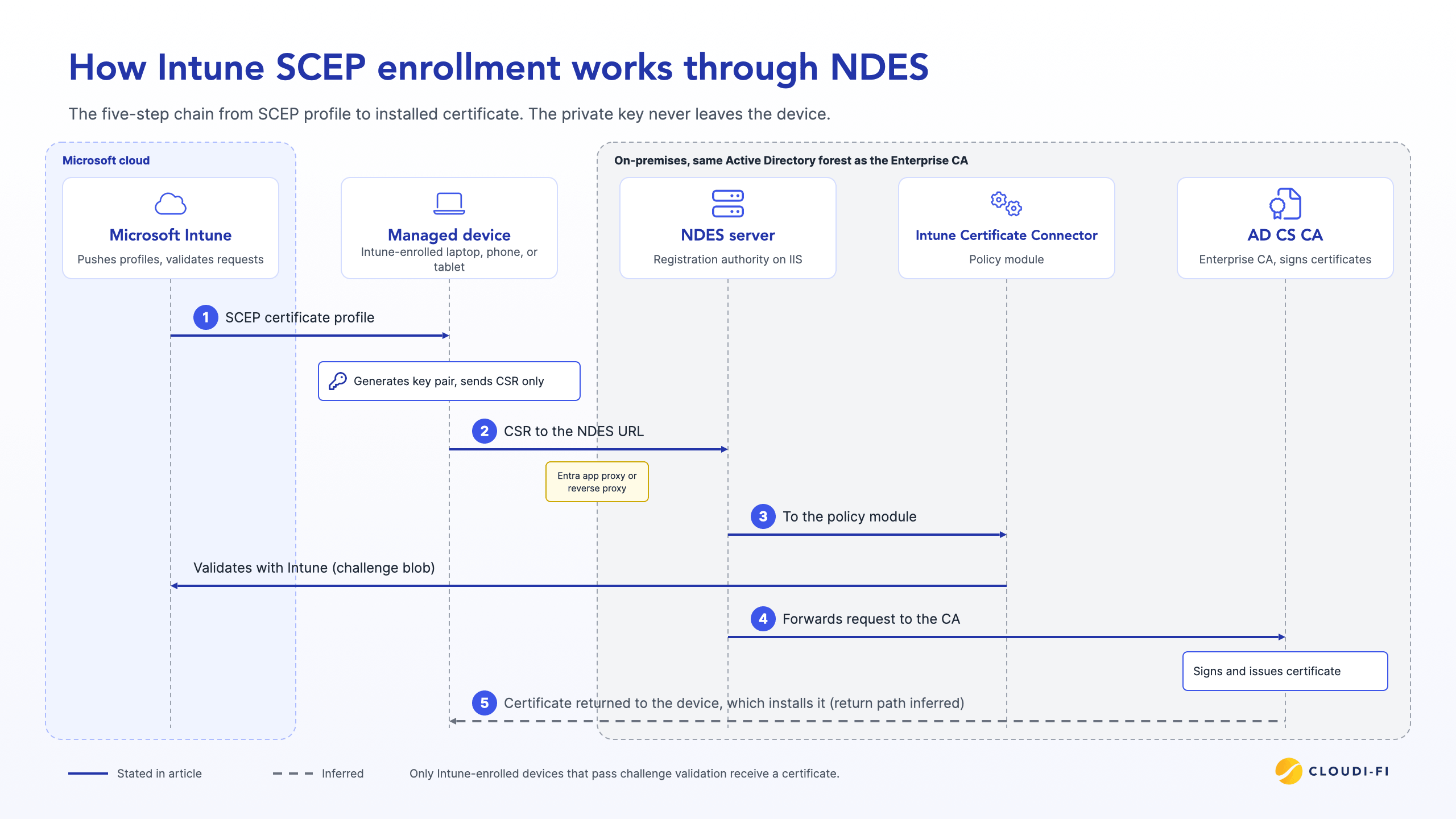
The policy module is what ties NDES to Intune. Per Microsoft's SCEP infrastructure guidance (linked in the requirements below), only requests from an Intune-enrolled device that pass challenge blob validation receive a certificate.
A common use for these certificates is Wi-Fi and VPN (virtual private network) access. Devices present them over 802.1X with EAP-TLS (Extensible Authentication Protocol-Transport Layer Security). A RADIUS (Remote Authentication Dial-In User Service) server validates the certificate at each connection.
Issuing the certificate is only half the job. The network still has to trust and validate it, and that dependency shapes any plan to retire NDES.
What it takes to run NDES
NDES needs dedicated Windows Server infrastructure and ongoing maintenance. Microsoft's requirements include:
- A domain-joined Windows Server running IIS (Internet Information Services)
- The same Active Directory forest as the Enterprise CA
- A host that isn't a domain controller or the CA server
- The Intune Certificate Connector to validate requests against Intune
- Microsoft Entra application proxy, or a reverse proxy with preauthentication set to Passthrough
Preauthentication must stay on Passthrough because SCEP can’t use it. Your NDES URL must stay reachable from the internet for devices to enroll off-network. If the server or proxy goes down, devices can't enroll or renew SCEP certificates.
Admins also maintain RA certificates, certificate templates, and the NDES service account. Each one has its own lifecycle, renewal schedule, and permissions to audit.
Encryption Consulting, a PKI services vendor, names three misconfiguration risks. An internet-exposed NDES endpoint, an over-privileged service account, or a weak template can each lead to unauthorized issuance.
Three ways to deploy Intune certificates in 2026
You have three paths. Cloud PKI removes on-premises issuing infrastructure, PKCS removes NDES but keeps a connector, and NDES keeps everything. Pick based on where your CA must live and which devices need certificates.
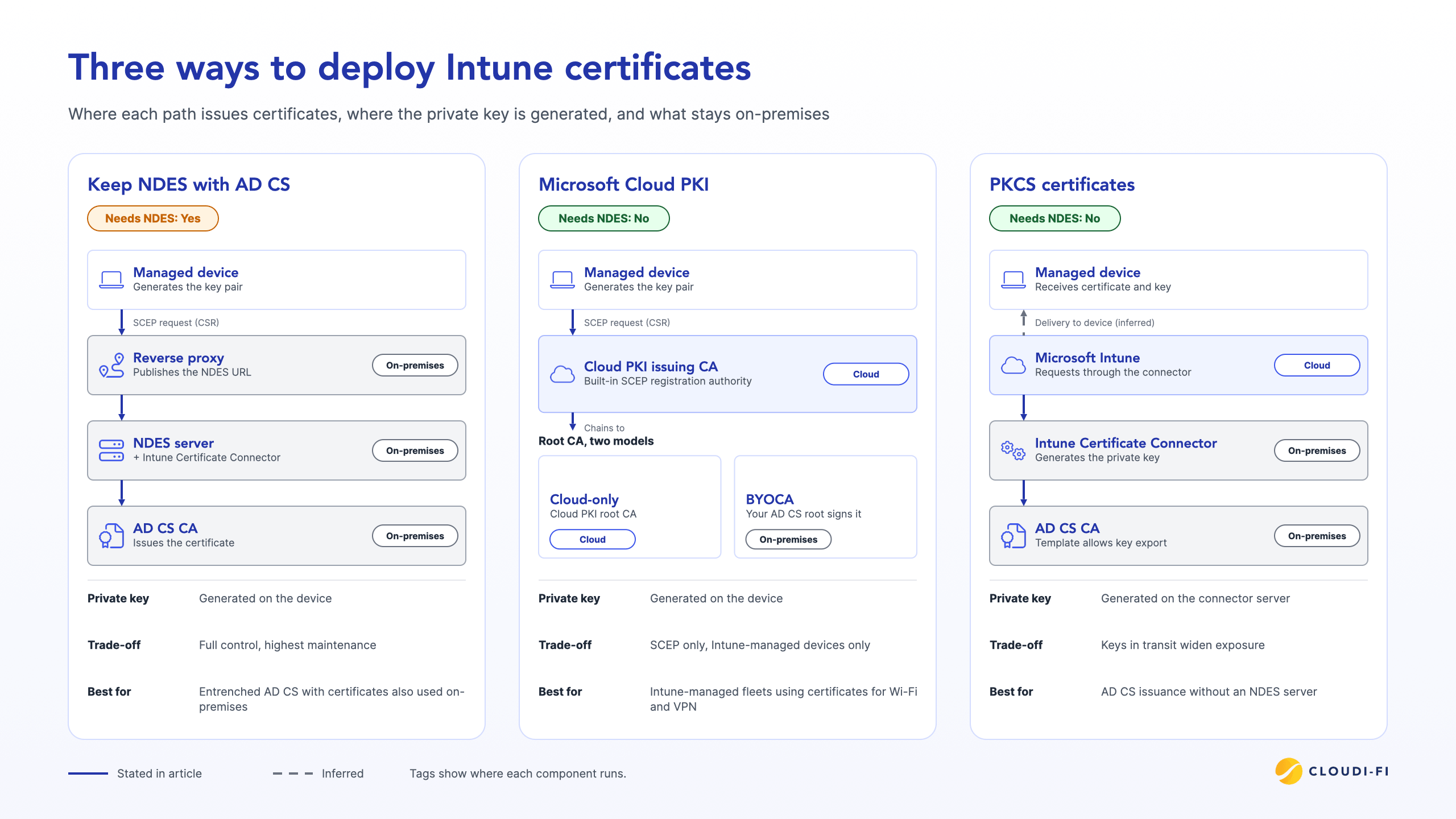
Keep NDES with AD CS
Keep NDES when AD CS is entrenched and the same certificates serve on-premises resources. This path changes the least, but it carries the full operational load.
Strong mapping is the main requirement to handle, and it applies to every path, PKCS and Cloud PKI included, whenever certificates authenticate to Active Directory.. KB5014754 (May 2022) added the security identifier (SID) to certificates for strong mapping.
Microsoft's SCEP guidance states that new or renewed Intune SCEP certificates for iOS/iPadOS, macOS, and Windows include the SID. It appears as a subject alternative name (SAN) tag: URL=tag:microsoft.com,2022-09-14:sid:<value>.
To get this tag, add the {{OnPremisesSecurityIdentifier}} variable as a URI SAN in your SCEP profile.
Microsoft MVP Richard Hicks explains that Intune certificates didn't embed the SID because Intune requires offline templates. He notes that the October 2024 Intune update addressed this limitation.
Confirm your SCEP profiles and active certificates include the SID tag, and renew older certificates issued before the update. You also own patching, high availability, and proxy maintenance for every NDES server.
Move to Microsoft Cloud PKI (cloud-only or BYOCA)
Microsoft Cloud PKI is the main NDES alternative for Intune-managed devices. Microsoft describes it as a dedicated PKI "without requiring any on-premises servers, connectors, or hardware." It handles issuance, renewal, and revocation for all Intune-supported platforms (Windows, MacOS, iOS/iPadOS and Android) .
Each issuing CA includes a built-in SCEP registration authority. Devices still enroll over SCEP, but no NDES server or connector sits in the path.
Intune Cloud PKI offers two deployment models:
- Cloud-only: Cloud PKI hosts both the root CA and the issuing CA in the Microsoft cloud.
- BYOCA (Bring Your Own CA): The Cloud PKI issuing CA anchors to a private CA such as AD CS, which signs its CSR.
BYOCA keeps your existing trust chain. Devices and RADIUS servers that already trust your AD CS root can trust the new issuing CA.
Licensing changed in 2026. Since July 2026, Microsoft 365 E5 includes Cloud PKI, along with other advanced Intune capabilities, per the Microsoft Intune pricing page. Microsoft 365 E3 gains a smaller set of these capabilities. Outside E5, Cloud PKI remains available as an add-on.”
Plan around two limits in Microsoft's Cloud PKI overview, linked above:
- Protocol: Cloud PKI issues certificates over SCEP only.
- Device scope: Cloud PKI covers Intune-enrolled devices only.
Use PKCS certificates
PKCS removes NDES but not on-premises infrastructure. Intune PKCS certificates flow through the Intune Certificate Connector, which still runs on-premises alongside AD CS.
Key handling is the main difference in SCEP vs PKCS. With SCEP, the device generates the private key. Microsoft's PKCS profile documentation states that with PKCS, the connector server generates the private key instead.
That model requires certificate templates that allow private key export. Keys in transit widen exposure compared with on-device generation.
The same page scopes strong mapping for PKCS. It applies to user certificates on all platforms and to device certificates on Microsoft Entra hybrid-joined Windows devices.
Choose PKCS when you need AD CS issuance, can't adopt Cloud PKI, and want to retire the NDES server and its published URL.
How to decide whether you still need NDES
Start from certificate consumers, not servers. List every device and service that enrolls through NDES today, then match each one to a path.
Mixed estates are common. The Encryption Consulting guide cited above describes an enterprise that uses NDES with Intune for device certificates. It pairs that with ACME (Automatic Certificate Management Environment) for container workloads and AD CS auto-enrollment for internal servers.
Keep NDES if:
- SCEP certificates (on-device keys) must be issued directly by AD CS and your security team hasn't approved BYOCA
- Non-Intune devices, such as network gear, enroll through NDES
- The same certificates authenticate to on-premises resources beyond Wi-Fi and VPN
Retire NDES if:
- Your devices are Intune-managed
- Certificates mainly serve Wi-Fi and VPN authentication
- Your licensing covers Cloud PKI through E5 or an add-on
Avoid these common pitfalls:
- Premature cutover: Removing NDES before your RADIUS server trusts the new CA chain. Devices with new certificates then fail 802.1X authentication.
- Forgotten SCEP clients: Missing network devices and other non-Intune clients that still enroll through NDES. They lose renewal when NDES goes away.
- Strong mapping gaps: Overlooking user certificates, and device certificates on hybrid-joined Windows devices that lack the SID tag.. Their certificate authentication to Active Directory fails.
- Lifetime overlap: Ignoring old and new certificates coexisting during migration. Define which certificate each Wi-Fi and VPN profile selects.
Run the migration in this order:
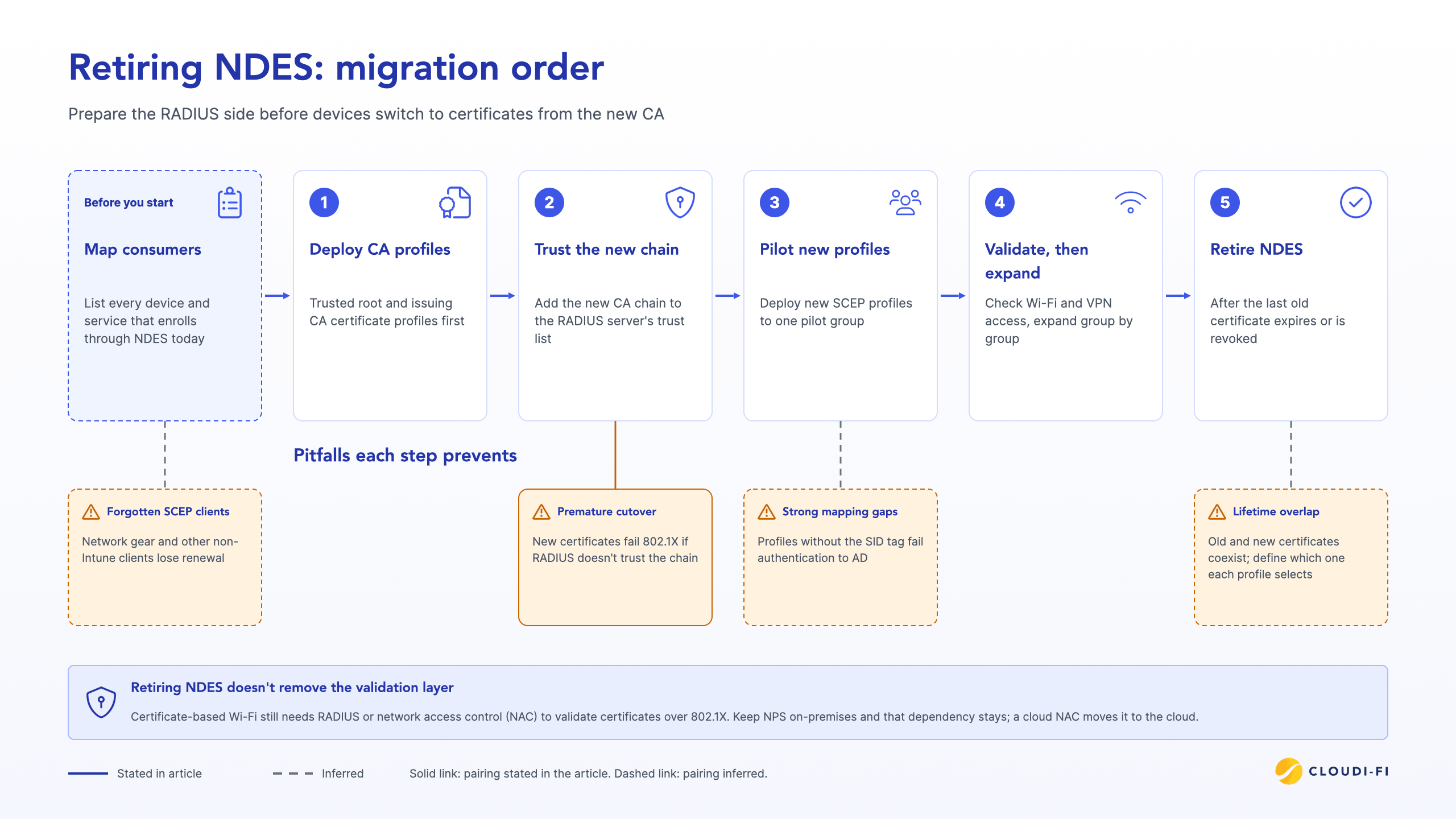
- Deploy the trusted root and issuing CA certificate profiles first.
- Add the new CA chain to your RADIUS server's trust list.
- Deploy new SCEP profiles to one pilot group.
- Validate Wi-Fi and VPN access, then expand group by group.
- Retire NDES after the last old certificate expires or is revoked.
Don't forget the network side of certificate-based access
Cloud PKI issues certificates, but a RADIUS or network access control (NAC) layer still has to validate them for 802.1X Wi-Fi. Retiring NDES alone doesn't remove that layer.
Teams that run Microsoft Network Policy Server (NPS) on Windows Server next to NDES face this directly. Retire NDES and keep NPS, and the on-premises dependency stays.
From legacy Microsoft NPS to cloud-native NAC
NIST SP 800-207 describes Zero Trust as replacing implicit network-location trust with per-request decisions. The device certificate is the identity behind each decision, so validation matters as much as issuance.
Cloudi-Fi moves the validation layer to the cloud:
- Cloud NAC: Cloud-based network access control without local RADIUS or additional hardware. It connects to your identity provider to support a Zero Trust approach to Wi-Fi and LAN access.
- Integrated cloud PKI: Built-in certificate services for EAP-TLS. You don't run a separate on-premises PKI for Wi-Fi authentication.
- IoT/OT onboarding: Cloud DHCP fingerprinting classifies and onboards Internet of Thins and Operational Technology (IoT/OT) devices that can’t hold certificates, so you can apply access policies to them.
Our article on PKI built into Cloud NAC covers the built-in versus bolt-on trade-off in detail. Cloudi-Fi is trusted by 200+ enterprises worldwide, across 90+ countries and 100K+ secured sites.
Conclusion
NDES still works. You still need it for AD CS-backed SCEP certificates and for non-Intune SCEP clients.
For Intune-managed fleets that use certificates for Wi-Fi and VPN, NDES is optional in 2026. Cloud PKI and PKCS both issue Intune certificates without it, and Cloud PKI removes the on-premises connector too.
Your next step: map every certificate consumer, then pick a path. Plan the RADIUS side at the same time, so retiring NDES removes on-premises infrastructure instead of leaving part of it behind.
Get a quote
FAQ
Is NDES deprecated?
No. NDES remains a supported AD CS role service in Windows Server 2016 through 2025. For Intune, Microsoft Cloud PKI offers an alternative that replaces NDES and the Intune Certificate Connector.
Can Microsoft Cloud PKI replace NDES completely?
For Intune-managed devices, yes. Cloud PKI doesn't cover non-Intune devices, so those still need NDES or another issuance path.
Does strong certificate mapping affect Intune SCEP certificates?
Yes, when the certificates authenticate to Active Directory. Check that your SCEP profiles and certificates carry the SID tag described in the AD CS section above.
Do I still need a RADIUS server if I drop NDES?
Yes. Something must validate certificates for 802.1X Wi-Fi, but that layer can be a cloud-based RADIUS or NAC service instead of an on-premises server.