.webp)
Enterprise networks no longer hold a fixed set of managed laptops. Corporate endpoints, guests, bring-your-own-device (BYOD) clients, and agentless Internet of Things / operational technology (IoT/OT) gear share the same Wi-Fi and wired segments. You cannot segment traffic or apply Zero Trust Network Access (ZTNA) context to devices you cannot classify.
DHCP fingerprinting turns the IP lease exchange into passive device classification. This guide defines how fingerprints form, walks a step-by-step identify-everything playbook, covers hard limits, and shows how cloud-native profiling scales across multi-site estates. For deeper NAC access-sequence context, see our companion piece on DHCP device profiling.
What is DHCP fingerprinting?
DHCP fingerprinting is the passive classification of a device’s type, operating system family, or vendor class by inspecting Dynamic Host Configuration Protocol (DHCP) client messages—especially Discover and Request—without installing an endpoint agent. The client already advertises how it wants to join the network. Fingerprinting reads that behavior and matches it to known patterns.
That is different from inventory methods that only store a MAC address or hostname. A MAC Organizationally Unique Identifier (OUI) can suggest a manufacturer when the address is stable. A hostname may be blank, generic, or spoofed. A DHCP fingerprint captures the combination and order of configuration options the client requests, plus optional vendor strings. The result is a device class hypothesis, not a cryptographic identity.
In practice, a fingerprint is a pattern: which options appear, in what order, and which vendor class strings accompany them. A fingerprint database maps that pattern to a class such as Windows workstation, VoIP phone, printer, or camera family. Primary uses include asset inventory, unknown-device detection, client-class or IP policy at the DHCP layer, and input to network access control (NAC) segmentation.
Treat the output as a classification signal. It informs policy. It does not replace 802.1X certificates, Security Assertion Markup Language (SAML) user identity, or posture checks when those controls are available.
The signals inside a DHCP exchange
Several fields inside the DHCP exchange carry identification value.
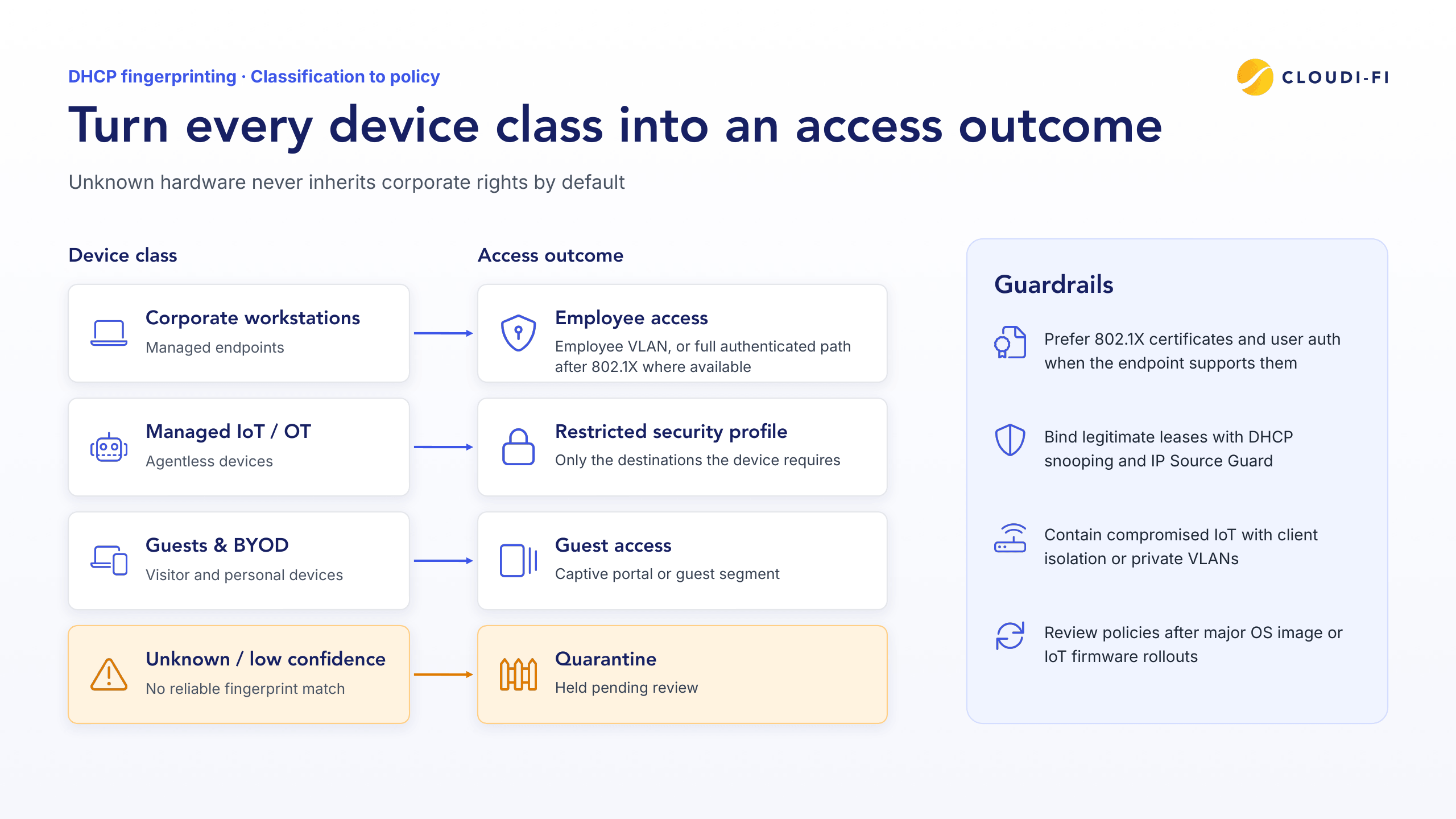
Option 55 — Parameter Request List (PRL): Defined in RFC 2132, Option 55 lists the configuration parameters the client wants from the server. Clients may order codes by preference. Different implementations request different sets and sequences. RFC 7844 documents that PRL content and ordering can enable OS and client fingerprinting—and defines anonymity profiles that intentionally reduce that surface. Option 55 is the strongest common discriminant in enterprise deployments.
Option 60 — Vendor Class Identifier: Also defined in RFC 2132, Option 60 lets the client declare vendor or product class information. Many IoT devices, phones, and printers populate a vendor- or model-specific string. Not every device sends Option 60, so use it as a supporting signal rather than a standalone key.
Supporting attributes: Hostname (Option 12), client identifier, MAC/OUI, and message type (Discover versus Request) add context. Some environments also see Option 77 (user class). DHCPv6 has parallel option concepts; the identification logic is the same idea at a high level.
Public operational examples show the pattern clearly. Enterprise DDI fingerprint detection publishes Windows Kernel-style Option 55 sequences such as 1,15,3,6,44,46,47,31,33,249,43 as OS-family signatures, not single-device uniques. IPAM walkthroughs of multi-device PRL patterns show distinct combinations across VoIP, Linux, printer, Windows, and iOS clients used for client-class IP assignment. Shared stacks mean many devices will map to the same class.
Why “every device” is hard, and what complete identification requires
“Identify every device” is an operations claim, not a single packet feature. Coverage fails in predictable places.
Blind spots: Devices with static IPs may never run DHCP. Long leases delay renewal visibility after the first join. VLANs without DHCP relay or helper paths never reach the profiler. Middleboxes that rewrite or mask Options 55 and 60 break matching—the same Infoblox NIOS guidance cited above notes fingerprinting cannot succeed when firewall rules modify those options.
Unstable keys: Modern clients randomize MAC addresses for privacy. RFC 9724 surveys randomized and changing MACs (per-use and per-network patterns). OUI matching still helps when a stable hardware address is present, but long-term inventory cannot hang on MAC alone.
Ambiguous stacks: Many embedded IoT/OT devices share generic Linux or RTOS DHCP clients. Matches land on broad “IoT/Linux” classes with lower confidence until you add vendor strings, traffic behavior, or custom fingerprints.
Completeness checklist: Observe DHCP client messages on every segment that matters. Maintain and update the fingerprint database. Score confidence on every match. Define handling for unknowns. Corroborate with other signals. Bind device class to access policy. Skip any step and “every device” becomes a partial inventory with silent gaps—especially across multi-site enterprises.
How to identify every device with DHCP fingerprinting (step-by-step)
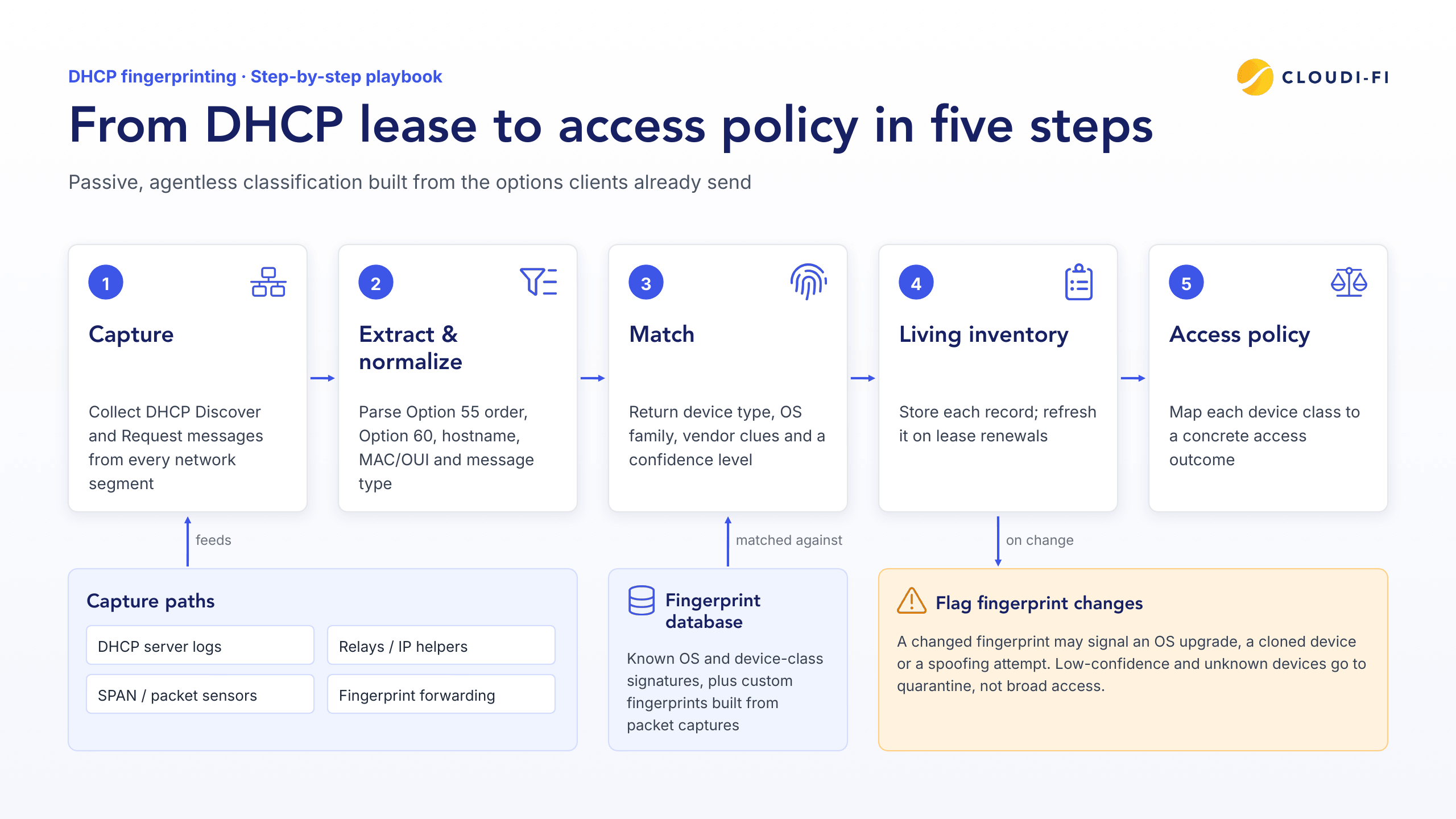
1. Capture DHCP traffic from every network segment
Fingerprinting only works where you can see the client Discover and Request. Capture paths include DHCP server logs, IP helpers and DHCP relays, SPAN or packet sensors, and fingerprint-forwarding features that mirror option sets to a profiler (relay and local-server paths appear in multi-vendor network OS docs).
Guest, corporate, IoT, and remote-site VLANs all need a path. Multi-site estates should centralize collection so a branch without local analysis does not create a silent inventory hole. If a segment never forwards client options to the fingerprint engine, that segment is invisible regardless of how good the database is.
2. Extract and normalize fingerprint attributes
Parse Option 55 order and membership, Option 60 strings, hostname, MAC/OUI when available, and message type. Normalize formats so the same sequence always hashes the same way across appliances and sites.
Store first seen, last seen, VLAN or SSID, and switch or access point identity when the infrastructure provides them. Normalization turns raw packets into comparable records. Without it, the same device class looks like many one-off fingerprints.
3. Match against a maintained fingerprint database
Compare normalized attributes to known OS and device-class signatures. When the library misses a fleet device, build a custom fingerprint from a packet capture of Option 55 and, if needed, Option 60—standard practice in access-control platforms that allow admin-defined fingerprints.
Every match should return device type, OS family, vendor clues, and a confidence level. Low, medium, and high scores reflect how differentiated the pattern is from neighboring classes. Low confidence is still useful: it drives quarantine policy instead of broad access. Cloudi-Fi documents this pattern when binding matches to security profiles for IoT onboarding.
4. Build a living device inventory
Record MAC when stable, IP, hostname, class, vendor, confidence, location, first/last seen, and associated user if 802.1X later binds identity to the session. Refresh records on lease renewals. Flag fingerprint changes—possible OS upgrade, device clone, or spoof attempt.
A living inventory answers operational questions: what joined overnight, which sites host unknown classes, and which cameras still sit in quarantine. Static spreadsheets lag the network within hours.
5. Turn classification into access policy
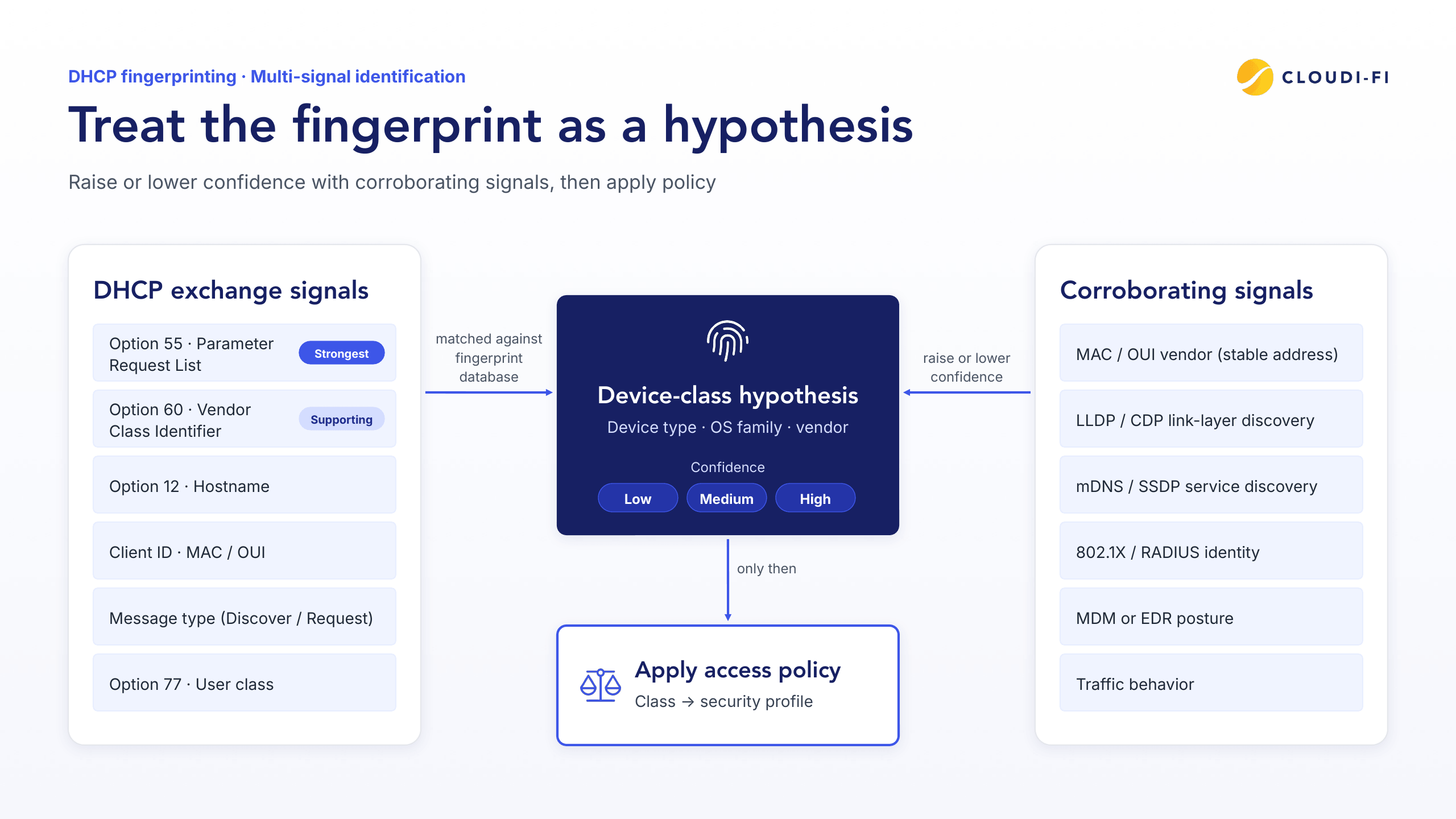
Map classes to concrete outcomes:
- Corporate workstations → employee VLAN or full authenticated path after 802.1X where available
- Managed IoT/OT → restricted security profile (only required destinations)
- Guests and BYOD → captive portal or guest segment
- Unknown or low-confidence → quarantine pending review
DDI platforms enforce some of this at lease time with fingerprint filters that grant or deny ranges by class. Security platforms bind profiles to addressing and firewall source-IP policy after classification. Prefer stronger identity—802.1X certificates and user authentication—whenever the endpoint supports it. DHCP fingerprinting fills the agentless gap for devices that cannot run agents or present interactive credentials.
Cloud-native designs apply the same profile logic without a dedicated IoT SSID: fingerprint, assign profile, enforce least privilege via IoT fingerprinting and IoT network segmentation. Whitelist, quarantine, and blacklist-style outcomes keep unknown hardware from inheriting corporate rights by default.
Corroborate DHCP fingerprints with other device signals
DHCP is a strong signal. It is rarely the only useful one. Research on public Wi-Fi identifiers ranks MAC prefix, DHCP Options 12/60/77, and other broadcast protocols among informative fields—and shows identifiers are often incomplete alone.
OUI and MAC vendor still help when randomization is off or a stable hardware address is used on enterprise SSIDs.
Link-layer discovery (LLDP/CDP) and local service discovery (mDNS, SSDP, and similar broadcasts) reveal printers, media devices, and infrastructure gear that advertise services after join.
802.1X/RADIUS identity and mobile device management (MDM) or endpoint detection and response (EDR) posture classify managed endpoints with higher assurance than DHCP alone.
Traffic behavior separates look-alike embedded devices that share a generic DHCP client but talk to different controllers or cloud endpoints.
Decision rule: treat the DHCP fingerprint as the hypothesis. Raise or lower confidence with corroborating signals. Only then apply policy. That multi-signal loop is how “identify every device” stays honest when stacks collide or clients minimize fingerprint surfaces.
Best practices and limitations
Treat fingerprints as context, not proof
Option values are self-reported. A hostile client can spoof Option 55, Option 60, or MAC fields to impersonate a trusted class. Privacy-aware clients can also minimize the PRL under anonymity profiles described in RFC 7844, which reduces fingerprintability by design.
Pair classification with infrastructure controls: DHCP snooping and IP Source Guard to bind legitimate leases, plus client isolation or private VLANs so compromised IoT cannot freely pivot. Fingerprints guide policy. Wire-level validation limits impersonation.
Design for MAC randomization and low-confidence matches
Do not key long-term inventory solely on MAC. Prefer composite keys: fingerprint class, hostname when stable, certificate identity when present, and location or port history.
Send unknown and low-confidence devices to quarantine or a restricted profile, not broad access. Keep fingerprint libraries current as OS images change. Add custom rules for critical IoT fleets your default database does not cover. Confidence scores only help if operators trust low scores enough to deny default trust.
Operational checklist for complete coverage
- Every relevant VLAN has a capture or relay path to the profiler
- Renewals are observed, not only first joins
- Static-IP exceptions are discovered another way (scan, controller inventory, or manual register)
- Firewalls and middleboxes do not strip Options 55 and 60
- Policies are reviewed after major OS image or IoT firmware rollouts
Run this checklist per site. Multi-site gaps are the most common reason inventories look complete in HQ and empty at the edge.
Cloud-scale identification for multi-site enterprises
Central Cloud DHCP and cloud-hosted profiling remove the need for a fingerprint appliance at every branch. The same fingerprint-to-security-profile logic applies across countries and sites, which matters when IoT/OT and guest Wi-Fi must follow one governance model.
That model fits infrastructure-agnostic rollouts: existing switches and access points stay in place while identity, DHCP classification, and access policy move to the cloud. Unmanaged IoT/OT gets agentless onboarding—type, brand, OS, and MAC vendor classification with confidence—then lands in predefined security profiles aligned with Zero Trust on wireless networks.
Cloudi-Fi delivers this pattern as Cloud DHCP plus IoT fingerprinting inside a cloud-native network access platform used by 200+ enterprises across 90+ countries, covering 500M+ users and devices and 100K+ secured sites. Evaluate Cloud DHCP and IoT fingerprinting when you need agentless device identity without per-site hardware sprawl.
FAQ
What is DHCP fingerprinting?
DHCP fingerprinting passively classifies devices by the options and vendor strings they send during DHCP Discover/Request, then matches that pattern to a device class. See the definition section above for how it differs from MAC-only inventory.
How does DHCP option 55 help identify devices?
Option 55 (Parameter Request List) shows which configuration codes a client asks for and in what order—patterns that often differ by OS and device family (RFC 2132; fingerprintability noted in RFC 7844).
Can DHCP fingerprints be spoofed?
Yes. Clients supply the options, so attackers can mimic trusted patterns; Never grant broad access on fingerprint alone, corroborate it with other signals, and limit the impact of spoofing with DHCP snooping, IP Source Guard and isolation.
Does DHCP fingerprinting work with DHCP relay?
Yes, when relays or helpers forward client Discover/Request visibility (or dedicated fingerprint forwarding) to the server or profiler so Options 55/60 remain intact end to end.
Is DHCP fingerprinting enough for Zero Trust access control?
No. It supplies device context for agentless endpoints; Zero Trust still needs identity, least-privilege policy, and continuous verification—use certificates and user auth when available.
Conclusion
DHCP fingerprinting classifies devices at join time from the options they already send. Completeness requires capture on every segment, a maintained fingerprint database with confidence scores, multi-signal corroboration, and explicit policy for unknowns—not a single clever packet field.
Next step: audit where DHCP client messages never reach your profiler, then map device classes to restricted profiles for IoT/OT and BYOD. When you are ready to operationalize agentless identity across sites, get a quote.