
Key takeaways
- DHCP does more than hand out addresses—the lease exchange exposes device signals security teams can inventory without agents.
- Fingerprinting (especially options 55 and 60) classifies likely device type and OS; it does not cryptographically prove identity.
- NIST Zero Trust expects discrete device authentication and authorization; DHCP context informs those decisions rather than replacing them.
- Wire DHCP telemetry into IPAM, NAC, and inventory so unknown IoT and BYOD stop being invisible the moment they join.
- Treat spoofing, MAC randomization, and rewritten options as design constraints—pair visibility with stronger device identity where risk requires it.
Why Zero Trust needs device visibility
Zero Trust programs often invest heavily in user identity—SSO, MFA, conditional access—then stall when the question turns to devices. Printers, cameras, building controllers, contractor laptops, and shadow IoT rarely run the corporate agent. If your trust decisions only see people, half the attack surface remains unlabeled.
NIST Special Publication 800-207 frames Zero Trust Architecture (ZTA) as a shift away from implicit trust based on network location or asset ownership. Authentication and authorization apply to both the subject and the device before a session to an enterprise resource is established. The standard is explicit about the drivers: remote users, bring-your-own-device (BYOD), and cloud assets that no longer sit neatly inside an enterprise-owned perimeter. In that world, protecting resources matters more than trusting a subnet label.
The operational gap is inventory. You cannot continuously verify, segment, or least-privilege what you cannot classify. Agent-based discovery covers managed endpoints well and fails on agent-resistant or air-gapped-adjacent gear. Active scanning helps but is noisy, incomplete on silent devices, and often restricted in OT environments.
That is where DHCP becomes strategic rather than purely operational. Almost every IPv4 client that needs an address speaks DHCP when it joins. The same exchange that configures connectivity is a passive, early telemetry event—often the first rich signal security teams get. Harvested correctly, DHCP powers Zero Trust device visibility: not a complete trust root, but the context layer that makes Zero Trust decisions about devices possible at scale.
Throughout this article, keep one distinction sharp. Visibility and context tell you what kind of thing appeared and where. Identity and authentication prove which device it is and whether it may access a resource. DHCP excels at the first. It must not be mistaken for the second.
What DHCP exchanges when a device joins the network
Dynamic Host Configuration Protocol (DHCP), defined for classic IPv4 operation in IETF RFC 2131, is a client–server protocol that automatically provides a host with an IP address and related parameters such as subnet mask, default gateway, DNS servers, and other options described in RFC 2132. Without it, operators would statically assign and reclaim addresses by hand; with it, a server maintains pools, leases, reservations, and a live record of assignments.
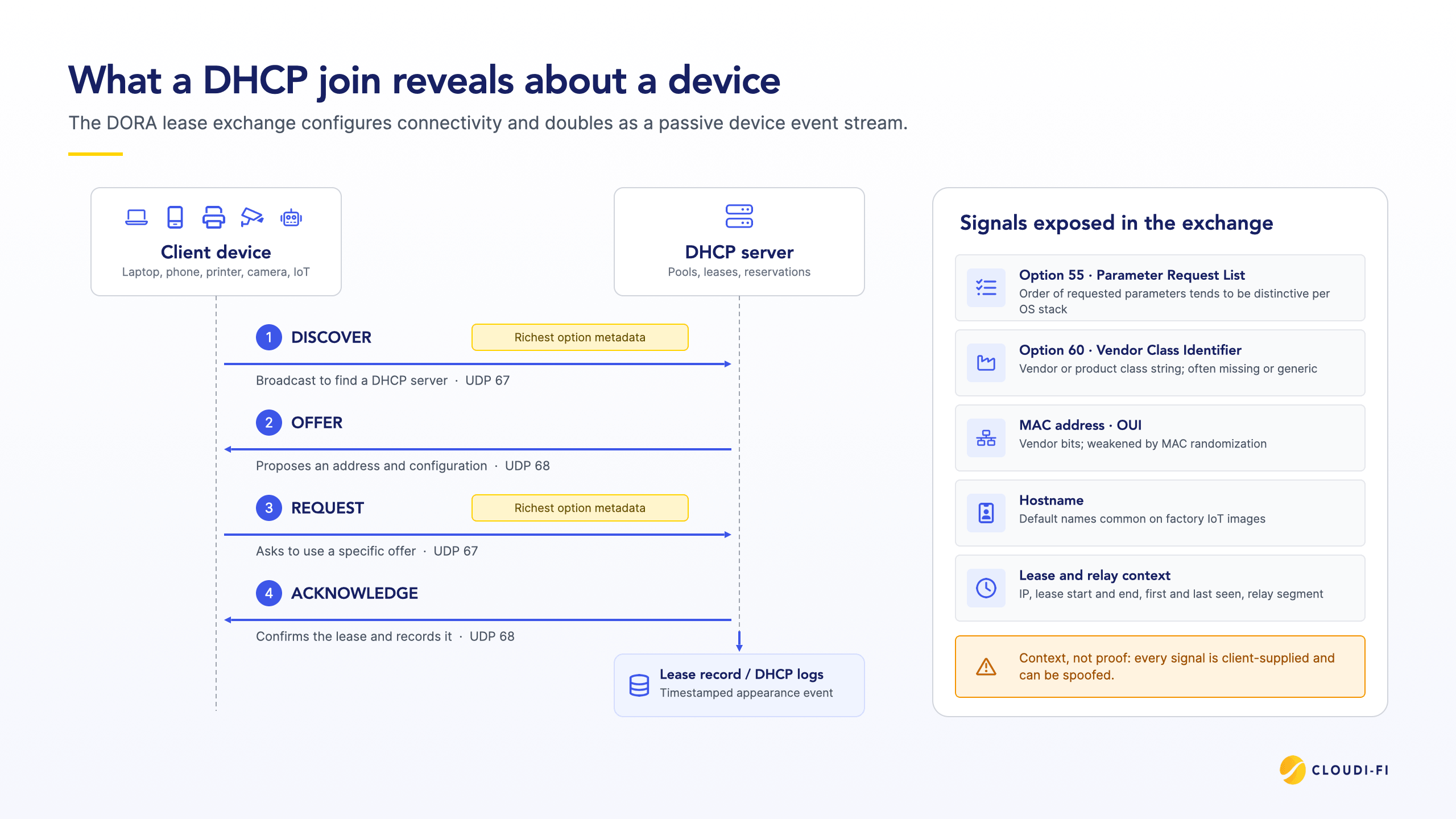
The join sequence is commonly taught as DORA:
- Discover: The client broadcasts to find a DHCP server.
- Offer: A server proposes an address and configuration.
- Request: The client asks to use a specific offer.
- Acknowledge: The server confirms the lease and records it.
DHCP rides UDP, with client-to-server traffic on port 67 and server-to-client traffic on port 68. Residential gateways, campus controllers, branch routers, and enterprise Windows or Linux DHCP roles all implement variants of this pattern. The important security observation is not novelty but ubiquity. If a device needs Layer 3 on your network, it very likely leaves a DHCP trail
From IP assignment to a living device event stream
Treat the lease database as more than an IPAM spreadsheet. Each Discover, Request, and Ack is a timestamped appearance or liveness event: which client identifier or MAC showed up, which address it received, through which relay, with which options, and until when.
IoT and device-security platforms already depend on this pattern. Many learn IP address-to-MAC bindings and track address changes by collecting DHCP traffic or DHCP server logs—see for example documentation on DHCP traffic used to learn IP–MAC bindings—then attach observed behavior to a stable device record even as leases turn over. When those events never leave the DHCP server—or never cover guest, OT, and wireless segments—Zero Trust policy engines lose ground truth at the moment a device actually joins.
In short: DHCP configuration traffic is also a device event stream. Visibility starts when you decide to collect and use it.
How DHCP fingerprinting turns options into device profiles
DHCP fingerprinting (also called DHCP device profiling) passively estimates device type, manufacturer family, or operating system by analyzing patterns in DHCP messages—especially during Discover and Request, when option metadata is richest. It requires no agent on the endpoint and works for many IoT and embedded systems that support little else.
Two options dominate practical deployments:
- Option 55 — Parameter Request List (PRL). The client lists which configuration parameters it wants, and in what order. Different OS network stacks tend to produce distinctive sequences. Fingerprinting systems compare that pattern to a curated fingerprint database of known devices and OS families.
- Option 60 — Vendor Class Identifier (VCI). The client may declare a vendor or product class string. VoIP phones, printers, and some embedded systems populate this field usefully. Support is inconsistent, and values can be generic. Infoblox notes that the vendor ID MSFT 5.0 can be the same for Microsoft Windows Kernel 5.1/5.2 systems and Microsoft Windows Kernel 6.0 systems—so option 60 alone is often a coarse signal (Infoblox NIOS DHCP Fingerprint Detection).
Production classifiers rarely rely on a single field. They fuse option 55 patterns, option 60 when present, MAC OUI vendor bits, default hostnames common on factory IoT images, and other DHCP options. A match yields a probable class (laptop OS family, phone, printer, camera). A miss yields unknown—arguably the most valuable bucket for Zero Trust, because unknowns are where investigation and tight policy should concentrate.
Vendor DHCP fingerprint features formalize this matching: option 55 sequence and option 60 vendor ID are incorporated into a fingerprint used to infer OS and device type. If intermediate firewalls rewrite options 55 or 60, that inference can fail—an operational detail that belongs in architecture planning, not a footnote.
How DHCP fingerprinting feeds Zero Trust access decisions
On most networks, DHCP runs right after a device connects, often before posture or application-level device checks complete. On open or MAC-authenticated segments, it can be the first rich signal a security team sees. That timing makes fingerprinting a strong first-pass classifier:
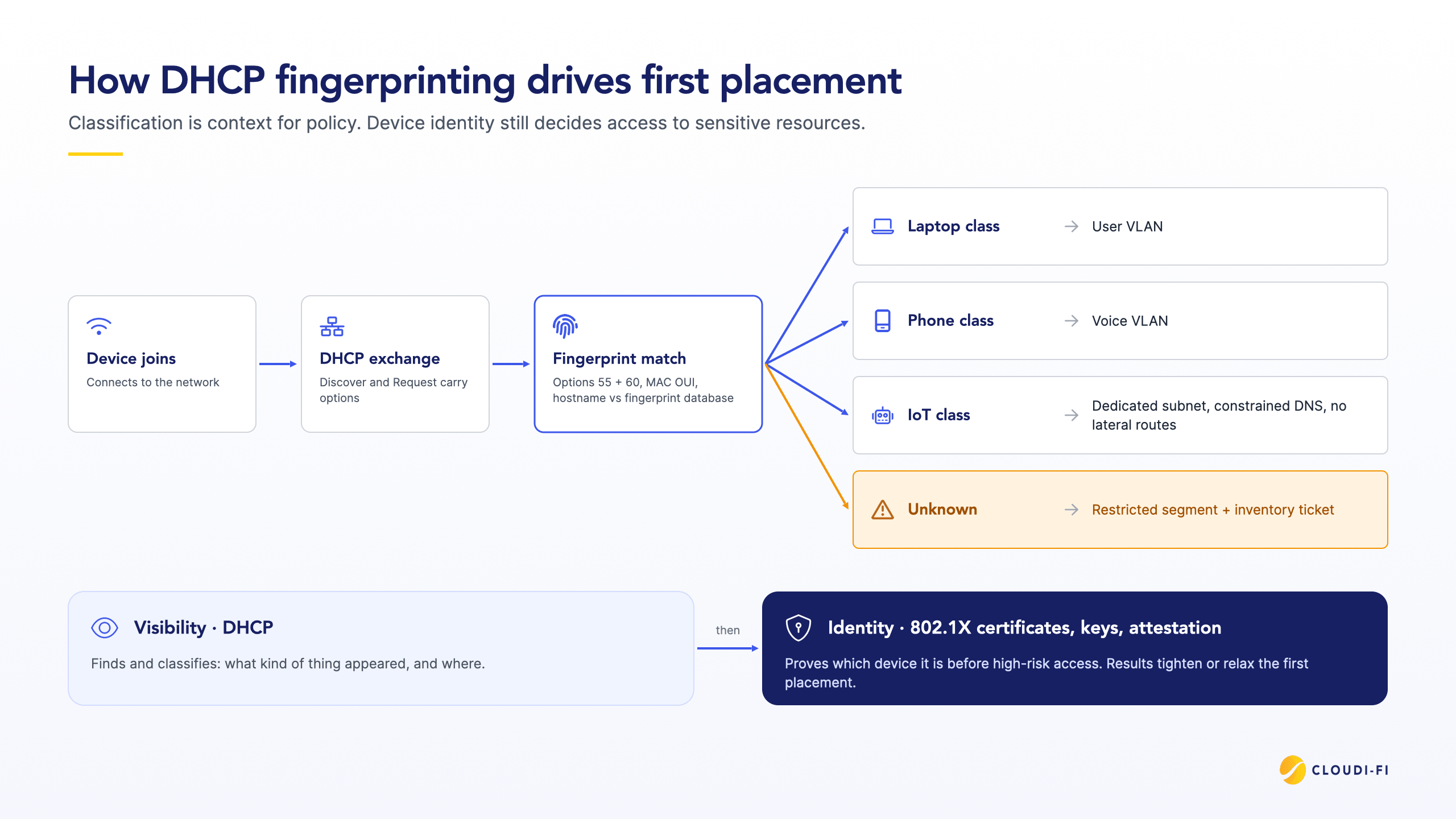
- NAC can use the DHCP fingerprint to place a phone-class device on a voice VLAN and a laptop-class device on a user VLAN, reassigning each one once the lease exchange reveals what it is.
- Unknown fingerprints can land in a restricted segment with internet-only or ticket-driven access.
- Later identity and posture results can tighten or relax that initial placement.
Fingerprinting can also refine decisions after the device is already communicating. What it should not do is stand alone as the gate to crown-jewel applications. Classification is context for policy; it is not a substitute for device authentication.
How DHCP visibility feeds Zero Trust access decisions
Here is the direct answer to "How DHCP powers Zero Trust device visibility": DHCP produces early, passive, high-coverage telemetry; fingerprinting and lease inventory turn that telemetry into device attributes; Zero Trust controls consume those attributes when they decide how much to trust a session.
A practical pipeline looks like this:
- Observe: Collect DHCP server logs, syslog, relay information, or traffic copies across every segment that matters.
- Classify: Match fingerprints; maintain known vs unknown; enrich with OUI and hostname hints.
- Decide: Feed attributes into NAC, firewall dynamic address groups, ZTNA device posture inputs, or SOAR playbooks.
- Enforce: Apply VLAN, ACL, microsegmentation, or application access rules consistent with least privilege.
- Reassess: Use renewals, rebinds, and new Discover storms as continuous signals that something changed.
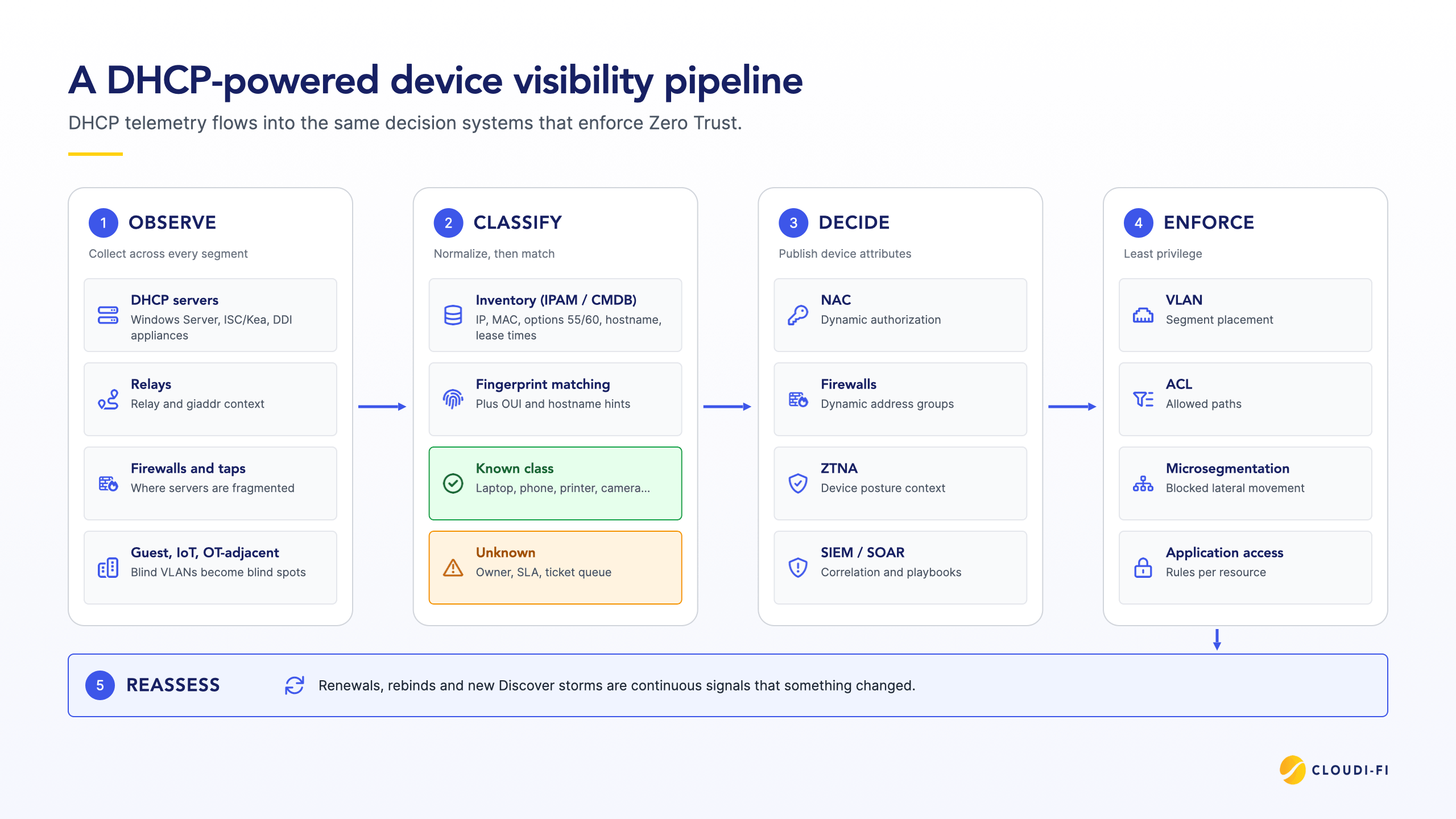
This maps cleanly onto NIST's insistence that device factors participate in access decisions. DHCP contributes attributes—likely type, vendor class, first/last seen, segment, known/unknown status—not a binary "trusted device" flag. A trust algorithm can weight those attributes alongside user identity, device health, and resource sensitivity.
Concrete policy patterns teams already run:
- Unknown fingerprint on a corporate SSID → quarantine VLAN + inventory ticket.
- VoIP or IoT client class → dedicated subnet, constrained DNS, blocked lateral routes; DHCP client classes can automate pool and option assignment from VCI, MAC, and option patterns.
- New MAC in a sensitive subnet or sudden fingerprint change on a stable reservation → SIEM alert for possible spoofing or device replacement.
- Lease inventory as network source of truth — DDI (DNS, DHCP, and IPAM) platforms emphasize that authoritative lease and name data underpin Zero Trust visibility, for example, EfficientIP's Zero Trust framing for DNS and DDI: you cannot microsegment fiction.
Visibility is necessary; identity still closes the loop
DHCP-powered visibility enables better Zero Trust decisions. It does not complete Zero Trust assurance.
Fingerprints are built from client-supplied DHCP behavior and can be spoofed or modified, so they are heuristic context—not proof of device identity. As SecureW2 summarizes, DHCP fingerprinting provides visibility, not cryptographic identity or access enforcement. High-risk access therefore still needs cryptographic device identity—802.1X with certificates, hardware-backed keys, managed device attestation, or equivalent—plus strong user authentication. The mature pattern is sequential: find and classify with DHCP; prove and authorize with identity.
Teams that skip the second step turn profiling into theater. Teams that skip the first step authenticate ghosts—well-verified users on devices nobody inventoried.
Design constraints for DHCP-based device visibility
Design for failure modes up front or the visibility program will silently rot.
Spoofing: Option 55, option 60, and MAC addresses can be forged by the client, DHCP fingerprinting cannot be considered foolproof, as anyone can forge DHCP frames. Treat class labels as probabilistic context, prefer deny-by-default for unknown or high-impact paths, and require stronger device authentication before sensitive resources.
MAC randomization: Modern mobile OS privacy features randomize MACs on many networks, weakening OUI-based vendor inference and long-lived MAC-as-identity assumptions—a practical limit documented in Cloudi-Fi's DHCP device profiling guidance on MAC randomization. Weight option patterns and multi-signal fusion more heavily than raw MAC stability.
Missing or generic option 60: Many clients omit VCI entirely; others send broad strings. Do not make option 60 mandatory for classification success.
Path distortion: If security devices rewrite DHCP options 55/60, collectors downstream see fiction. Preserve unmodified DHCP on the path to fingerprinting and inventory systems, or terminate collection at the authoritative DHCP server logs.
Over-precision: A single VCI match is not a full CMDB record. Expect family-level labels ("Windows client," "Android phone," "vendor X phone") more often than exact model and patch level.
Mitigations that work in practice: multi-signal inventories; explicit unknown SLAs; anomaly detection on new fingerprints in privileged segments; controlled expansion of the fingerprint database; escalation paths from "profiled" to "cert-authenticated" as risk increases.
A practical architecture for DHCP-powered device visibility
You do not need a greenfield network. You need a deliberate pipeline.
Collect broadly: Export leases and options from enterprise DHCP (Windows Server, ISC/Kea, appliance DDI), capture DHCP on firewalls or taps where servers are fragmented, and include guest, IoT, and OT-adjacent segments. Blind VLANs become blind spots in Zero Trust.
Normalize into a durable store: Land IP, client identifier/MAC, options 55 and 60, hostname, lease start/end, and relay/giaddr context in IPAM or a CMDB-like inventory. This is the device visibility layer policy systems will query.
Classify with an unknown bucket: Maintain fingerprint matching and a first-class unknown state with owners and time-bound investigation SLAs. Unknown should trigger tighter policy, not silent full access.
Publish to enforcement and detection: Stream events to NAC for dynamic authorization, to firewalls for group updates, to ZTNA for device context, and to SIEM/SOAR for correlation (for example, DHCP-seen device with no EDR heartbeat).
Govern the program: Track metrics: percentage of active leases with a confident class, unknown rate by segment, lease-to-managed-asset match rate, and mean time to classify new fingerprints. Review fingerprint additions like detection content—false novelty creates alert fatigue; false confidence creates risk.
Start small: Pick one high-churn segment (guest Wi-Fi or a building IoT VLAN). Measure unknown-device reduction and policy hit rate for two to four weeks. Expand only after collection quality and ownership are real.
DHCP visibility implementation checklist
- Inventory every DHCP server and relay path in scope.
- Enable structured logging (options included), not address-only logs.
- Confirm collectors see unmodified option 55/60 where fingerprinting is required.
- Define NAC/firewall actions for known classes vs unknown.
- Connect inventory to ticket queues for unknowns above a risk threshold.
- Document the handoff to certificate or 802.1X device identity for sensitive apps.
- Revisit fingerprint coverage quarterly as new device fleets arrive.
Conclusion
DHCP is the quiet control plane almost every device talks to when it arrives. Leases and options are not only how networks configure themselves; they are how security teams can see printers, phones, sensors, and unmanaged laptops without installing another agent.
Used well, that telemetry powers Zero Trust device visibility: classify early, inventory continuously, and feed device context into NAC and access policy. Used alone, it is a false sense of trust. Pair DHCP-derived context with real device identity where risk demands it, close collection blind spots, and drive the unknown rate down on purpose.
How DHCP powers Zero Trust device visibility is ultimately an architecture choice: treat the first configuration exchange as security-relevant telemetry, and wire it into the same decision systems that already claim to "never trust, always verify."
Check your Zero Trust readiness
DHCP visibility is one piece of a Zero Trust access strategy. The Zero Trust Network Access checklist covers the rest, from device identity and segmentation to guest, BYOD, and IoT access, so you can see where your network stands and what to address first.
Get the ZTNA checklist