

Guest Wi-Fi onboarding is the process of giving each visitor network access that matches who they are, how long they stay, and what they need to reach. Done well, it replaces a shared password with a short sign-in that identifies each connection to a person or device, applies the right policy, and expires on its own.
This guide shows you how to design onboarding journeys for guests, visitors, contractors, and event attendees, how to set them up on your existing Wi-Fi, and how to avoid the mistakes that frustrate users or leave gaps in security.
In today’s hyperconnected world, Guest Wi-Fi has become an expectation in almost every environment—whether it’s a retail store, a hotel lobby, a corporate office, or even a healthcare facility. But offering Guest Wi-Fi isn’t just about providing internet access. When paired with a captive portal, it becomes a powerful tool for secure onboarding, user engagement, and business intelligence.
Why shared Wi-Fi passwords fail
A password printed on a reception sign or a meeting room card looks simple, but it creates three problems that grow with every site you run.
- No accountability: everyone uses the same credential, so you cannot tell who was connected when something goes wrong, or answer a request for connection logs.
- No expiry: the password keeps working long after the visit ends. Former contractors, neighbors, and anyone who photographed the sign can still connect.
- No differentiation: a one-day visitor and a three-month contractor get the same access, bandwidth, and session length, because the network cannot tell them apart.
Changing the password fixes none of this for long, and it creates support tickets at every location each time you do it. The alternative is to onboard people, not devices that happen to know a password.
What good guest Wi-Fi onboarding looks like
Good onboarding gives every visitor an individual, time-limited connection with the least access they need, in as few steps as possible. In practice, that comes down to six principles:
- One identity per person: each visitor signs in as themselves, through email, SMS, a sponsor, a voucher, or single sign-on.
- The right method for each visitor type: friction should match the risk, so a walk-in customer accepts terms while a contractor needs a host's approval.
- Access that expires: sessions and accounts end on their own when the visit, booking, or contract ends.
- Separation from internal systems: guest traffic stays on its own segment and goes straight to the internet, through a cloud security platform if you use one.
- Recognition on return: regular visitors reconnect without signing in every time, within the limits you set.
- A record of every session: logs show who connected, when, and from where, for troubleshooting and for local legal requirements.
Most of these depend on a captive portal, the sign-in page that holds a device until the user completes onboarding. For a full explanation of how it works, read what a captive portal is and how it works.
Onboarding journeys by visitor type
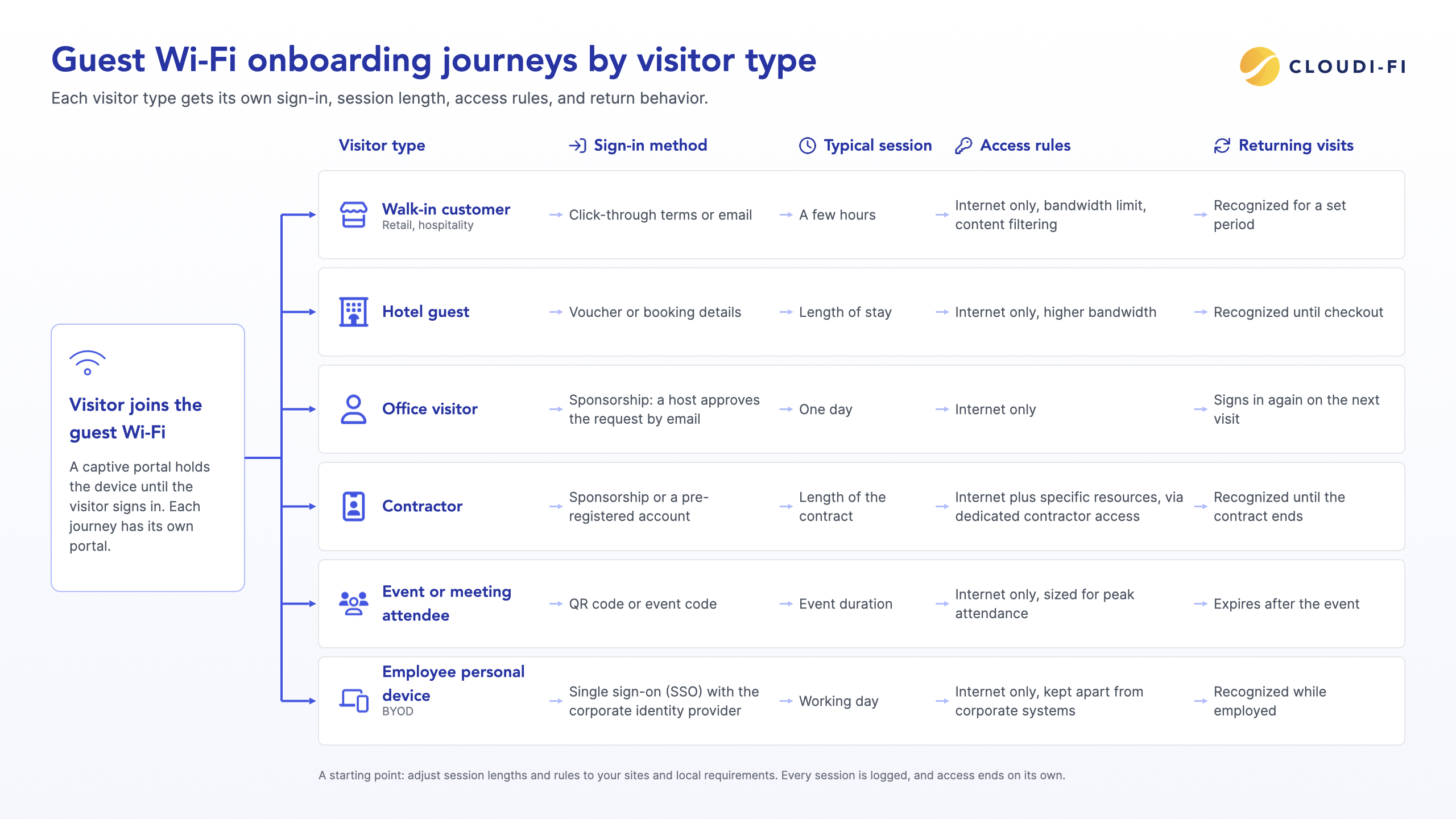
Start by listing who connects to your guest network, then give each group its own journey. The table below is a starting point; adjust session lengths and rules to your sites and local requirements.
For the full list of sign-in methods and how much identity assurance each one gives, see the captive portal authentication methods section of our captive portal guide.
How to set up guest Wi-Fi onboarding, step by step
With a cloud captive portal, you can set up onboarding once and roll it out to every site without new hardware. Follow these seven steps:
- Map your visitor types and sites: List each group from the table above and the locations where they connect. This decides how many portals and policies you need.
- Connect your existing Wi-Fi infrastructure: Point your access points or controller to the cloud captive portal. The Cloudi-Fi help center has deployment guides by vendor, from Cisco Meraki and HPE Aruba to Fortinet and Juniper Mist.
- Create a portal for each journey: Choose the sign-in method, write the terms of use, and apply your brand and local languages.
- Set the walled garden: Allow the domains required before sign-in, including those used by single sign-on (SSO) identity providers, social login services, and SMS authentication providers. See how to set up a walled garden for your captive portal.
- Define the access policy for each journey: Set session length, bandwidth, content filtering, and the guest network segment. If you use a cloud security platform such as Zscaler or Palo Alto Networks Prisma Access, forward guest traffic to it.
- Configure log retention: Store connection logs in the regions your local regulations require, for the required period.
- Test every journey on real devices: Try each sign-in method on iPhone, Android, and a laptop, at more than one site, before you announce the change.
For first-time setup, start with how to get started with the Cloudi-Fi cloud captive portal.
Recognizing returning visitors
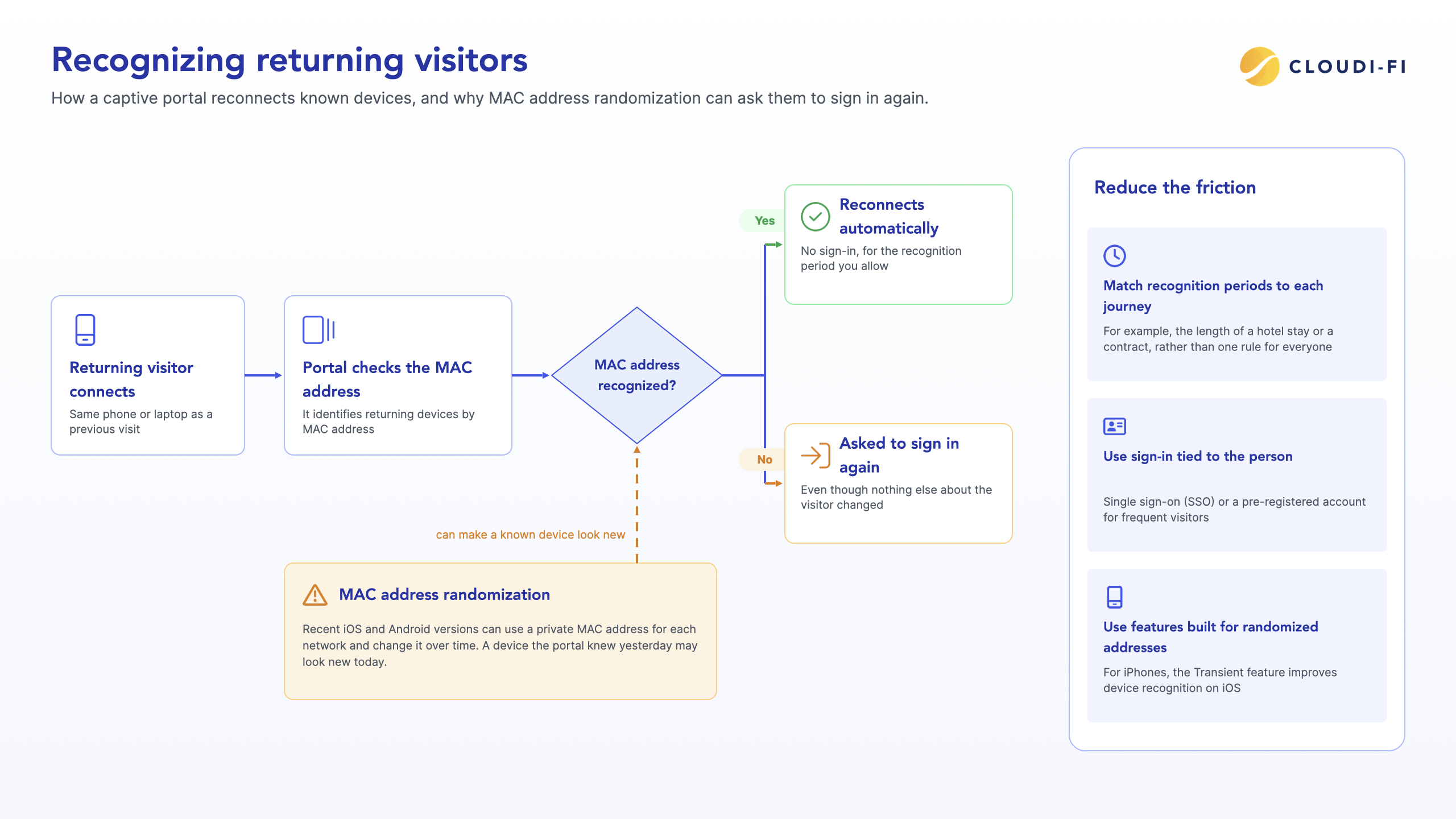
Regular visitors should not have to sign in on every visit. A captive portal usually recognizes a returning device by its MAC address and reconnects it automatically for the period you allow.
MAC address randomization makes this harder. Recent iOS and Android versions can use a private MAC address for each network and change it over time, so a device the portal knew yesterday may look new today. The visitor is then asked to sign in again, even though nothing else changed.
You can reduce this friction in three ways:
- Set recognition periods that match each journey, such as the length of a hotel stay or a contract, rather than one rule for everyone.
- Use sign-in methods tied to the person, such as single sign-on or a pre-registered account, for frequent visitors.
- Use features designed for randomized addresses. For iPhones, see how the Transient feature improves device recognition on iOS.
Turning onboarding data into insight, with consent
Every onboarding session produces data you can use to run your sites better, as long as you collect it lawfully.
For IT and operations teams, connection data shows how many people connect at each site and when, which devices they use, and how long sessions last. That helps you size bandwidth for peak hours, spot sites with connection problems, and plan access point capacity.
For marketing teams in retail and hospitality, onboarding is also a consented touchpoint. A visitor who signs in with email or SMS can opt in to receive offers, join a loyalty program, or answer a short survey, and returning visitors can see a personalized welcome page. Opted-in contacts can flow into a CRM such as Salesforce, HubSpot, or Pipedrive.
Keep three rules in place:
- Separate consents: accepting the terms of use must never imply marketing consent.
- Ask only for what you use: each extra field adds friction and compliance risk.
- Store and delete on schedule: keep personal data and connection logs only as long as the law in each country requires or allows.
Learn how guest Wi-Fi management brings portals, policies, and data together across sites.
Common onboarding mistakes
Most onboarding problems come from applying one journey to everyone. Watch for these six mistakes:
- Too many fields: asking walk-in customers for a full profile drives them to mobile data instead.
- One session length for all: day visitors and contractors end up with access that is either too short to work or too long to be safe.
- A portal that fails on phones: test the page on small screens and in the built-in sign-in window that phones open automatically, not only in a desktop browser.
- Social login without a walled garden: if the login provider's domains are blocked before sign-in, the button simply fails.
- Guests on the corporate network: onboarding is not a substitute for segmentation; guest traffic should never reach internal systems.
- No offboarding: contractor accounts that outlive the contract are the shared password problem in a new form. Tie expiry to the contract end date.
For security settings beyond onboarding, see what makes a captive portal secure.
Summary
Guest Wi-Fi onboarding works best when each visitor gets a journey built for them: the right sign-in, the right access, and an automatic end. A cloud captive portal lets you run those journeys on your existing access points at every site. To see how it works in practice, explore guest Wi-Fi management with Cloudi-Fi.
Frequently asked questions
What is guest Wi-Fi onboarding?
Guest Wi-Fi onboarding is the process of giving visitors network access through an individual sign-in instead of a shared password. Each visitor authenticates in a way that suits their visit, receives access rules and a session length to match, and each session is logged, so the organization can trace who, or which device, connected and when.
How can I simplify guest Wi-Fi onboarding?
Match the sign-in method to the visitor: one-tap terms for walk-in customers, a voucher for hotel guests, and sponsor approval for office visitors. Recognize returning devices for a set period, test the portal on phones, and manage every site from one console so changes apply everywhere at once.
Should guest Wi-Fi have a password?
A shared password alone is not enough, because it cannot tell users apart and keeps working after a visit ends. Individual sign-in through a captive portal gives you accountability and expiry. Where devices support it, WPA3 Enhanced Open can encrypt traffic on a network without a password.
How long should guest Wi-Fi access last?
Access should last as long as the visit: a few hours for customers, the stay for hotel guests, one day for office visitors, and the contract period for contractors. Setting a different session length per journey avoids both repeated sign-ins and access that outlives its purpose.
How do I give contractors Wi-Fi access?
Use sponsorship or a pre-registered account tied to the contract's start and end dates. A host employee approves access, the contractor gets only the resources they need, and the account expires automatically when the contract ends, so no one has to remember to remove it.