

In the first years of enterprise networking, security was defined by physical boundaries. The corporate network was a "walled garden," and the primary objective was to ensure that only authorized people could enter that garden. To manage this, organizations turned to Network Access Control (NAC). For decades, NAC served as the ultimate gatekeeper, checking credentials at the door and ensuring that devices met specific health requirements before they were granted a seat at the table.
However, the world for which traditional NAC was built has effectively vanished. The "castle and moat" strategy, while once the gold standard, has been degraded by the forces of digital transformation. Today’s workforce is hybrid; critical applications reside in the cloud; and the network is flooded with an unmanageable number of IoT devices that lack the basic security protocols of a standard PC.
In this landscape, the rigid, hardware-bound architecture of legacy NAC has become a bottleneck. To keep pace with modern business requirements, organizations are shifting toward cloud-native NAC, a model that prioritizes identity over location and software over hardware.
This blog will explore the fundamental differences between these two models and why the transition to the cloud is no longer just an option, but a necessity for the modern enterprise.
What is legacy NAC?
Legacy NAC refers to traditional, on-premises security solutions designed to control access to a Local Area Network (LAN). These systems are typically composed of physical or virtual appliances, actual servers sitting in a rack, situated at every major site to intercept connection requests.
Technically, these systems generally rely on the IEEE 802.1X standard. This process involves a complex "three-way handshake" between three distinct components:
- The Supplicant: The software agent on the user's device that provides credentials.
- The Authenticator: The network hardware (a switch or wireless access point) that acts as a middleman.
- The Authentication Server: The on-premise NAC appliance (usually a RADIUS server) that makes the final decision.
What made it successful?
Legacy NAC persists today largely due to "technological inertia." Many large organizations made massive capital investments in these systems five to ten years ago. There’s a lot of stickiness due to this per site physical deployment architecture. For a company that operates out of a single, centralized headquarters with a 100% on-site workforce and no cloud dependency, the legacy model still functions. In this scenario, there’s still a large cost of integration and running the solution.
However, as soon as that company introduces a remote office, a guest Wi-Fi network, or a fleet of smart devices, the legacy NAC begins to struggle. It was designed for a static world that just doesn't exist anymore. In today's fast-moving world, it feels less like a security shield and more like an anchor slowing you down.
What is cloud-native NAC?
Cloud-native NAC is a modern, Software-as-a-Service (SaaS) approach to network access control. In many environments, it is evolving into a broader Network Access as a Service (NAaaS) model, where authentication, policy enforcement, onboarding, and visibility are delivered through a globally distributed cloud architecture rather than traditional on-premise appliances.
In a cloud-native model, the physical location of the user is irrelevant. Whether an employee is logging in from corporate headquarters, a satellite branch, a home office, or a hotel, their authentication request is routed to a cloud-based policy engine.
This engine integrates directly with modern Identity Providers (IdPs) like Okta, Microsoft Entra ID, or Google Workspace. By doing so, it treats identity, the person and the context of their connection, as the new perimeter. It is no longer about which port you plugged into, but who you are and whether your device is safe at this very moment.
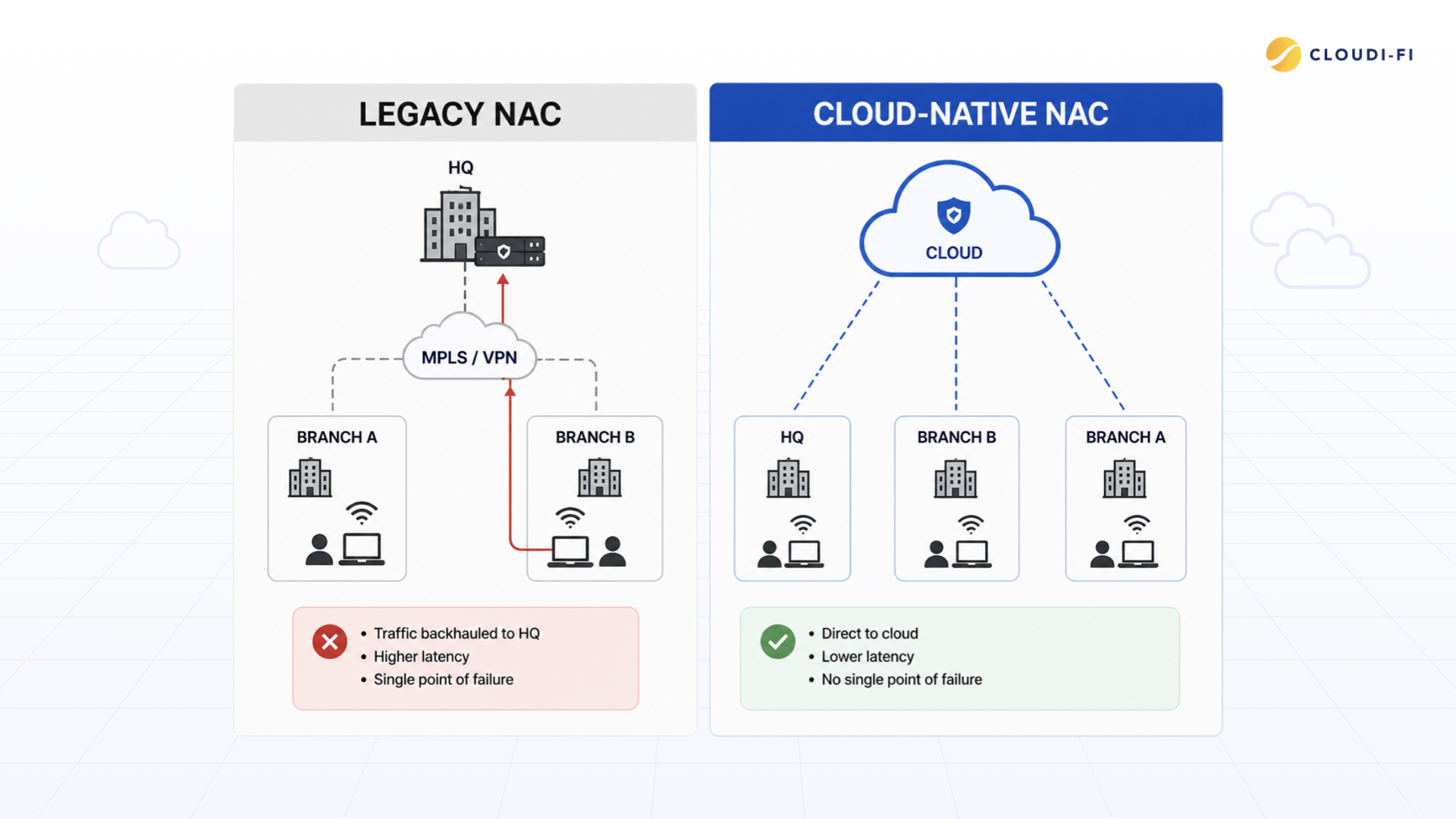
Legacy NAC vs. cloud-native NAC: Key differences
To understand why enterprises are migrating, we must look at how these two models handle the daily realities of IT operations, security, and growth.
A head-to-head comparison
Limitations of legacy NAC
As networks grow more distributed, the cracks in the legacy model become apparent. These systems were built for an era that assumed the network was a single, manageable entity.
Today, that assumption is a liability.
Complexity and "configuration drift"
Legacy NAC is difficult to maintain. Every time you add a new switch vendor, update a wireless controller, or change a VLAN, you must manually update the NAC. Over time, this leads to "configuration drift," where security policies vary from building to building. This inconsistency creates unintended backdoors that attackers can exploit.
The cost of "box management"
The Total Cost of Ownership (TCO) for legacy NAC is really high. It is not just the software license; it is the hidden costs:
- CapEx: High upfront costs for physical appliances dedicated per site.
- Electricity: The ongoing cost of powering and cooling racks.
- Redundancy: To avoid a single point of failure, you must buy two of everything for high availability.
- Labor: Highly specialized engineers must spend hours patching server OS vulnerabilities and managing hardware failures and scalability.
Poor fit for modern environments (IoT and BYOD)
Many IoT devices, printers, cameras, and smart sensors do not support 802.1X authentication. Organizations often use MAC-based identification to onboard these devices, but MAC addresses alone provide limited assurance of device identity.
Cloud-native NAC enhances this approach through device profiling, contextual information, automated classification, and policy-based access controls to improve security for non-802.1X devices.
Benefits of cloud-native NAC
Moving the control plane to the cloud transforms NAC from a bottleneck into a business enabler. It allows security to move at the speed of the cloud.
Identity-driven access
Cloud-native NAC integrates directly with your "Source of Truth", your directory service. If a user is added to the "Finance" group in your company directory, they automatically receive Finance-level network permissions across the entire global organization. If they leave the company and are deactivated in the directory, their network access is revoked everywhere, including the office Wi-Fi and remote access, instantaneously.
Identity-driven access enables organizations to secure BYOD, guest, and IoT connectivity without adding unnecessary complexity.
Simplified operations
Because the system is SaaS, there are no boxes to rack or firmware to patch. Your IT team stops being "hardware mechanics" and starts being "security architects." They manage global policies from a single browser-based dashboard, ensuring that a policy change in London is applied in New York and Singapore at the same time.
Faster deployment and agility
In a legacy world, opening a new branch office takes weeks of planning and shipping hardware. With cloud-native NAC, a new site can be secured as soon as the internet is connected. This "Zero Touch Provisioning" allows enterprises to scale their operations globally without being held back by their security infrastructure.
Legacy NAC vs. modern security models (Zero Trust, Identity)
The cybersecurity industry is moving toward Zero Trust Architecture (ZTA). The core principle of Zero Trust is "never trust, always verify."
“NAC vs. Zero Trust”
Legacy NAC is often the antithesis of Zero Trust. It operates on "binary" trust: once you are on the VLAN, you are trusted. If an attacker gains access to one device on that VLAN, they can move laterally to any other device.
Cloud-native NAC, however, supports microsegmentation. It doesn't just check your credentials once; it continuously monitors the user's identity and device health. If a laptop suddenly shows signs of malware, the cloud-native NAC can automatically revoke its access or move it to an isolated "quarantine" VLAN, even if the user is still logged in.
Identity-based access control
In the modern network, identity is the new perimeter. It doesn't matter if you are sitting at a corporate desk or in a coffee shop; a cloud-native NAC applies the same identity-based rules. It bridges the gap between the network layer (IPs and MACs) and the application layer (Users and Roles), ensuring a seamless security experience.
The architecture shift: Visualizing the change
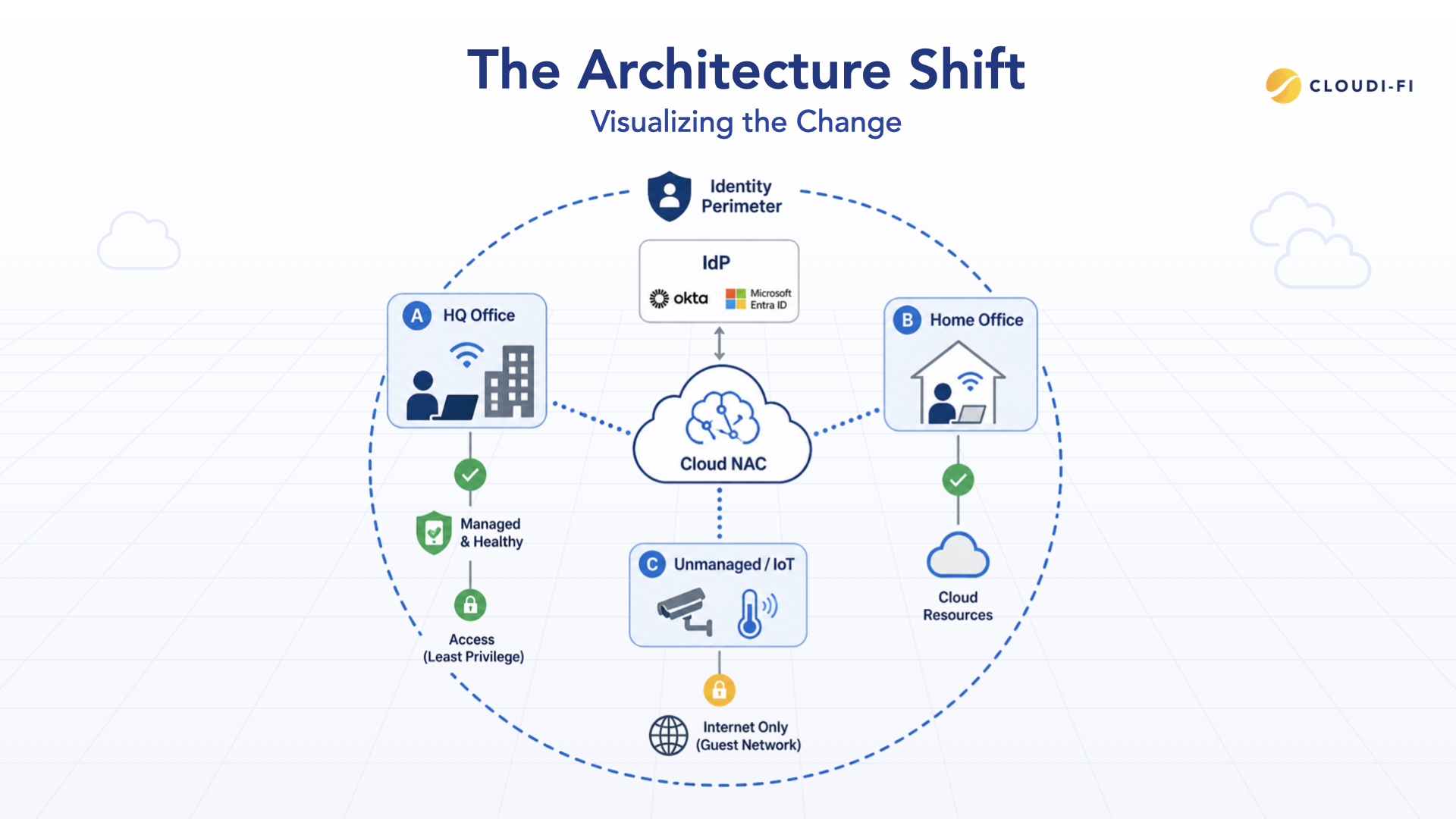
In a legacy NAC setup, traffic from small branch offices often has to be sent back to a central data center just to be authenticated by the central NAC box. This causes significant lag and consumes expensive bandwidth.
In a Cloud-native NAC setup, the authentication happens at the "Edge." The branch office communicates directly with the cloud service. This reduces latency, improves the user experience, and ensures that even if the corporate headquarters goes offline, the branch offices can still function securely.
The unified identity perimeter
Imagine a security circle that surrounds not just your office, but your employees wherever they are. A cloud-native NAC creates this Identity Perimeter. It connects your Wi-Fi, your wired ports, and your remote access points into one single policy engine. No matter how the user connects, the "Brain" in the cloud recognizes them and applies the correct guardrails based on their current context.
Do you need to replace your NAC?
If your organization is currently using a legacy system, it is time for an honest audit of your capabilities. If you find your team struggling with any of the following, a replacement is likely necessary:
- Visibility Gaps: You cannot see every device currently connected to your global network on a single screen.
- Deployment Delays: It takes weeks to set up security for a new office or a temporary site.
- High Maintenance Costs: You are spending a significant portion of your budget on hardware refreshes and specialized labor just to keep the NAC running.
- Hybrid Work Friction: Your remote employees have a different security experience and different access rules than those in the office.
If your hardware is reaching its End-of-Life (EOL), you are at a critical crossroads. Do you reinvest in more expensive hardware that will be obsolete in five years, or do you pivot to a cloud-native model that scales with your business?
What if you don't have a NAC today?
Many organizations still rely on network segmentation, VPNs, firewall rules, or manual processes to control network access. While these approaches may work initially, they often lack the visibility and policy enforcement capabilities required to secure modern environments.
As the number of employees, guests, IoT devices, and remote locations grows, managing access without a dedicated NAC solution becomes increasingly difficult.
A cloud-native NAC provides centralized visibility, automated onboarding, identity-based policies, and consistent access control across all locations without the complexity of traditional on-premise NAC deployments.
Signs you may need a NAC if you don't have one
- Limited visibility into connected devices
- Manual guest onboarding processes
- Growing number of IoT devices
- Difficulty enforcing access policies consistently
- Increasing reliance on remote access and hybrid work
Conclusion: Why enterprises are moving to cloud-native NAC
The transition to cloud-native NAC is more than just a technical upgrade; it is a fundamental shift in how we protect the enterprise. The old model of "protecting the building" is no longer relevant because the work, the people, and the data are no longer confined to the building.
As enterprises embrace hybrid work, move their workloads to the cloud, and deploy thousands of IoT devices, they need a security framework that is as flexible and scalable as the cloud itself.
For organizations managing distributed offices and hybrid workforces, understanding how a cloud-native approach strengthens security is key—especially when implementing Zero Trust across multi-site enterprises. We wrote an entire article on the topic which you can access here: Zero Trust across multi-site enterprises.
Cloud-native NAC provides the centralized visibility, agility, and identity-centric security required to protect this borderless workplace. By stripping away the complexity and cost of on-premises hardware, organizations can focus on their core mission, confident that their network is protected by a system that evolves at the speed of the modern threat landscape.
At Cloudi-Fi, we specialize in helping enterprises navigate this transition. By unifying identity management and network access in a single cloud platform, we remove the friction from security. We turn the network from a complex obstacle into a seamless, secure experience for every user, on every device, everywhere in the world. The future of the network has arrived, and it is cloud-native.
Not sure where to start with Zero Trust? Our NAC checklist covers the essential requirements for securing network access.
Deep dive: The operational impact of the cloud shift
To truly understand this transition, we must look at the long-term operational impacts that cloud-native systems have on IT culture and business efficiency.
Moving from reactive to proactive security
In the legacy NAC world, IT teams are almost always reactive. They react to hardware failures, they react to manual configuration errors, and they react to new devices that don't fit the existing templates. Because the system is so complex, most of the "security" work is actually just "network plumbing."
With a cloud-native approach, this is handled by the service provider. This allows the internal security team to become proactive. They can spend their time analyzing access patterns, tightening Zero Trust policies, and ensuring that guest access is both secure and user-friendly.
Enhancing the user experience
Security is often seen as the "Department of No." Legacy NAC often frustrates users with complex login procedures or by blocking devices that should be allowed. Cloud-native NAC changes this dynamic. By using modern authentication (like SAML or OIDC), users can log into the network using the same credentials they use for their email or Slack. It is a "Single Sign-On" experience for the entire network.
In summary, the move to cloud-native NAC is about more than just security, it's about business resilience. It's about ensuring that your network infrastructure is an asset that helps the company grow, rather than a legacy burden that holds it back. The old model no longer fits because the world it was built for no longer exists. It's time to move to the cloud.


.webp)